









 New features
Price book, CIS, certificates and an offline app for trades
Trades Business Manager 0.14 adds the tools a growing trades business asks for next: a price book with kits, a register for vans and tools, CIS for paying subcontractors, bills to pay, gas safety and boiler certificates on the phone, a staff app that works with no signal, and a ready-made website.
Price book and kits
Your labour rates, materials and kits with your mark-up, added to any quote in one go. Standard plan.
Vans and tools
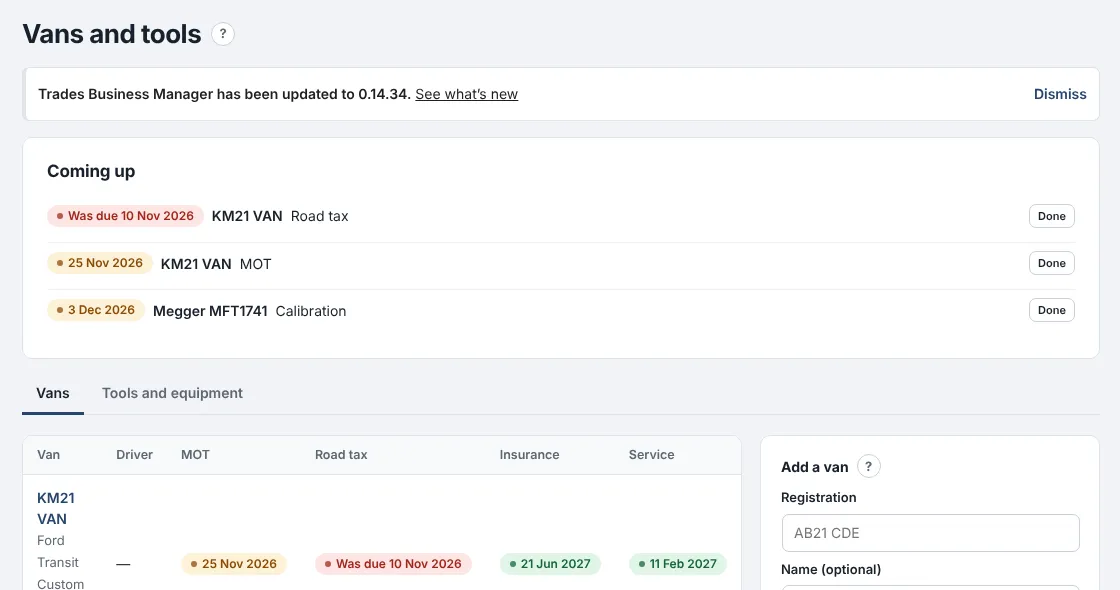
Every van's MOT, tax, insurance and service dates and your tools' test dates, with reminders. Standard plan.
CIS for paying subcontractors
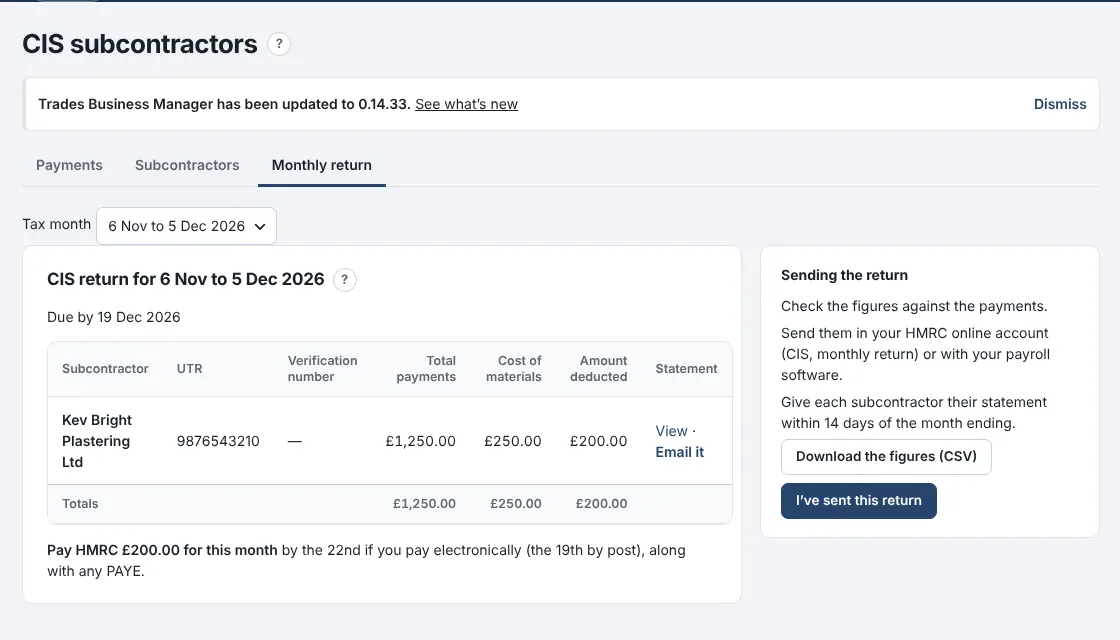
Deductions worked out from each subcontractor's HMRC status, and the monthly return figures ready. Premium plan.
Bills to pay
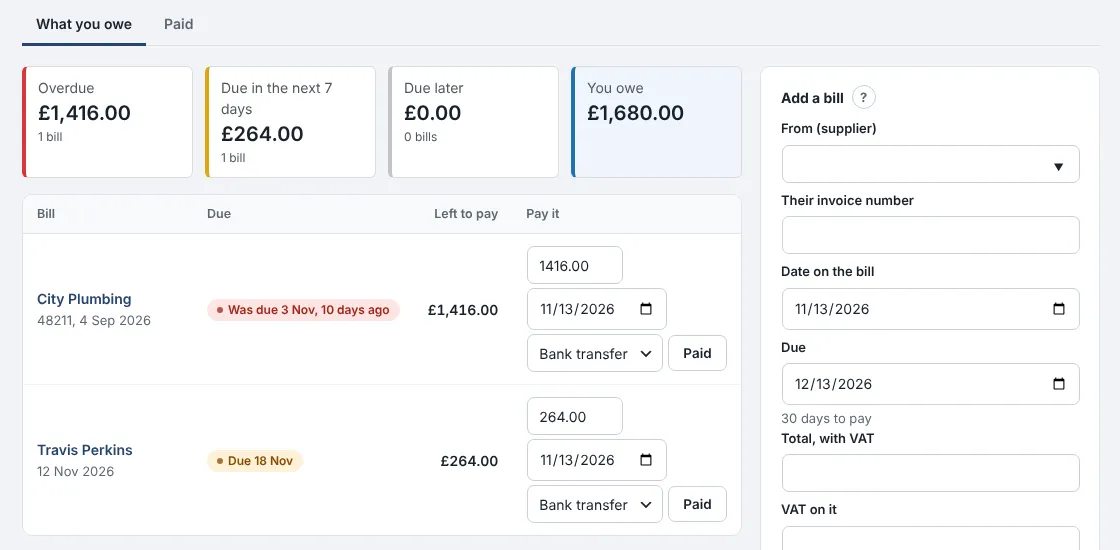
Every supplier bill with its due date, marked paid when you pay, and in your VAT and profit from the day it arrives. Premium plan.
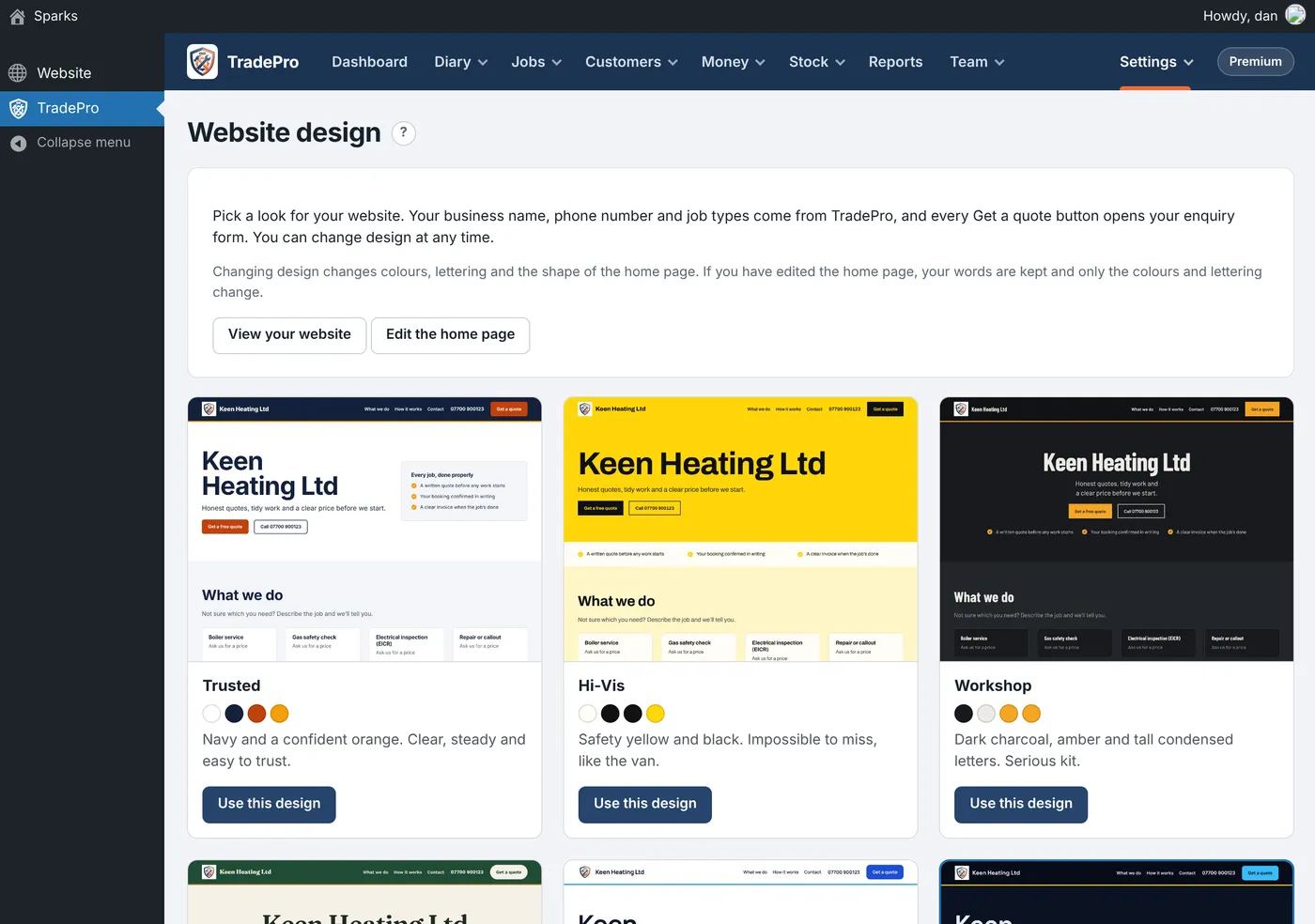
Digital certificates
Gas safety records, boiler services and minor works filled in on the phone, with your logo on the certificate. Premium plan.
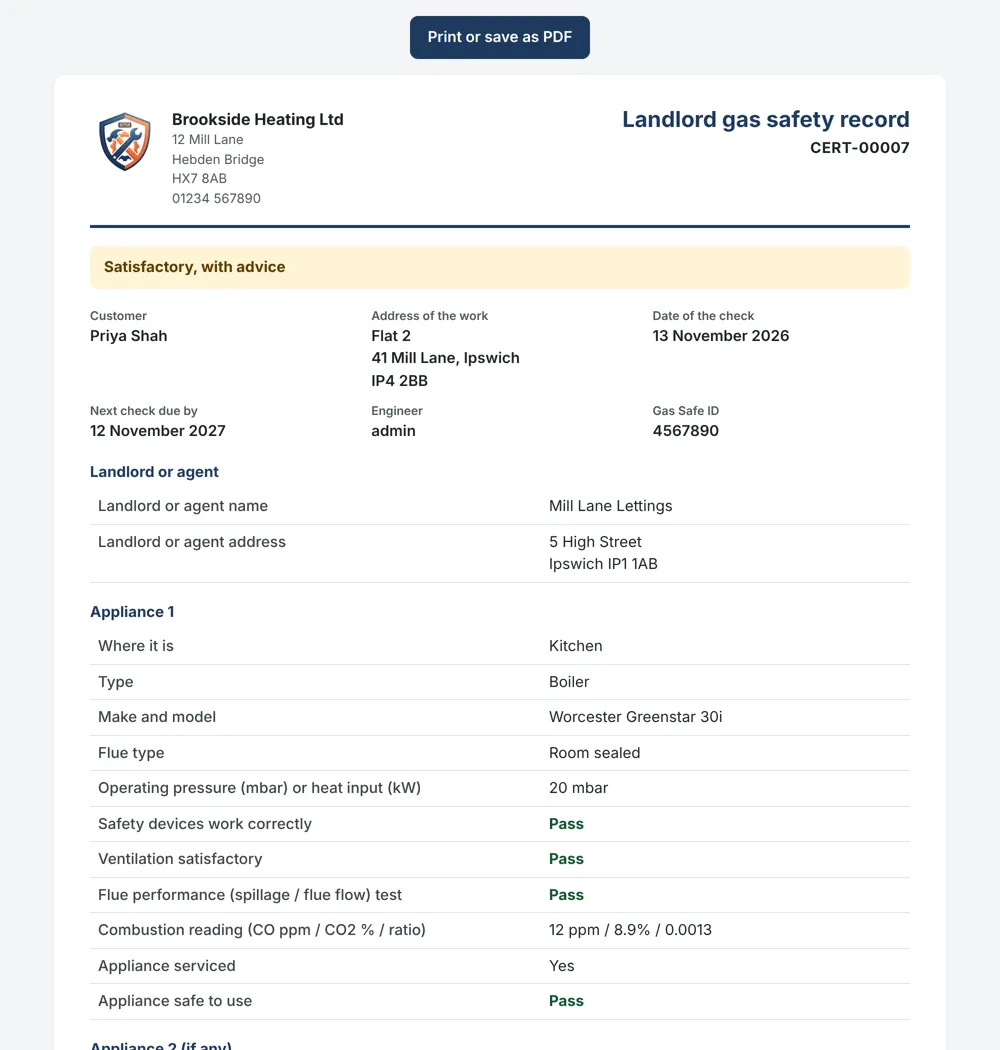
Works with no signal
The staff app keeps today's and tomorrow's jobs on the phone, so engineers keep working in lofts and cellars. Premium plan.
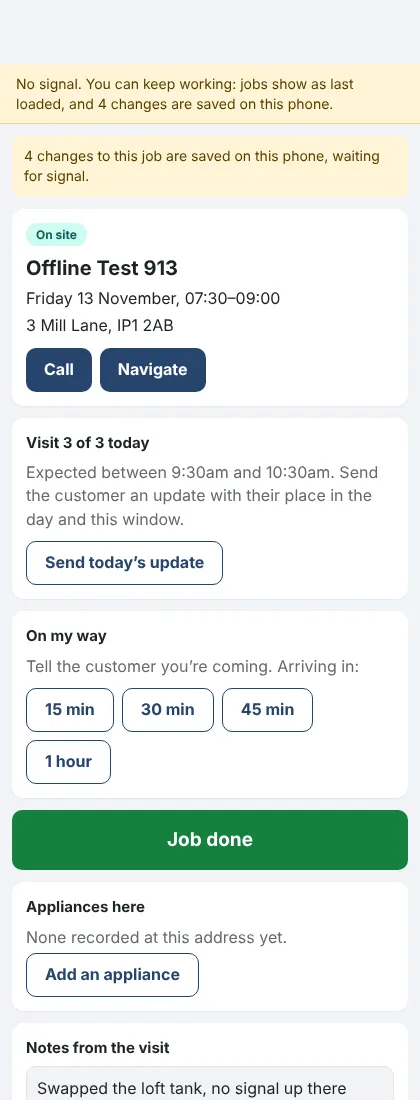
A ready-made website
Twelve designs to choose from, with your business details filled in. Standard plan.
Notes de version
0.14.40November 13, 2026
Remplissez un certificat de sécurité gaz, un entretien de chaudière ou des petits travaux sur votre téléphone, et le certificat est créé pour vous.
Où : Interventions › Formulaires et contrôles, et l’application pour le personnel (Premium)
Les réponses se transforment en un certificat avec votre logo, prêt à être imprimé ou enregistré au format PDF, et il est enregistré dans les Certificats avec son rappel de renouvellement.
- Dans Formulaires et contrôles, ajoutez un formulaire prêt à l’emploi portant la mention "génère un certificat".
- Sur l’intervention, remplissez-le sur votre téléphone, signatures comprises.
- Un lien vers son certificat est envoyé par e-mail au client immédiatement, et il se trouve dans son espace client.
- Un test d’appareil ou d’étanchéité marqué Échec fait figurer la mention "Non conforme" sur le certificat.
- N’importe quel formulaire personnalisé peut également générer un certificat.
- Le certificat de l’année dernière à la même adresse cesse d’envoyer des rappels.
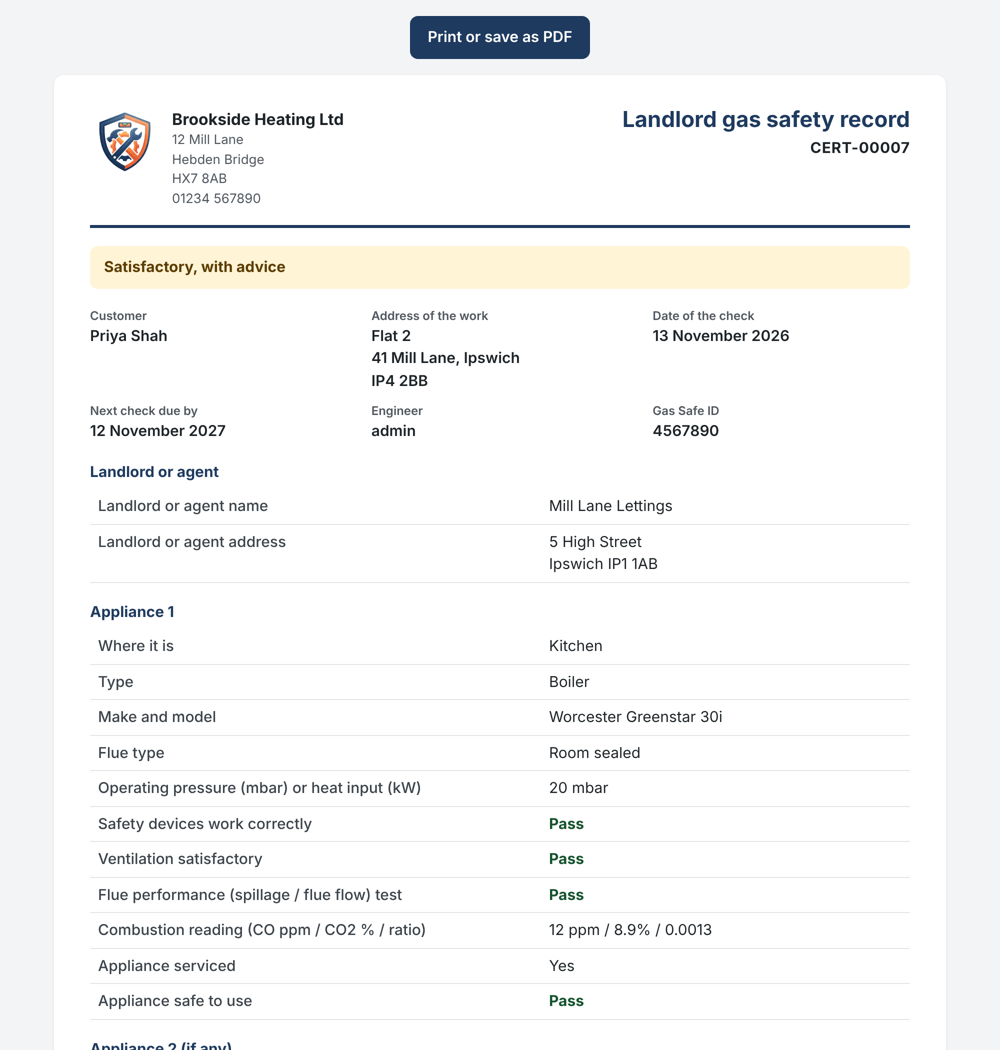
Un registre de sécurité gaz pour propriétaire réalisé sur téléphone 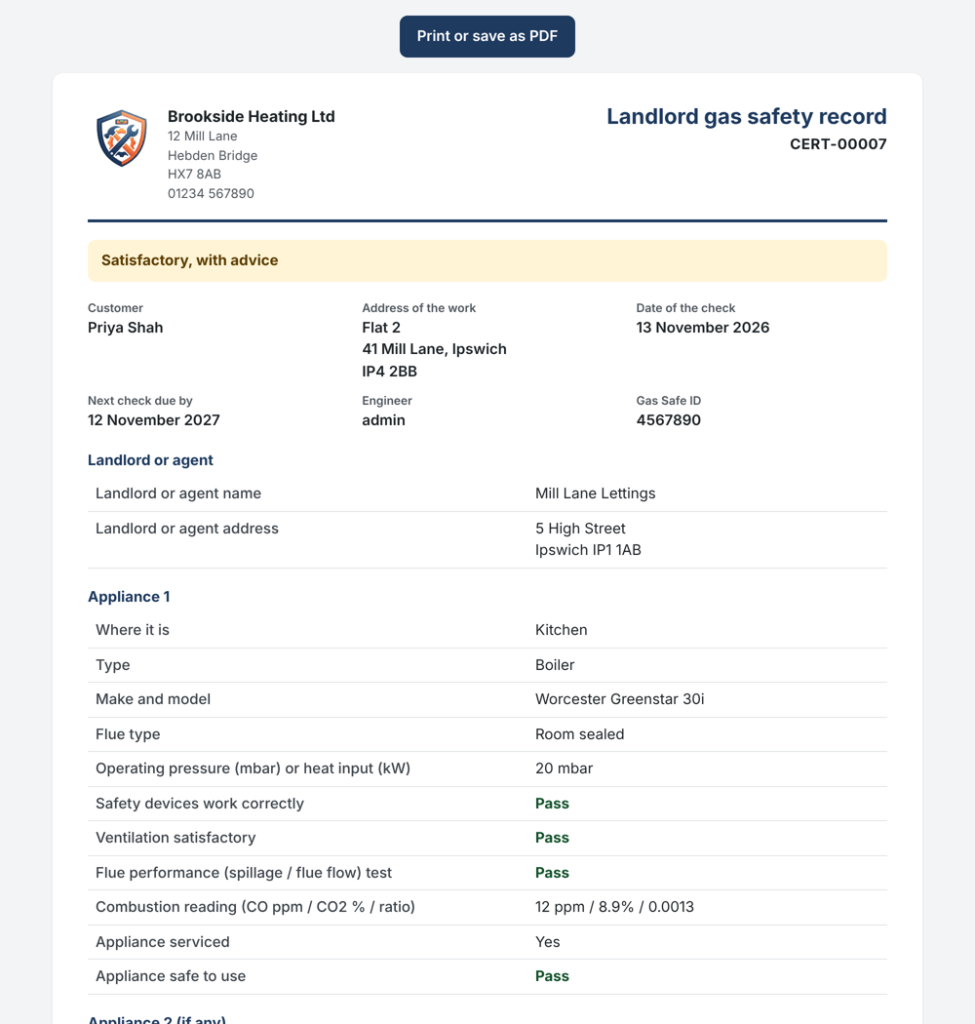
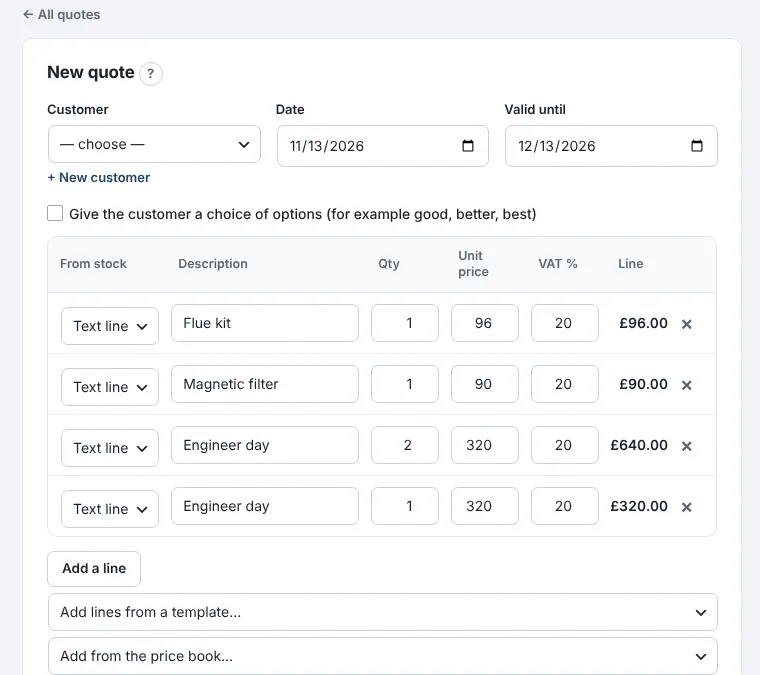
Conservez vos taux de main-d’œuvre, matériaux et kits dans un catalogue de prix, et ajoutez-les à n’importe quel devis en un seul geste.
Où : Argent › Catalogue de prix et kits (Standard)
Indiquez le coût de chaque élément ainsi que votre marge, et le prix de vente se calcule tout seul.
- Ajoutez vos taux de main-d’œuvre, tels qu’une heure ou une journée de technicien, puis les matériaux que vous achetez régulièrement.
- Dans l’onglet Kits, regroupez les interventions que vous devisez sans cesse, comme le remplacement d’une chaudière avec ses pièces et deux jours de main-d’œuvre.
- Sur un devis ou une facture, choisissez le kit ou l’article depuis "Ajouter depuis le catalogue de prix".
- Chaque kit affiche son coût de revient, ce que vous facturez et votre marge.
- Lorsqu’un coût augmente, les kits qui l’utilisent se mettront à jour ; les devis déjà envoyés conservent leurs prix.
- Les kits peuvent aussi inclure des articles en stock.
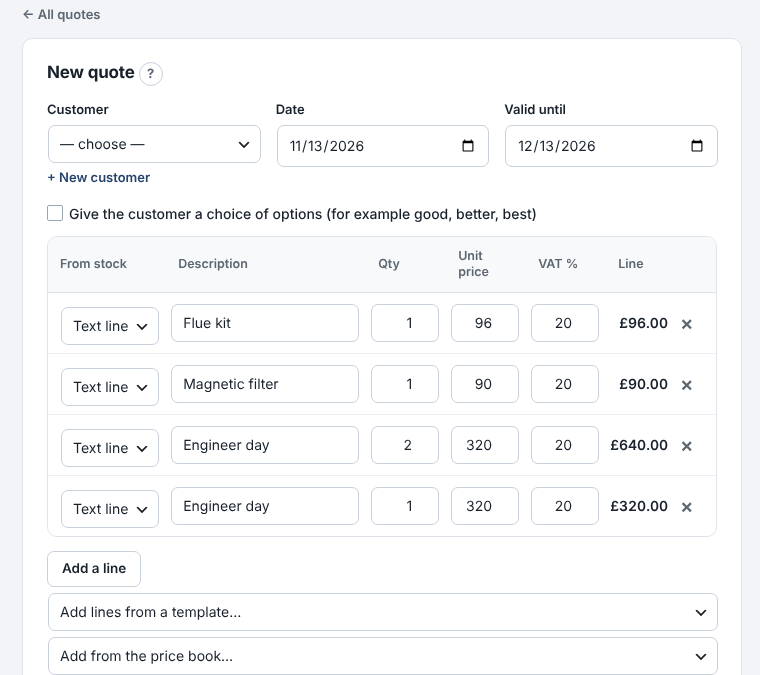
Ajout d’un kit à un devis depuis le catalogue de prix 
Visualisez toutes vos factures fournisseurs, leur date d’échéance et marquez-les comme payées une fois réglées.
Où : Money › Bills to pay (Premium)
Les factures sont comptabilisées dans vos dépenses à leur propre date, afin que votre TVA et vos bénéfices soient corrects même avant le paiement.
- Ajoutez une facture : le fournisseur, son numéro de facture, la date et le total. La date d’échéance se remplit automatiquement selon les conditions de paiement de ce fournisseur.
- Vérifiez ce qui est en retard, ce qui est dû cette semaine et le total de vos dettes.
- Lorsque vous payez, cliquez sur Paid. Saisissez un montant inférieur si vous n’avez payé qu’une partie.
- Définissez des conditions de paiement différentes pour chaque fournisseur, par exemple 60 jours pour votre fournisseur principal.
- La réception d’un bon de commande “sur facture” ajoute automatiquement sa facture.
- Le tableau de bord devient rouge lorsqu’une facture est en retard.
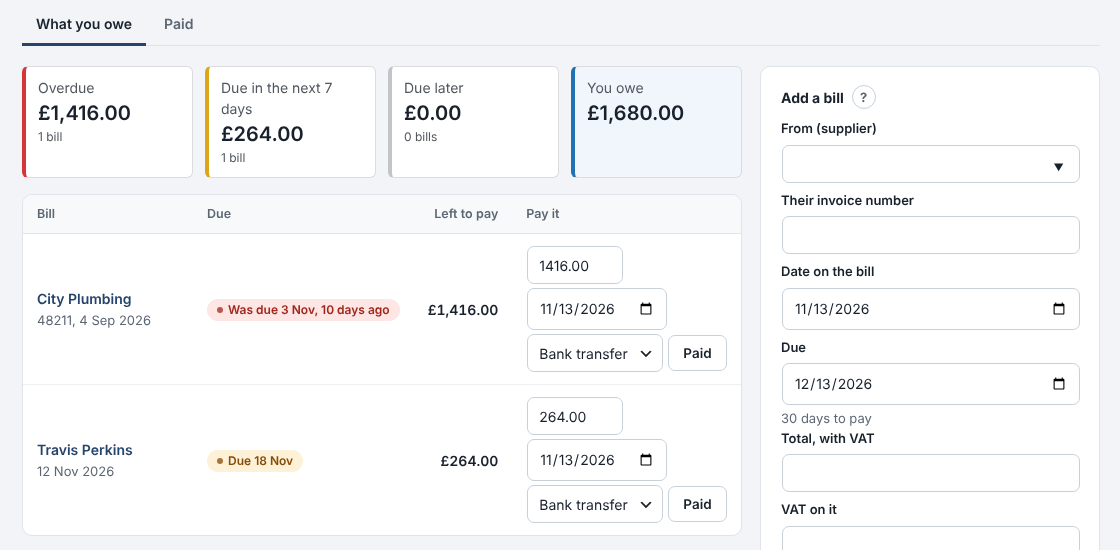
Ce que vous devez aux fournisseurs et quand 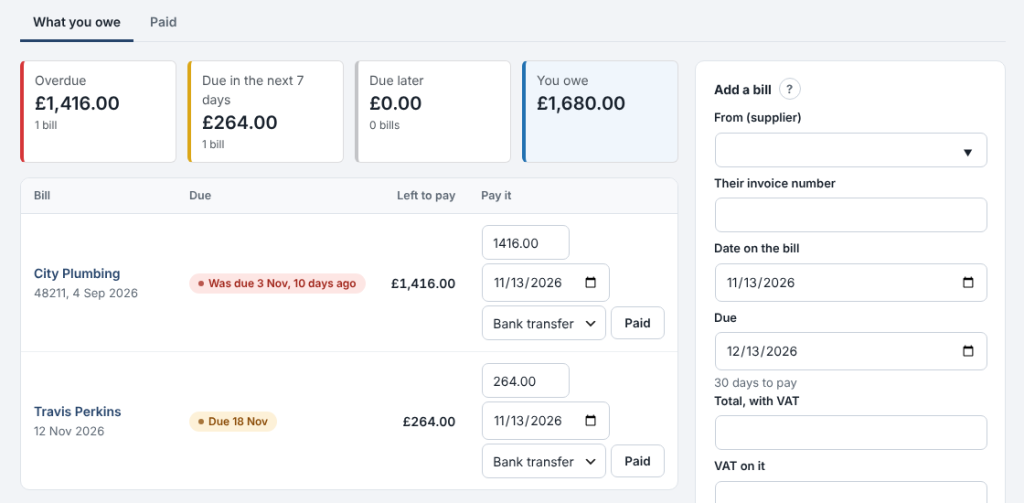
0.14.36November 13, 2026
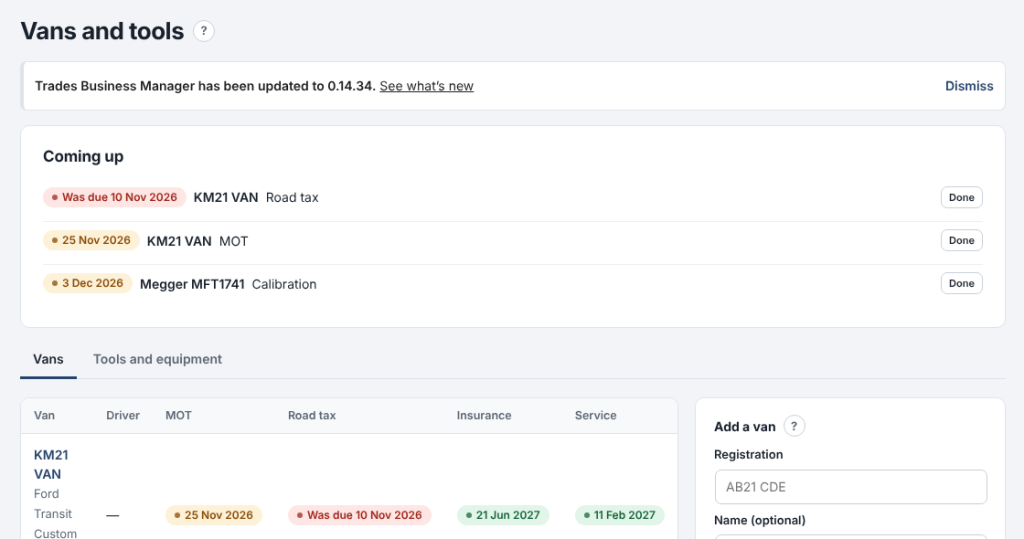
Keep every van's MOT, tax, insurance and service dates, and your tools' test dates, in one place.
Where: Team › Vans and tools (Standard)
Anything due in the next 30 days shows at the top and on the dashboard, and you get an email when it comes due.
- Add each van with its registration, driver and dates. Pick its stock to see the parts on board.
- On Tools and equipment, add anything that needs testing: PAT tests, meter calibration, ladder inspections.
- When something is done, press Done: the next date is set for you.
- Each date is emailed once, and again if it's missed.
- Overdue dates show in red.
- Sold vans and lost tools can be kept as no longer used.

0.14.35November 13, 2026
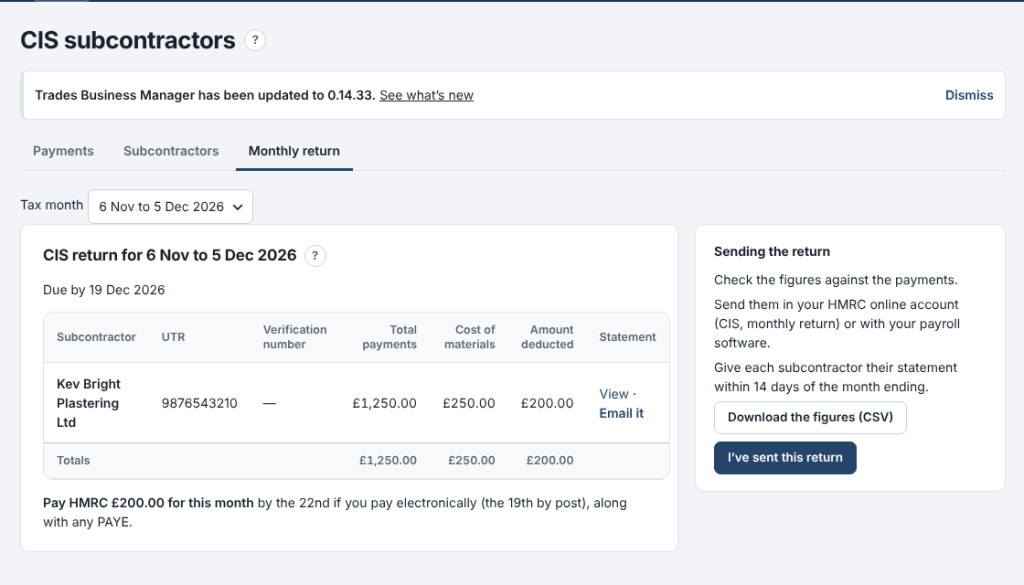
Pay subcontractors under CIS and get your monthly return figures without the sums.
Where: Money › CIS subcontractors (Premium)
Add each subcontractor with the status HMRC gave you, record what you pay them, and the deduction is worked out for you.
- On Subcontractors, add each one with their UTR and their status: gross, 20% or 30%.
- On Payments, record each payment: the amount for the work and the materials in it. The deduction and what you pay them show as you type.
- On Monthly return, copy the figures into your HMRC return by the 19th, and print or email each subcontractor's statement.
- The deduction comes off labour only, never materials or VAT.
- Payments go into Expenses under Subcontractors automatically.
- Nothing is sent to HMRC for you.

0.14.34November 13, 2026
The staff app now works with no signal.
Where: the staff app on the phone
Engineers can keep working in lofts, cellars and anywhere the signal drops.
- Open the app once a day with signal: today's and tomorrow's jobs are kept on the phone.
- With no signal, open a job and carry on: mark on site or done, add notes, photos, parts and the customer's signature.
- A yellow strip shows what is saved on the phone. When the signal comes back it all sends by itself.
- Nothing is sent twice, even if the signal drops mid-send.
- Messages to customers, such as On my way, still need signal.
- Signing out with changes not yet sent asks first.
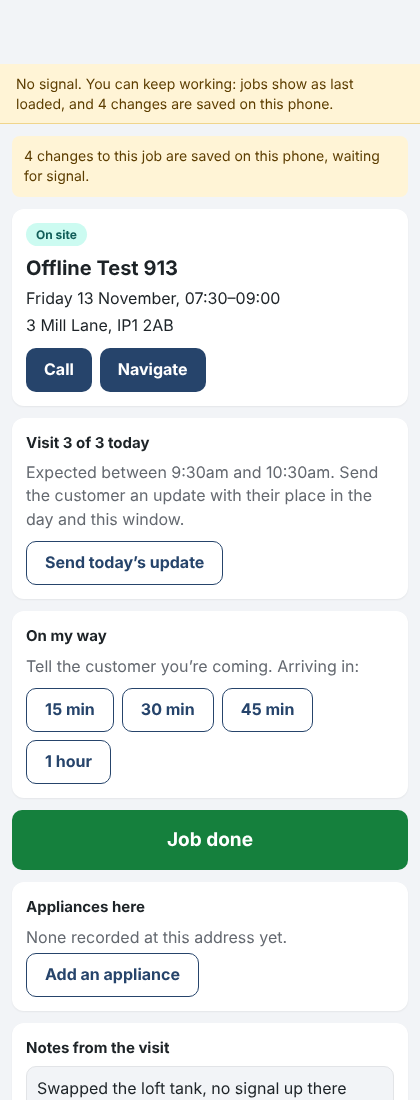
The staff app with no signal, changes saved on the phone 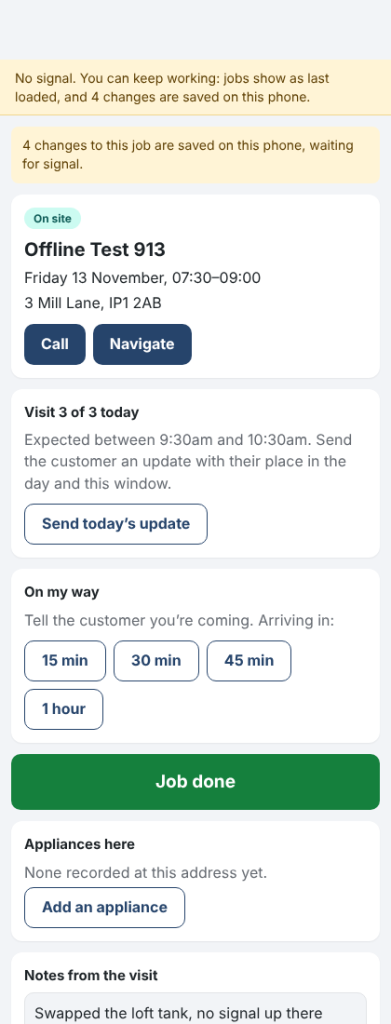
0.14.24November 10, 2026
Trades Business Manager now comes with a ready-made website for your business, with twelve designs to choose from.
Where: Settings › Website design
- Open Settings › Website design.
- Press Use this design on the one you like.
- Press View your website to see it.
- Your business name, phone, address and job types (with usual prices) come from Trades Business Manager.
- Every Get a quote button opens your enquiry form, so enquiries land in Trades Business Manager.
- Change design whenever you like. Once you've edited the home page, your words are kept.
- On sites ModuleFest hosts, the design picked at sign-up is already in place.
- Part of the Standard and Premium plans, ticked on the plan comparison. The free WordPress.org plugin doesn't include it.
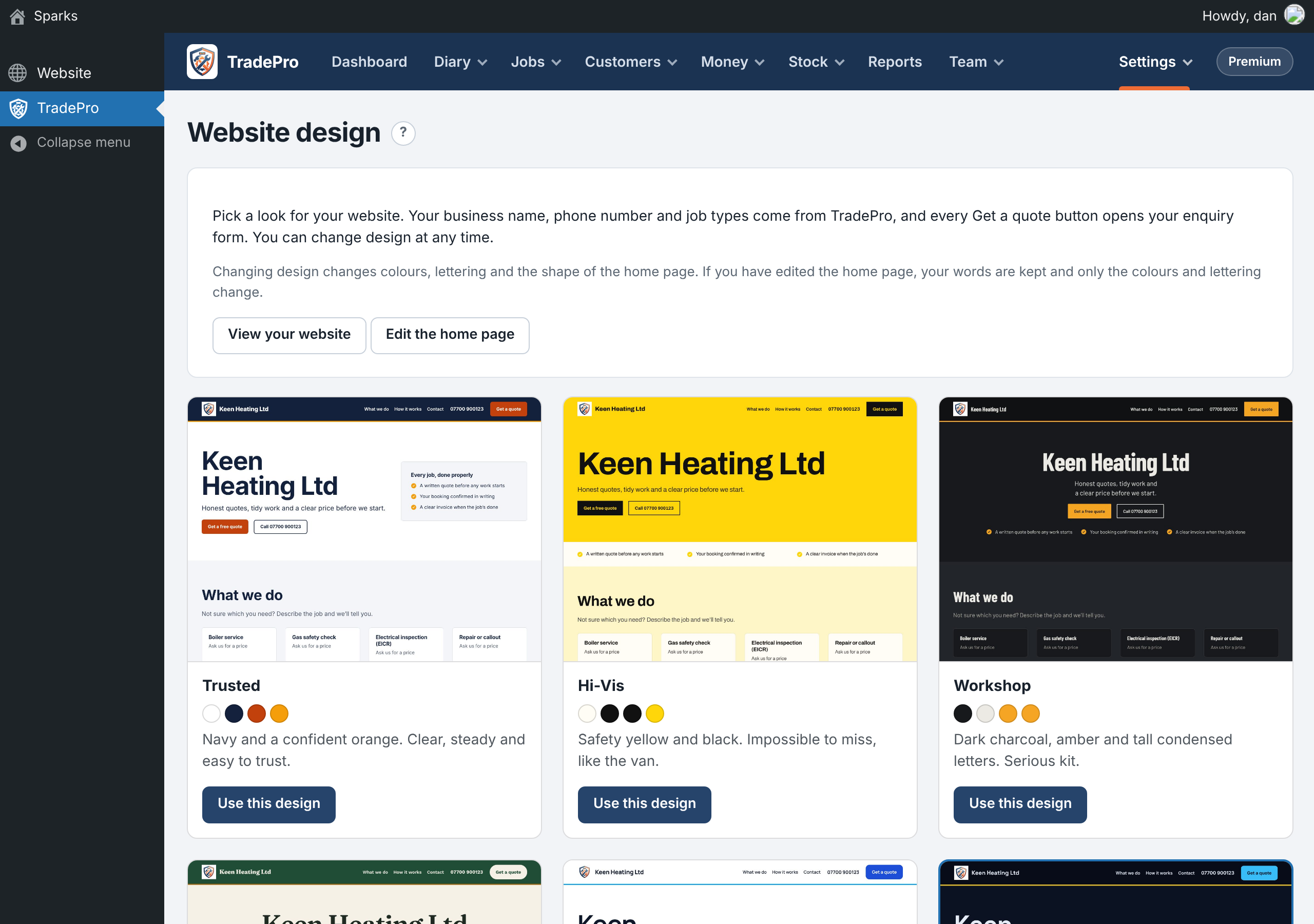
Choosing a website design
ModuleFest Trades Business Manager
Jobs, quotes, invoices and stock for trades
Autres actualités
 Nouvelle fonctionnalitéPet Groomer 2.77: Account credit and monthly billingManage advance payments and bill chosen clients just once a month.Voir les nouveautés →
 Nouvelle versionModuleFest Pet Walker 2.771.222Les clients peuvent désormais payer à l'avance et régler leurs factures en utilisant leur solde. Également dans cette version : paiement mensuel à échoir : une…Voir les nouveautés →
 Nouvelle versionModuleFest Trades Business Manager 0.14.42Jobs, quotes, invoices and stock for tradesVoir les nouveautés →