









 New features
Price book, CIS, certificates and an offline app for trades
Trades Business Manager 0.14 adds the tools a growing trades business asks for next: a price book with kits, a register for vans and tools, CIS for paying subcontractors, bills to pay, gas safety and boiler certificates on the phone, a staff app that works with no signal, and a ready-made website.
Price book and kits
Your labour rates, materials and kits with your mark-up, added to any quote in one go. Standard plan.
Vans and tools
Every van's MOT, tax, insurance and service dates and your tools' test dates, with reminders. Standard plan.
CIS for paying subcontractors
Deductions worked out from each subcontractor's HMRC status, and the monthly return figures ready. Premium plan.
Bills to pay
Every supplier bill with its due date, marked paid when you pay, and in your VAT and profit from the day it arrives. Premium plan.
Digital certificates
Gas safety records, boiler services and minor works filled in on the phone, with your logo on the certificate. Premium plan.
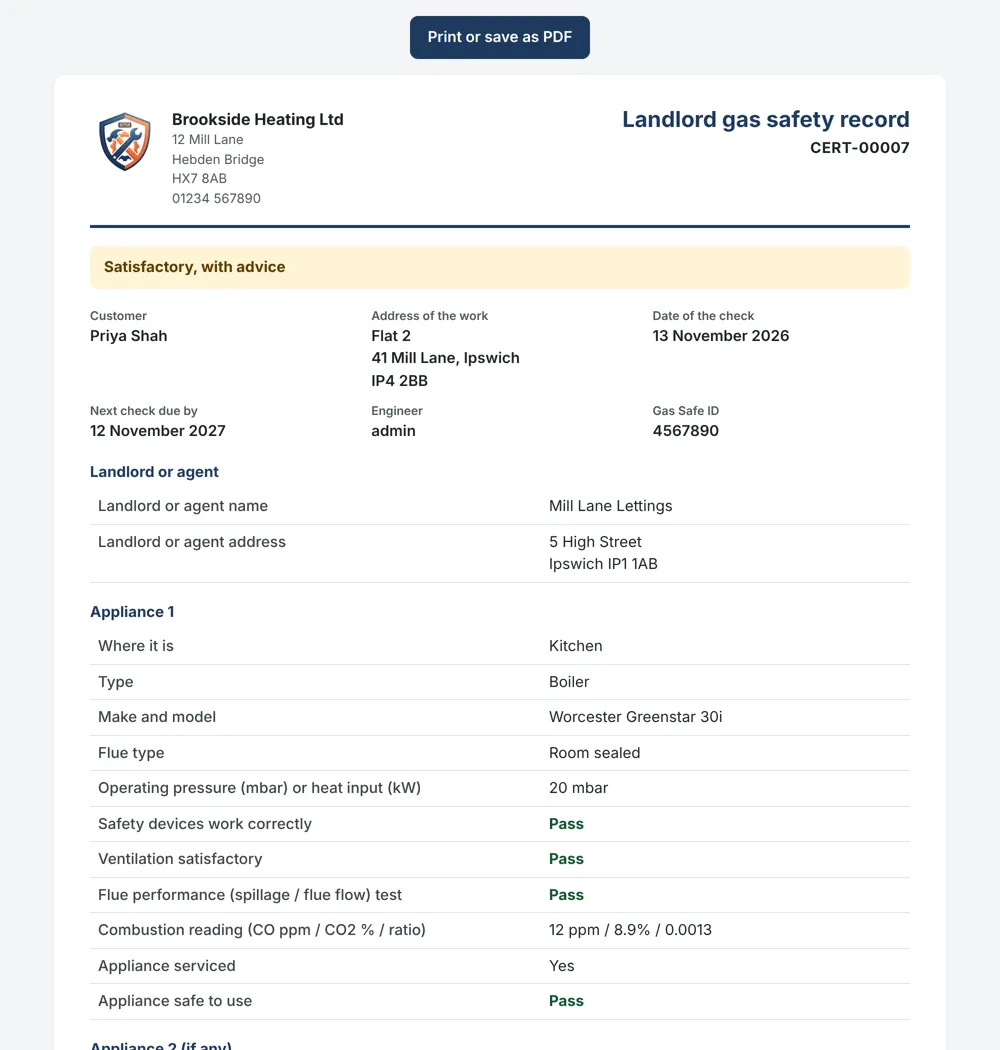
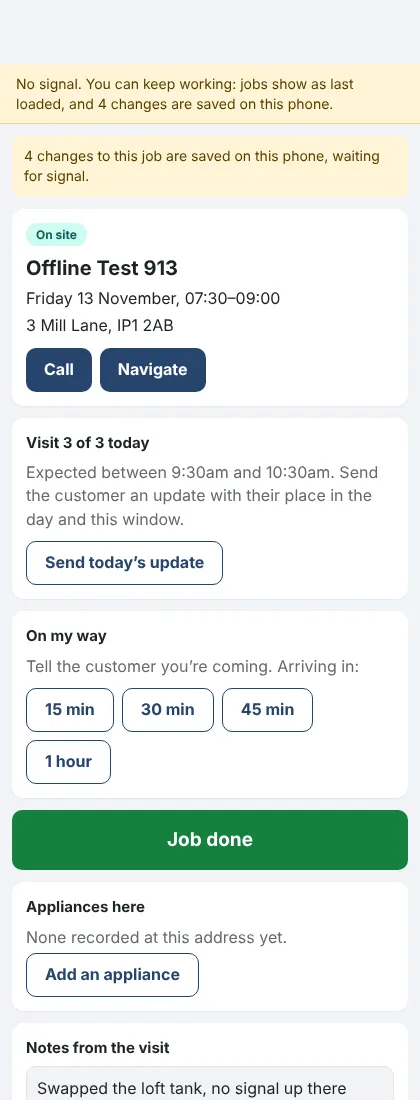
Works with no signal
The staff app keeps today's and tomorrow's jobs on the phone, so engineers keep working in lofts and cellars. Premium plan.
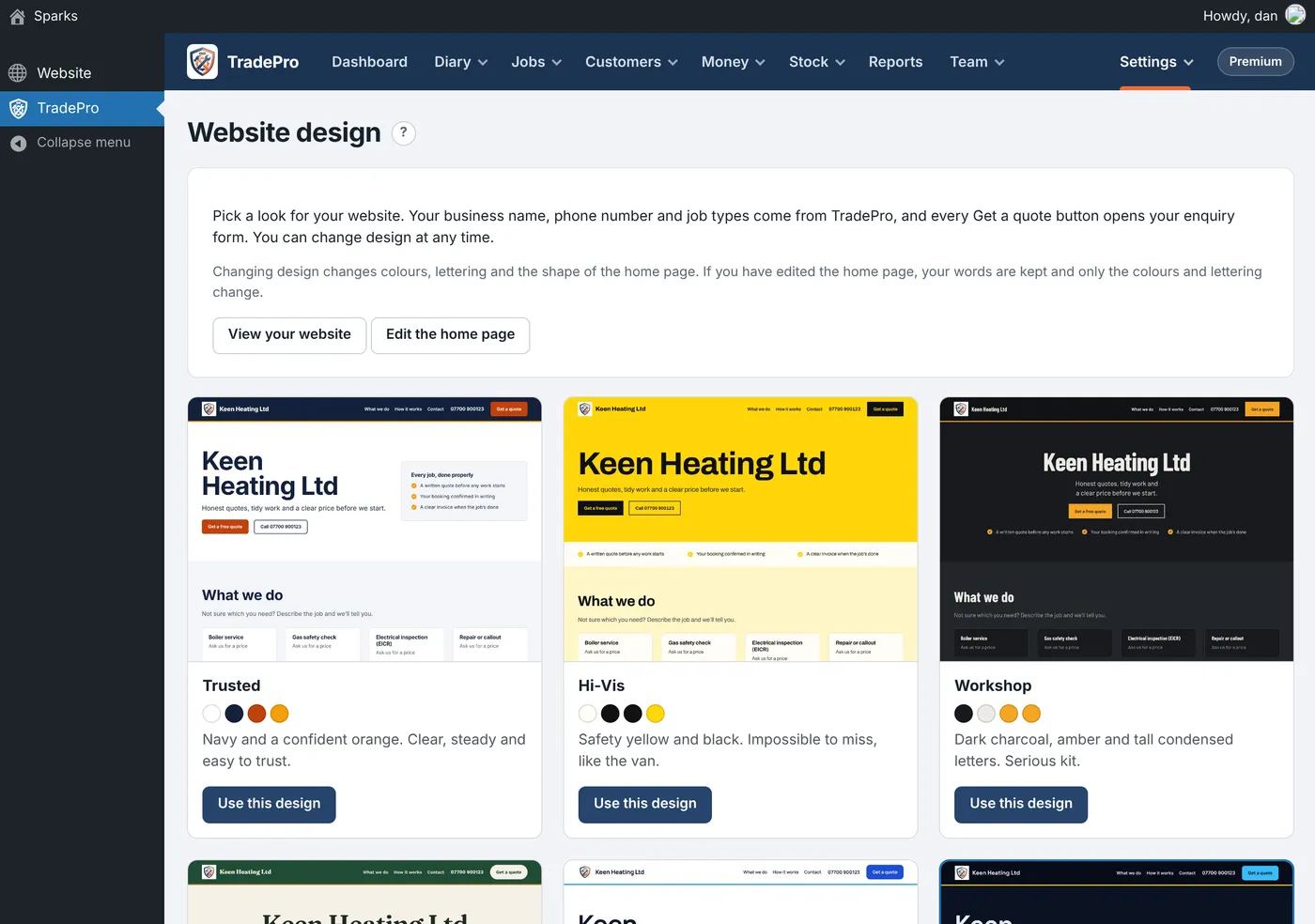
A ready-made website
Twelve designs to choose from, with your business details filled in. Standard plan.
Versionshinweise
0.14.40November 13, 2026
Füllen Sie ein Gassicherheitsprotokoll, einen Kesselservice oder kleinere Arbeiten auf dem Smartphone aus, und das Zertifikat wird für Sie erstellt.
Wo: Jobs › Forms and checks und in der Mitarbeiter-App (Premium)
Aus den Antworten wird ein Zertifikat mit Ihrem Logo erstellt, das gedruckt oder als PDF gespeichert werden kann. Es landet direkt in Certificates mitsamt Erinnerung an die Erneuerung.
- Fügen Sie unter Forms and checks ein vorgefertigtes Formular mit der Markierung „makes a certificate“ hinzu.
- Füllen Sie es direkt beim Kunden auf dem Smartphone aus, einschließlich Unterschriften.
- Der Kunde erhält sofort einen Link zu seinem Zertifikat per E-Mail, und es ist im Kundenportal verfügbar.
- Ein Gerät oder eine Dichtheitsprüfung mit dem Status Fail lässt das Zertifikat „Not safe“ anzeigen.
- Jedes von Ihnen selbst erstellte Formular kann ebenfalls ein Zertifikat ausstellen.
- Das Zertifikat des Vorjahres unter derselben Adresse stoppt den Versand von Erinnerungen.
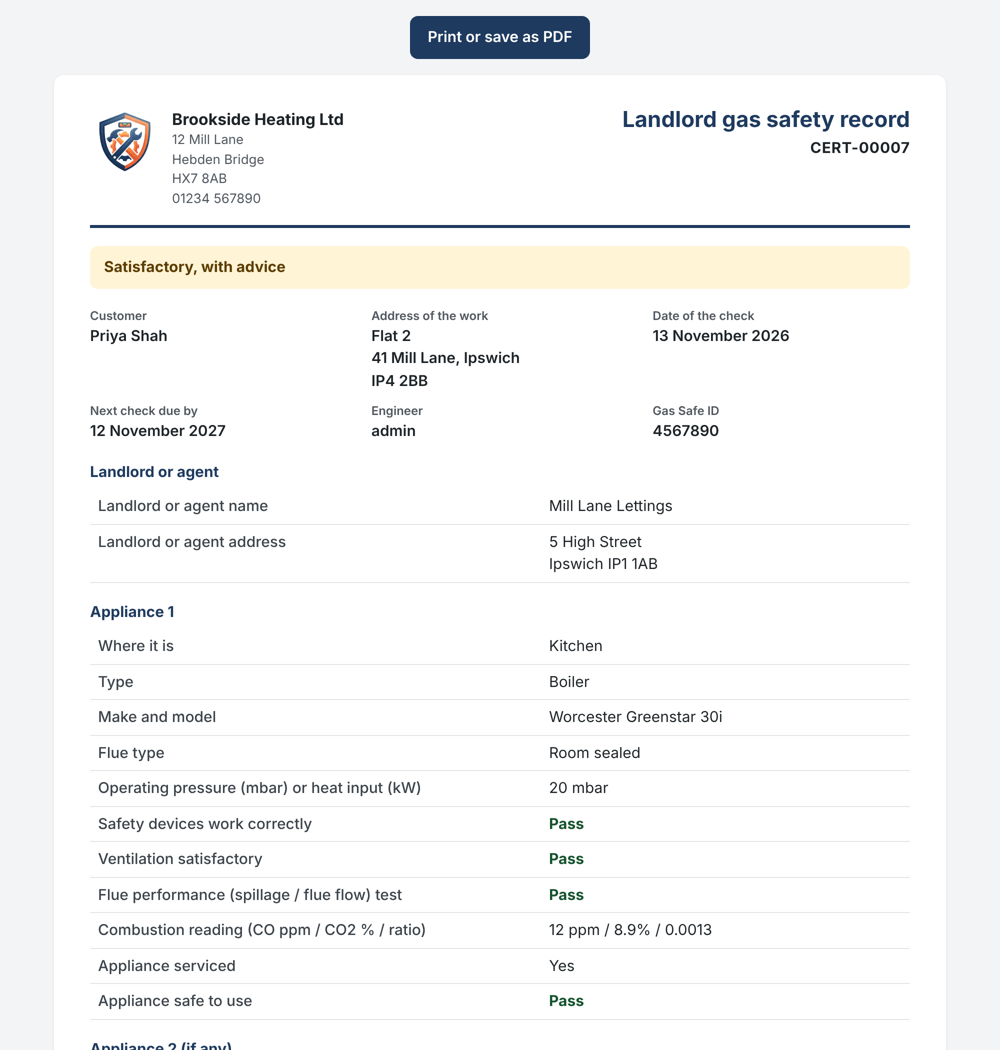
A landlord gas safety record made on the phone 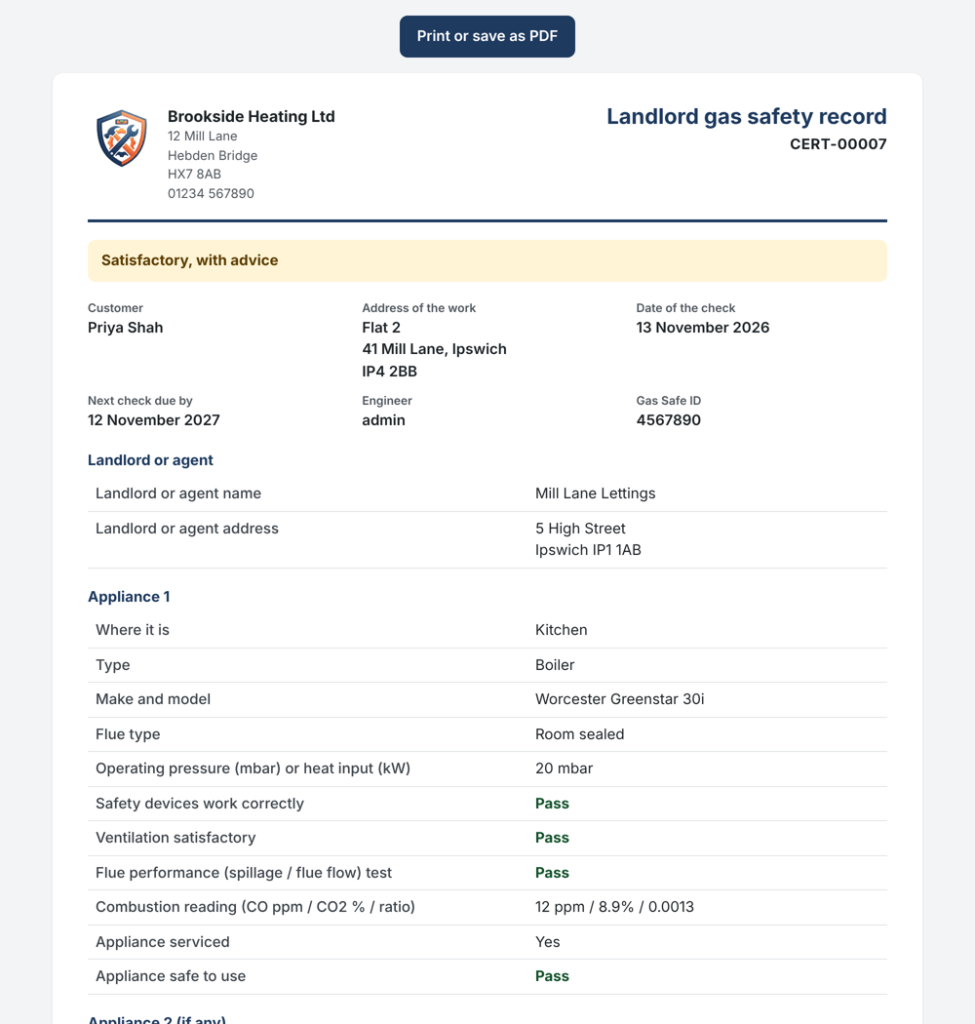
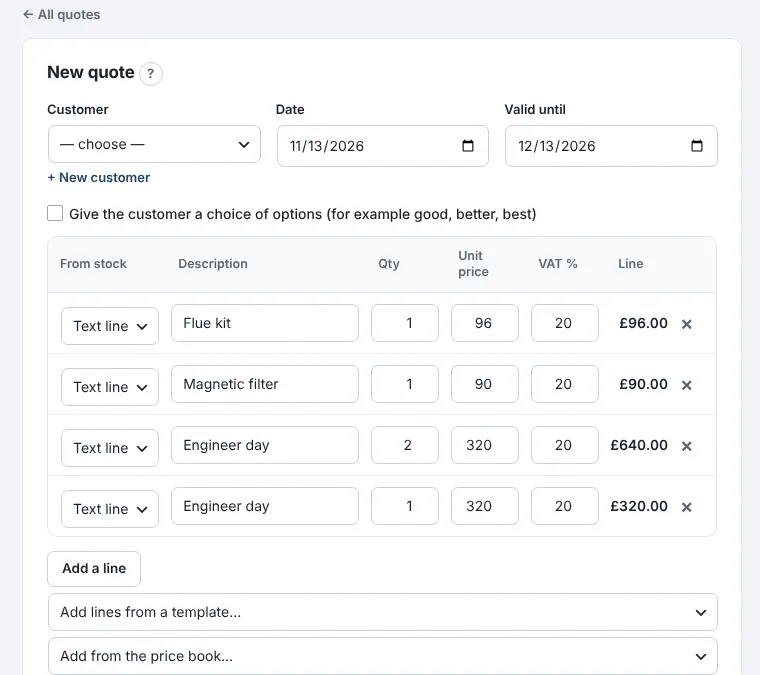
Keep your labour rates, materials and kits in a price book, and add them to any quote in one go.
Where: Money › Price book and kits (Standard)
Put in what each thing costs you and your mark-up, and the selling price works itself out.
- Add your labour rates, such as an engineer hour and an engineer day, then the materials you often buy in.
- On the Kits tab, put together the jobs you quote again and again, like a combi swap with its parts and two days' labour.
- On a quote or invoice, choose the kit or item from "Add from the price book".
- Each kit shows what it costs you, what you charge and your margin.
- When a cost goes up, kits using it follow; quotes already sent keep their prices.
- Kits can include stock items too.
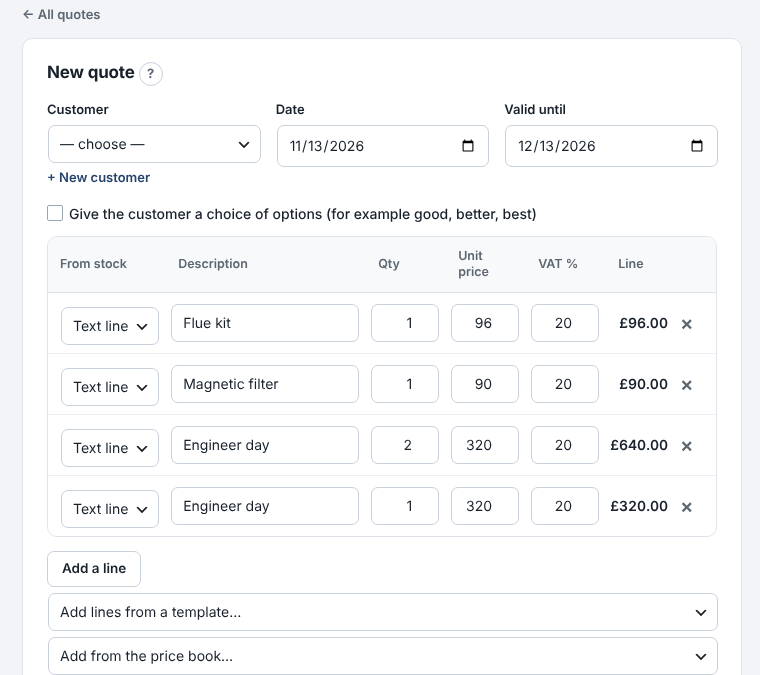
Adding a kit to a quote from the price book 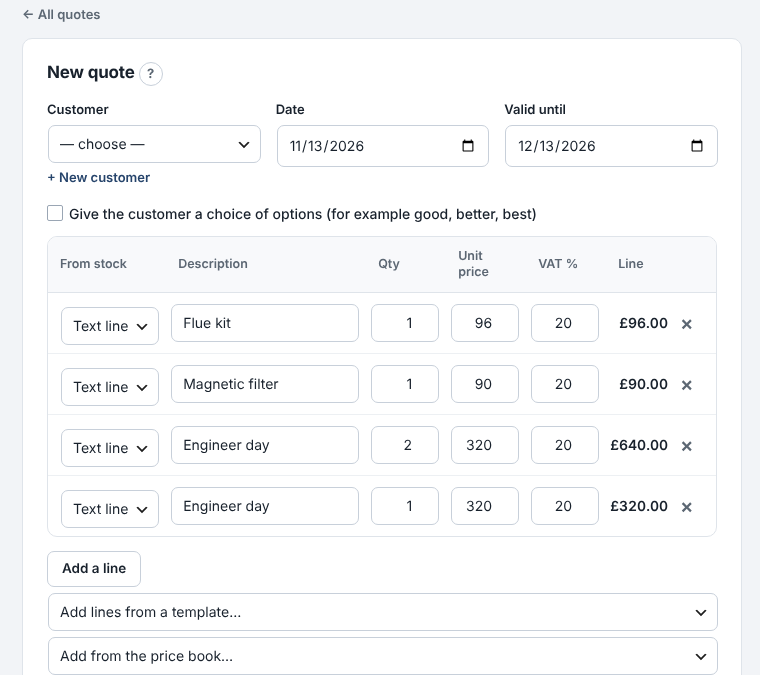
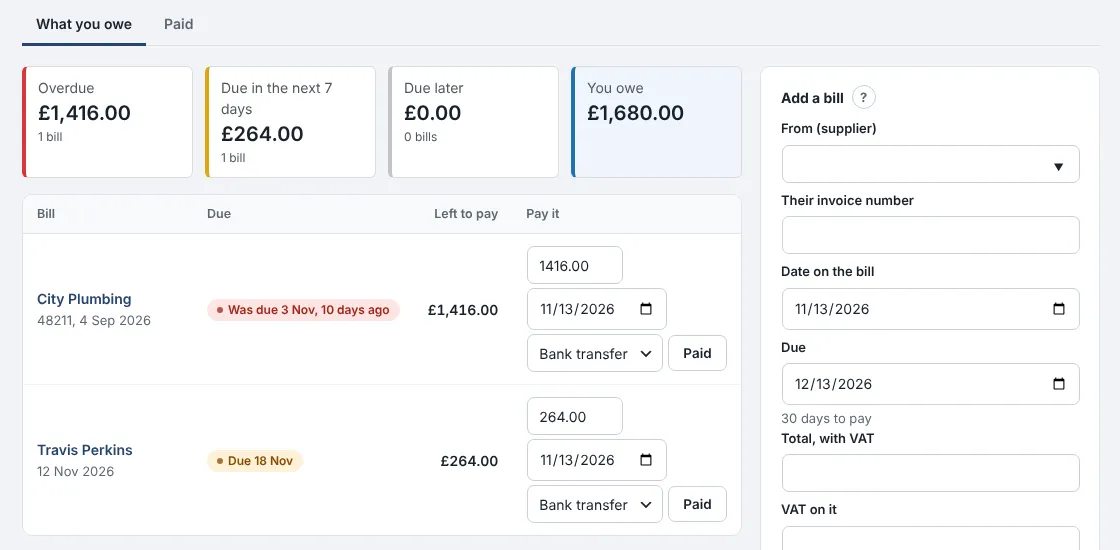
See every supplier bill you owe, when it's due, and mark it paid when you pay it.
Where: Money › Bills to pay (Premium)
Bills go into your expenses on their own date, so your VAT and profit are right even before you've paid.
- Add a bill: the supplier, their invoice number, the date and the total. The due date fills in from that supplier's payment terms.
- Check what's overdue, what's due this week and what you owe in total.
- When you pay, press Paid. Put in a smaller amount if you've paid part of it.
- Set different payment terms for each supplier, such as 60 days for your main merchant.
- Receiving a purchase order "on account" adds its bill for you.
- The dashboard turns red when a bill is overdue.
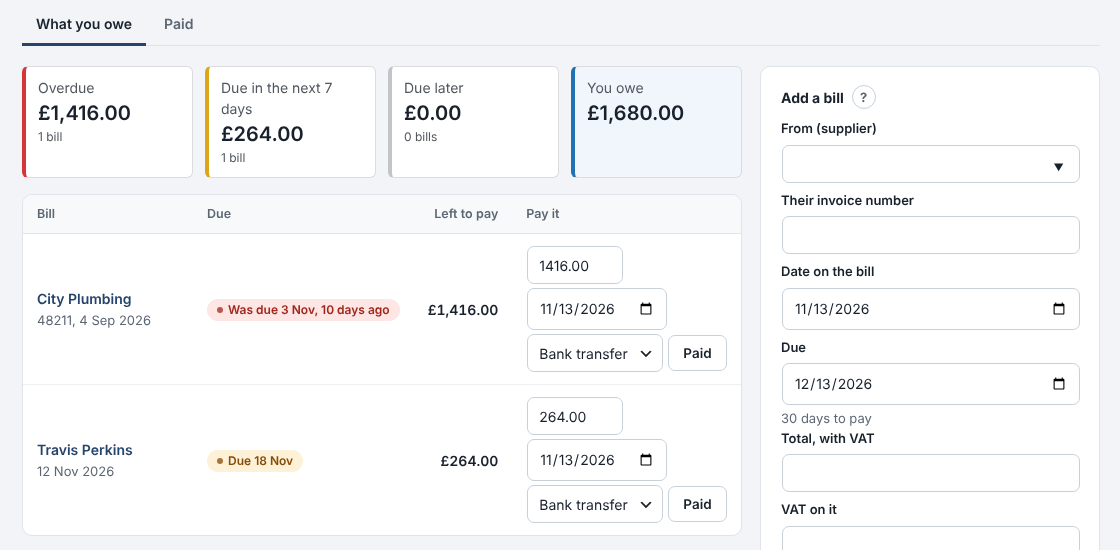
What you owe suppliers, and when 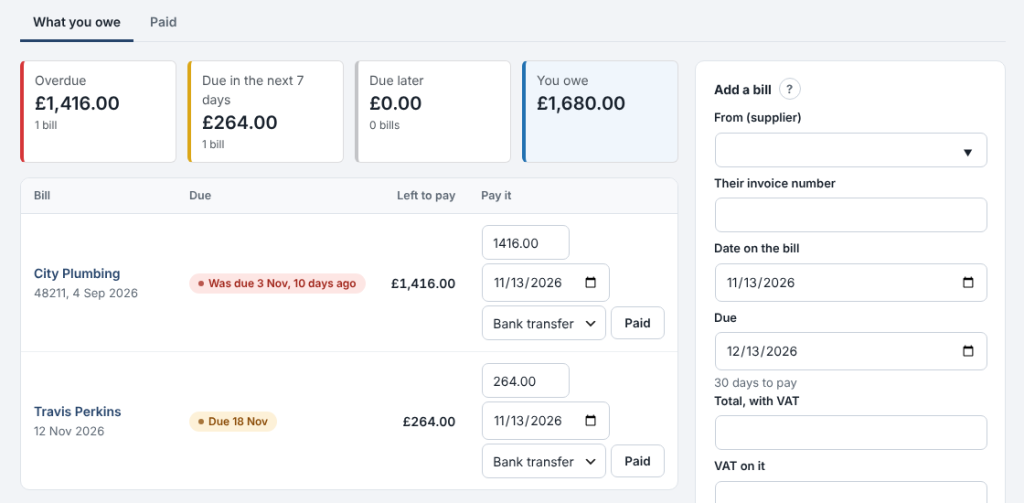
0.14.36November 13, 2026
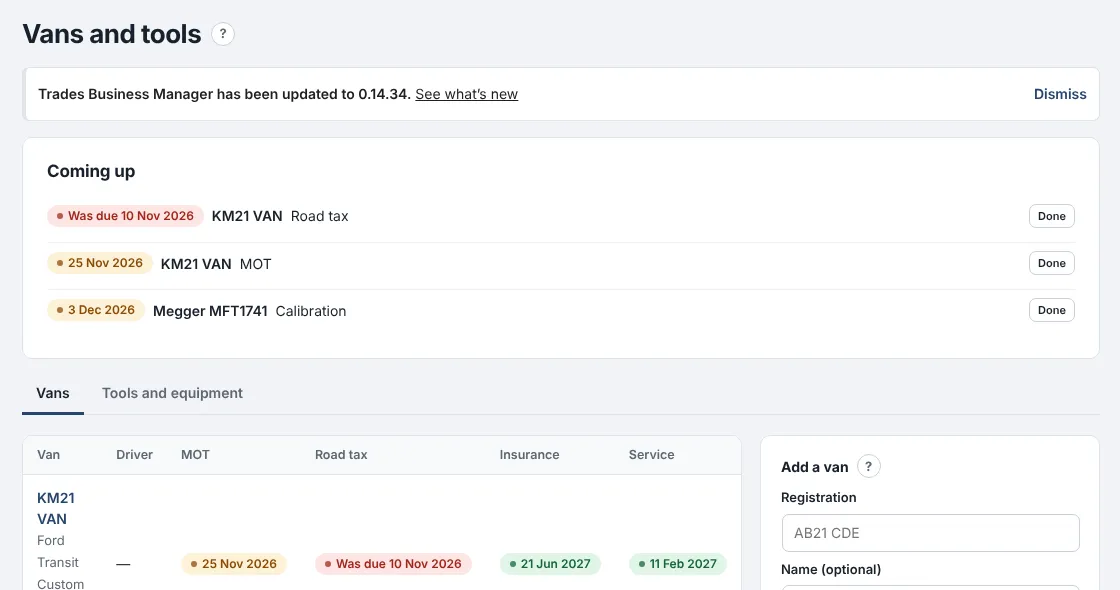
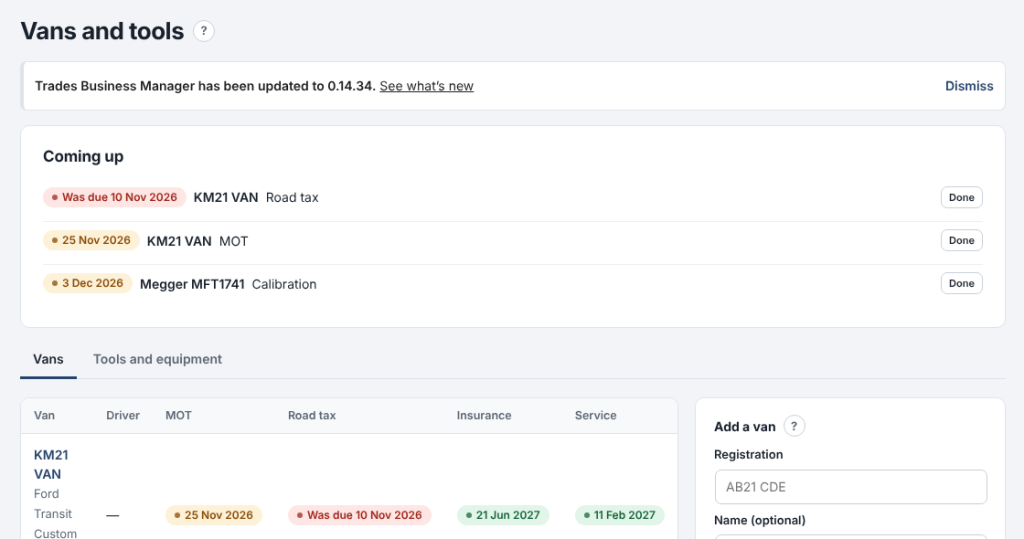
Keep every van's MOT, tax, insurance and service dates, and your tools' test dates, in one place.
Where: Team › Vans and tools (Standard)
Anything due in the next 30 days shows at the top and on the dashboard, and you get an email when it comes due.
- Add each van with its registration, driver and dates. Pick its stock to see the parts on board.
- On Tools and equipment, add anything that needs testing: PAT tests, meter calibration, ladder inspections.
- When something is done, press Done: the next date is set for you.
- Each date is emailed once, and again if it's missed.
- Overdue dates show in red.
- Sold vans and lost tools can be kept as no longer used.

0.14.35November 13, 2026
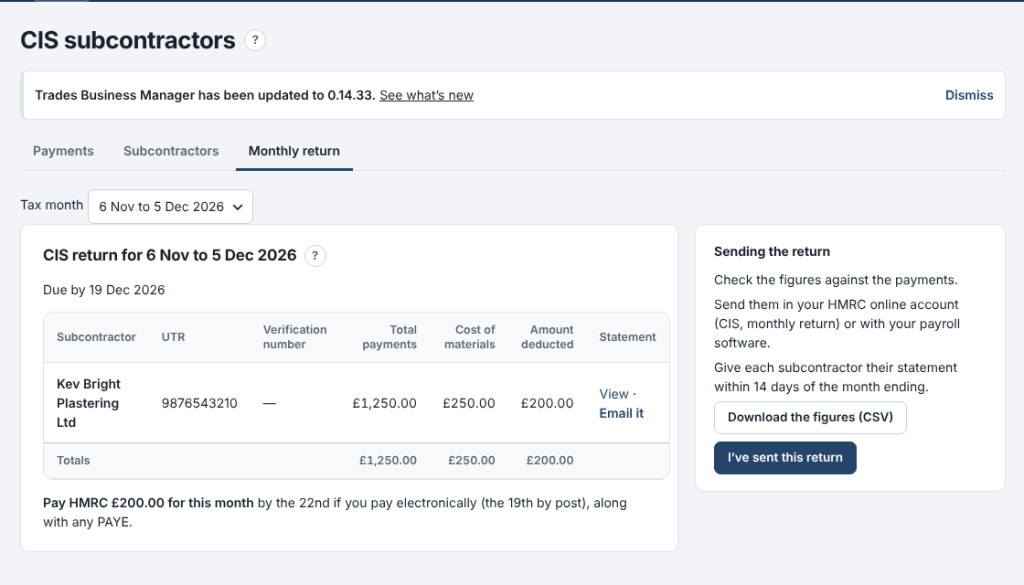
Pay subcontractors under CIS and get your monthly return figures without the sums.
Where: Money › CIS subcontractors (Premium)
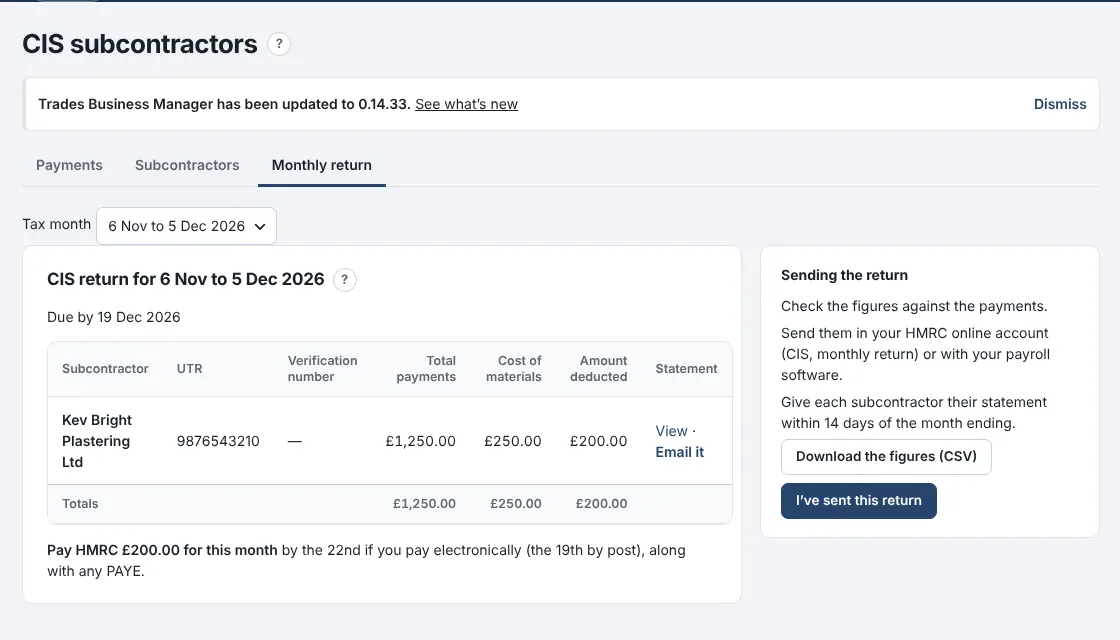
Add each subcontractor with the status HMRC gave you, record what you pay them, and the deduction is worked out for you.
- On Subcontractors, add each one with their UTR and their status: gross, 20% or 30%.
- On Payments, record each payment: the amount for the work and the materials in it. The deduction and what you pay them show as you type.
- On Monthly return, copy the figures into your HMRC return by the 19th, and print or email each subcontractor's statement.
- The deduction comes off labour only, never materials or VAT.
- Payments go into Expenses under Subcontractors automatically.
- Nothing is sent to HMRC for you.

0.14.34November 13, 2026
The staff app now works with no signal.
Where: the staff app on the phone
Engineers can keep working in lofts, cellars and anywhere the signal drops.
- Open the app once a day with signal: today's and tomorrow's jobs are kept on the phone.
- With no signal, open a job and carry on: mark on site or done, add notes, photos, parts and the customer's signature.
- A yellow strip shows what is saved on the phone. When the signal comes back it all sends by itself.
- Nothing is sent twice, even if the signal drops mid-send.
- Messages to customers, such as On my way, still need signal.
- Signing out with changes not yet sent asks first.
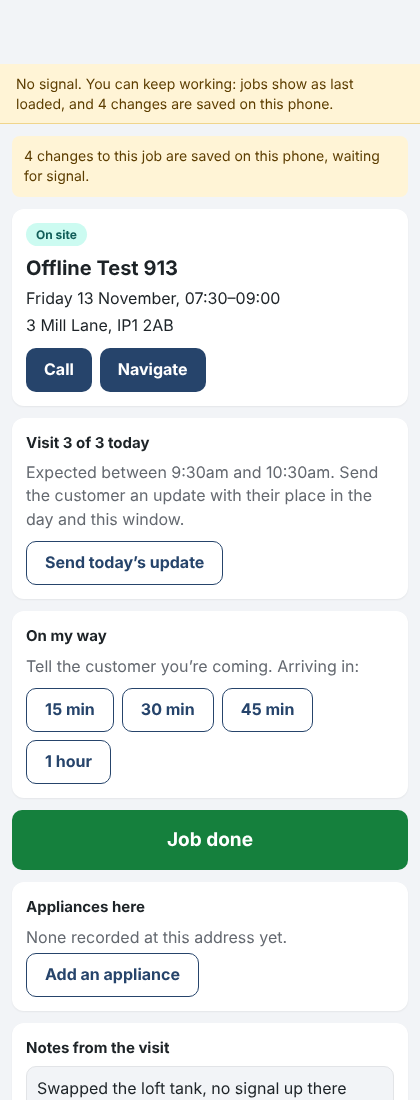
The staff app with no signal, changes saved on the phone 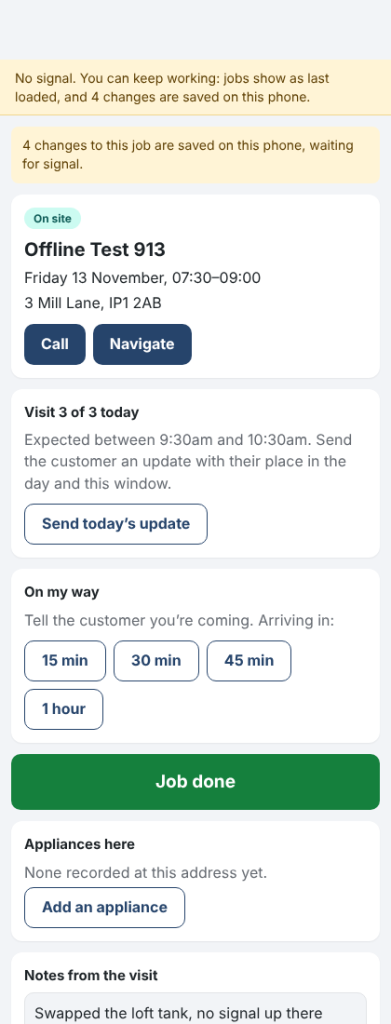
0.14.24November 10, 2026
Trades Business Manager now comes with a ready-made website for your business, with twelve designs to choose from.
Where: Settings › Website design
- Open Settings › Website design.
- Press Use this design on the one you like.
- Press View your website to see it.
- Your business name, phone, address and job types (with usual prices) come from Trades Business Manager.
- Every Get a quote button opens your enquiry form, so enquiries land in Trades Business Manager.
- Change design whenever you like. Once you've edited the home page, your words are kept.
- On sites ModuleFest hosts, the design picked at sign-up is already in place.
- Part of the Standard and Premium plans, ticked on the plan comparison. The free WordPress.org plugin doesn't include it.
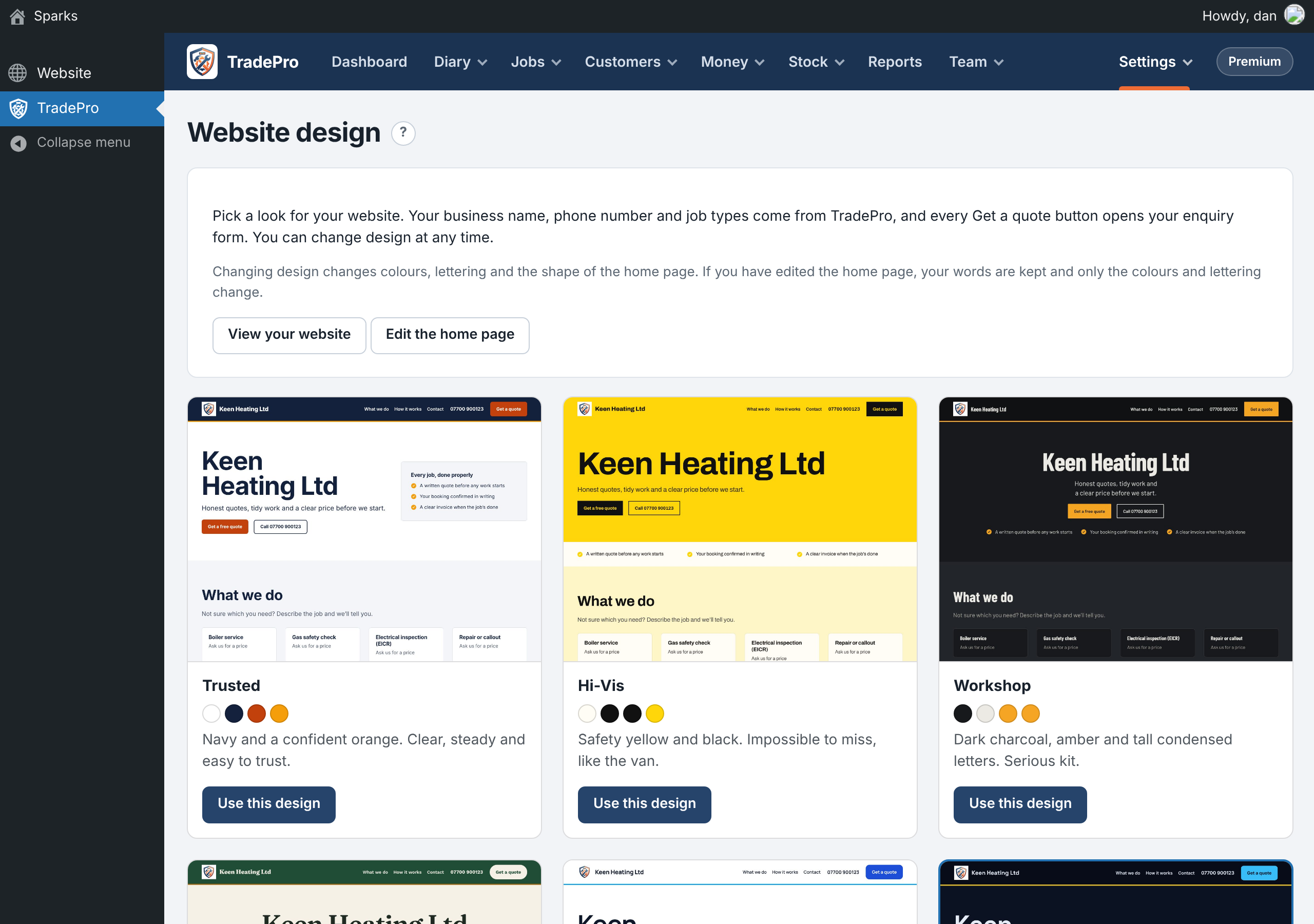
Choosing a website design
ModuleFest Trades Business Manager
Jobs, quotes, invoices and stock for trades
Weitere Neuigkeiten
 Neue FunktionPet Groomer 2.77: Account credit and monthly billingManage advance payments and bill chosen clients just once a month.Was ist neu →
 Neue VersionModuleFest Pet Walker 2.771.222Kunden können jetzt im Voraus bezahlen und ihre Rechnungen über das Guthaben begleichen lassen. Außerdem in dieser Version: pay monthly in arrears: one invoice at the…Was ist neu →
 Neue VersionModuleFest Trades Business Manager 0.14.42Jobs, quotes, invoices and stock for tradesWas ist neu →