









 New features
Price book, CIS, certificates and an offline app for trades
Trades Business Manager 0.14 adds the tools a growing trades business asks for next: a price book with kits, a register for vans and tools, CIS for paying subcontractors, bills to pay, gas safety and boiler certificates on the phone, a staff app that works with no signal, and a ready-made website.
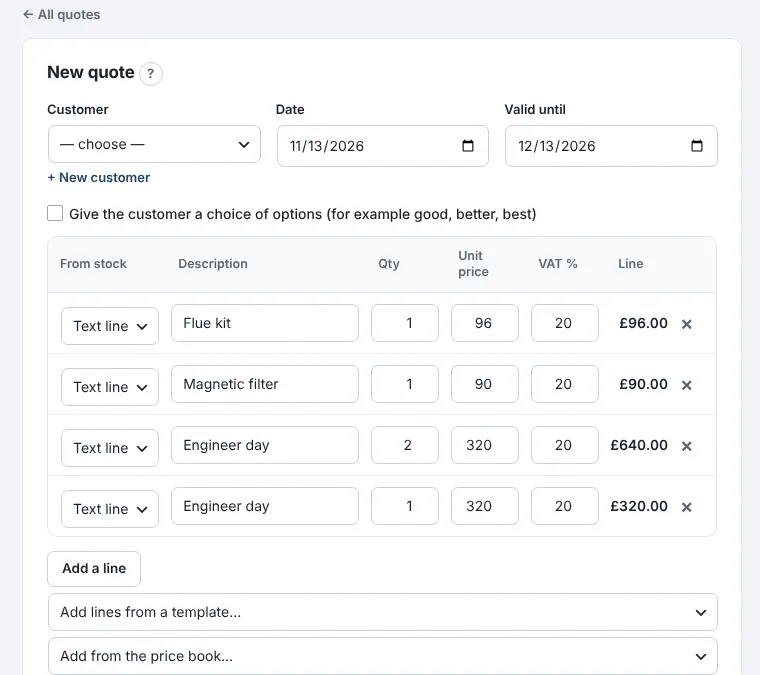
Price book and kits
Your labour rates, materials and kits with your mark-up, added to any quote in one go. Standard plan.
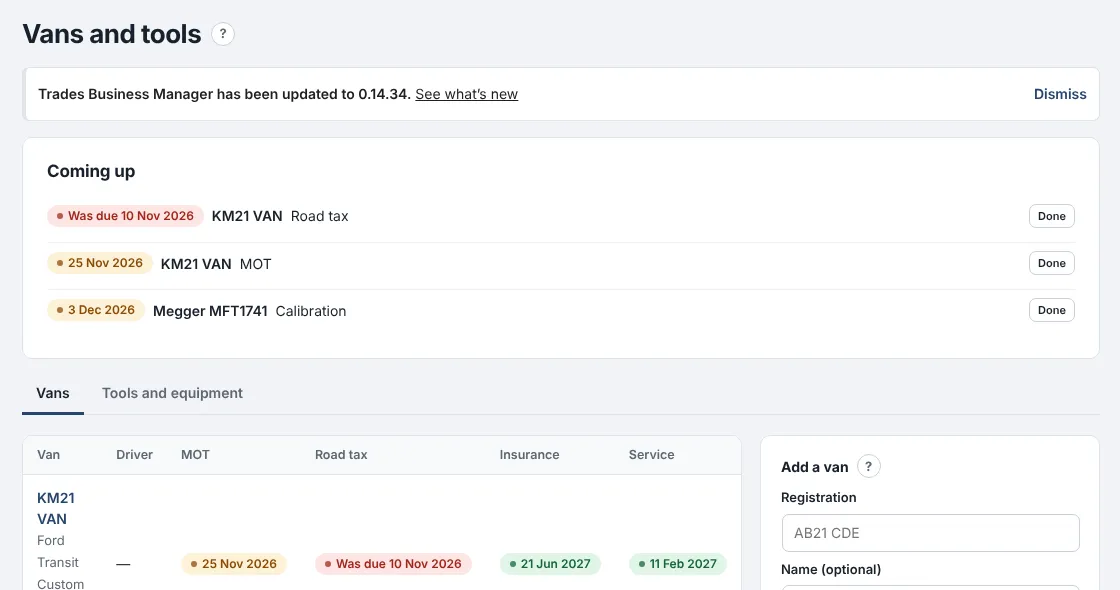
Vans and tools
Every van's MOT, tax, insurance and service dates and your tools' test dates, with reminders. Standard plan.
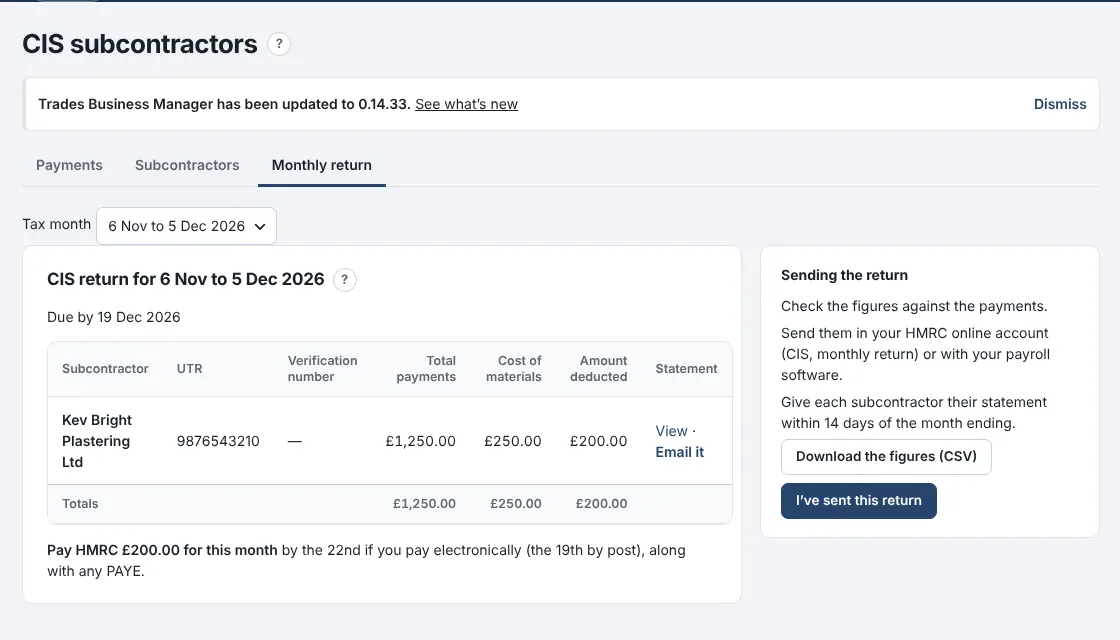
CIS for paying subcontractors
Deductions worked out from each subcontractor's HMRC status, and the monthly return figures ready. Premium plan.
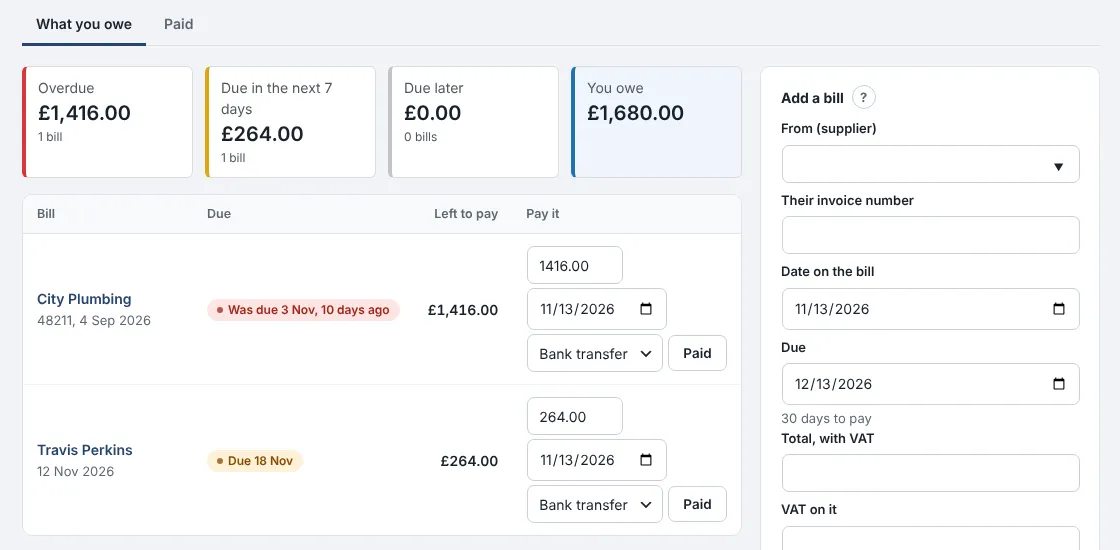
Bills to pay
Every supplier bill with its due date, marked paid when you pay, and in your VAT and profit from the day it arrives. Premium plan.
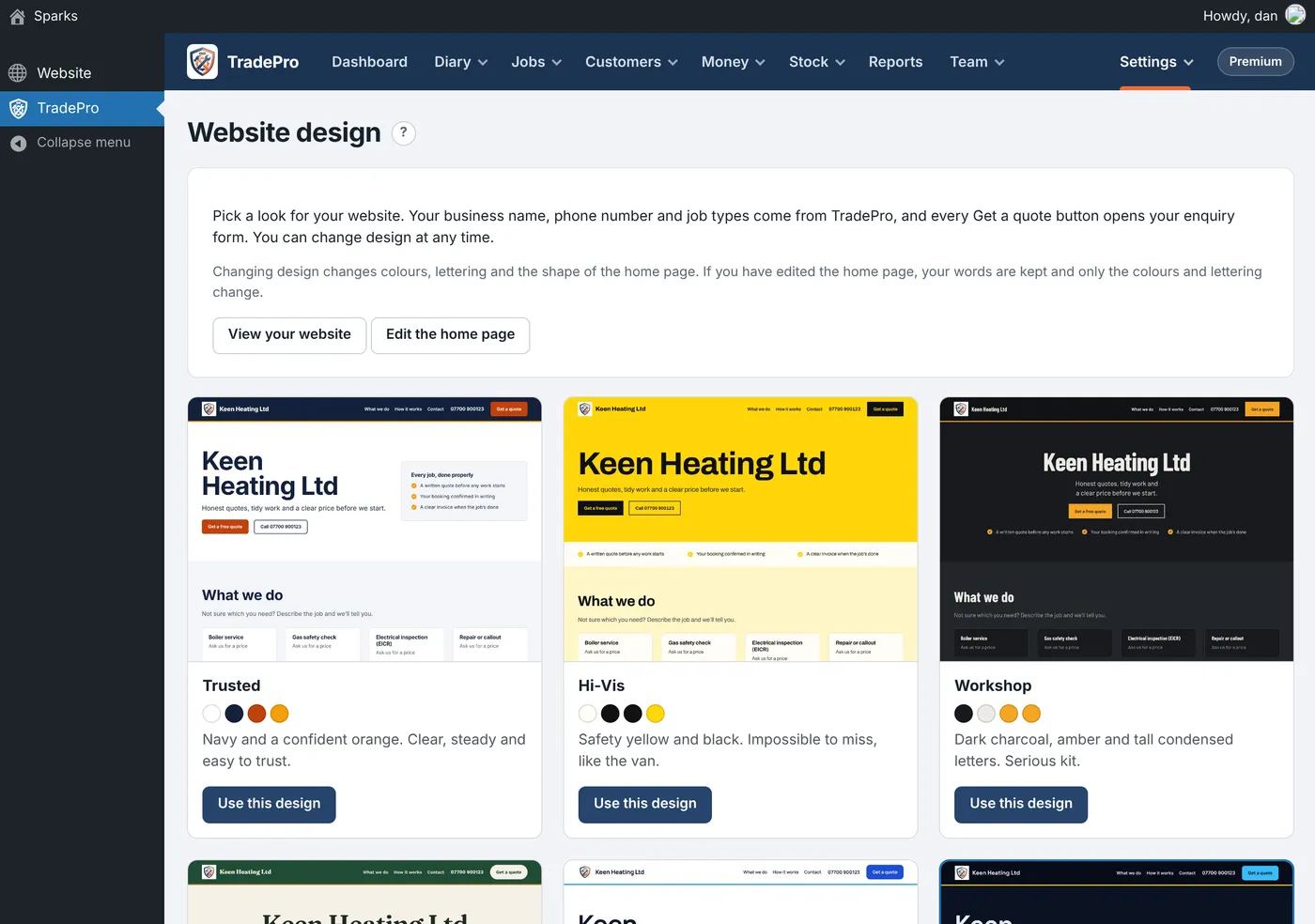
Digital certificates
Gas safety records, boiler services and minor works filled in on the phone, with your logo on the certificate. Premium plan.
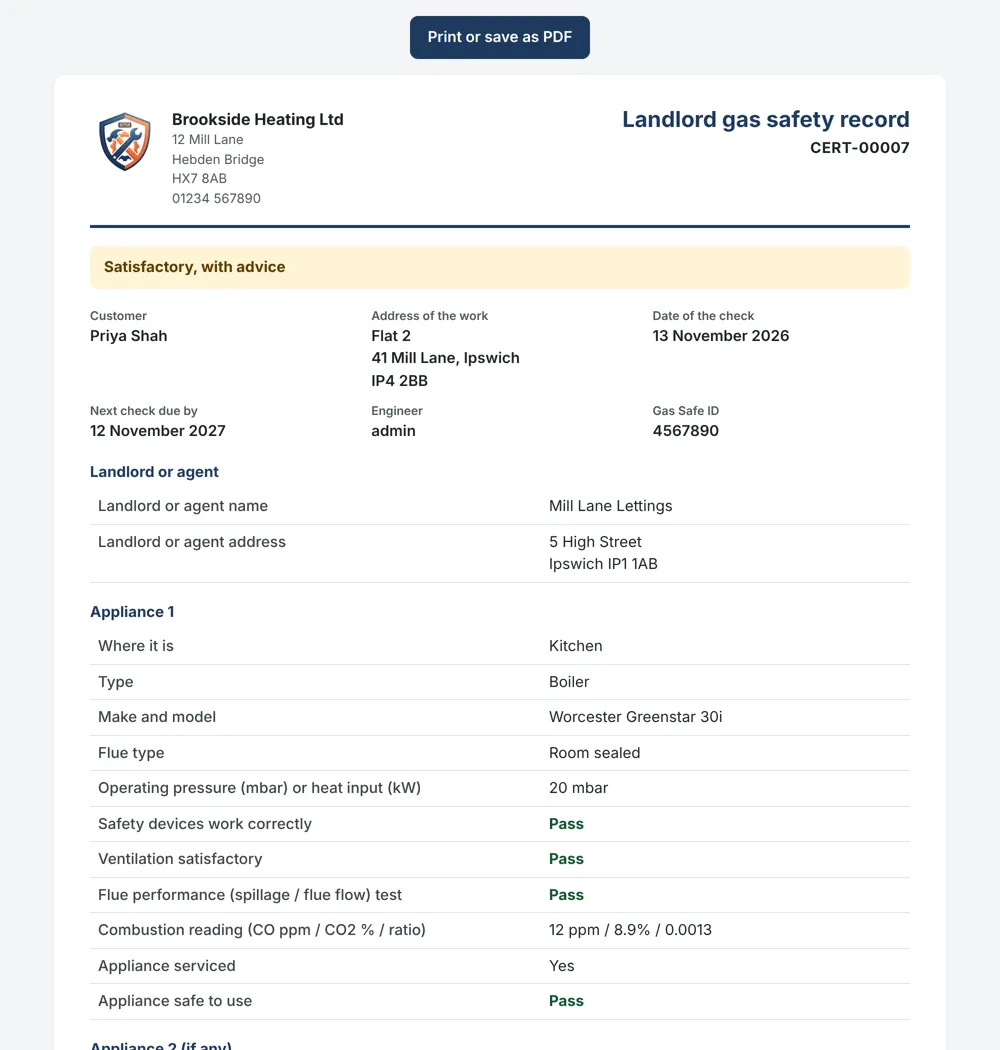
Works with no signal
The staff app keeps today's and tomorrow's jobs on the phone, so engineers keep working in lofts and cellars. Premium plan.
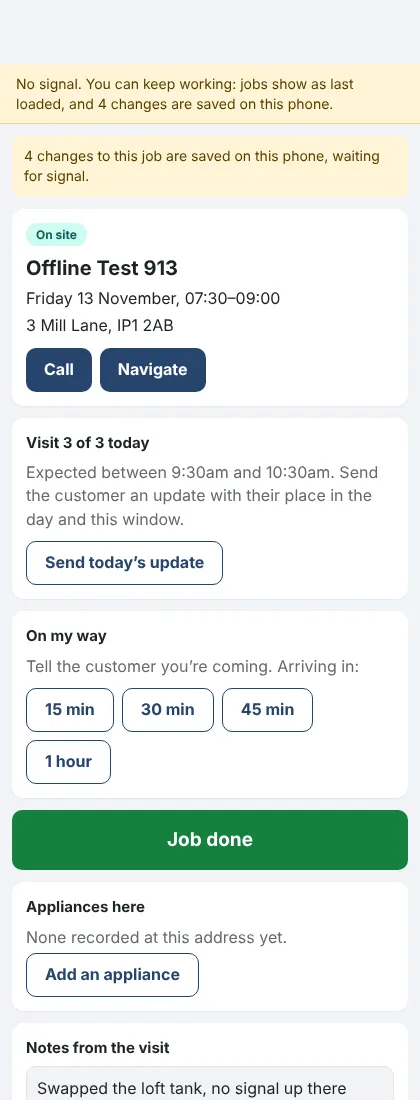
A ready-made website
Twelve designs to choose from, with your business details filled in. Standard plan.
Note di rilascio
0.14.40November 13, 2026
Compila un rapporto sulla sicurezza del gas, la manutenzione della caldaia o piccoli interventi direttamente dal telefono, e il certificato viene creato per te.
Dove: Interventi › Moduli e controlli, e l’app per il personale (Premium)
Le risposte diventano un certificato con il tuo logo, pronto per essere stampato o salvato come PDF, e viene inserito in Certificati con il relativo promemoria di rinnovo.
- In Moduli e controlli, aggiungi un modulo pronto all’uso contrassegnato con "crea un certificato".
- Sull’intervento, compilalo tramite telefono, firme incluse.
- Al cliente viene inviato immediatamente un link via email al proprio certificato, che sarà disponibile nel suo portale.
- Un test di tenuta o su un apparecchio contrassegnato come Negativo fa sì che il certificato riporti la dicitura "Non sicuro".
- Anche qualsiasi modulo creato da te può generare un certificato.
- Il certificato dell’anno scorso allo stesso indirizzo interrompe l’invio dei promemoria.
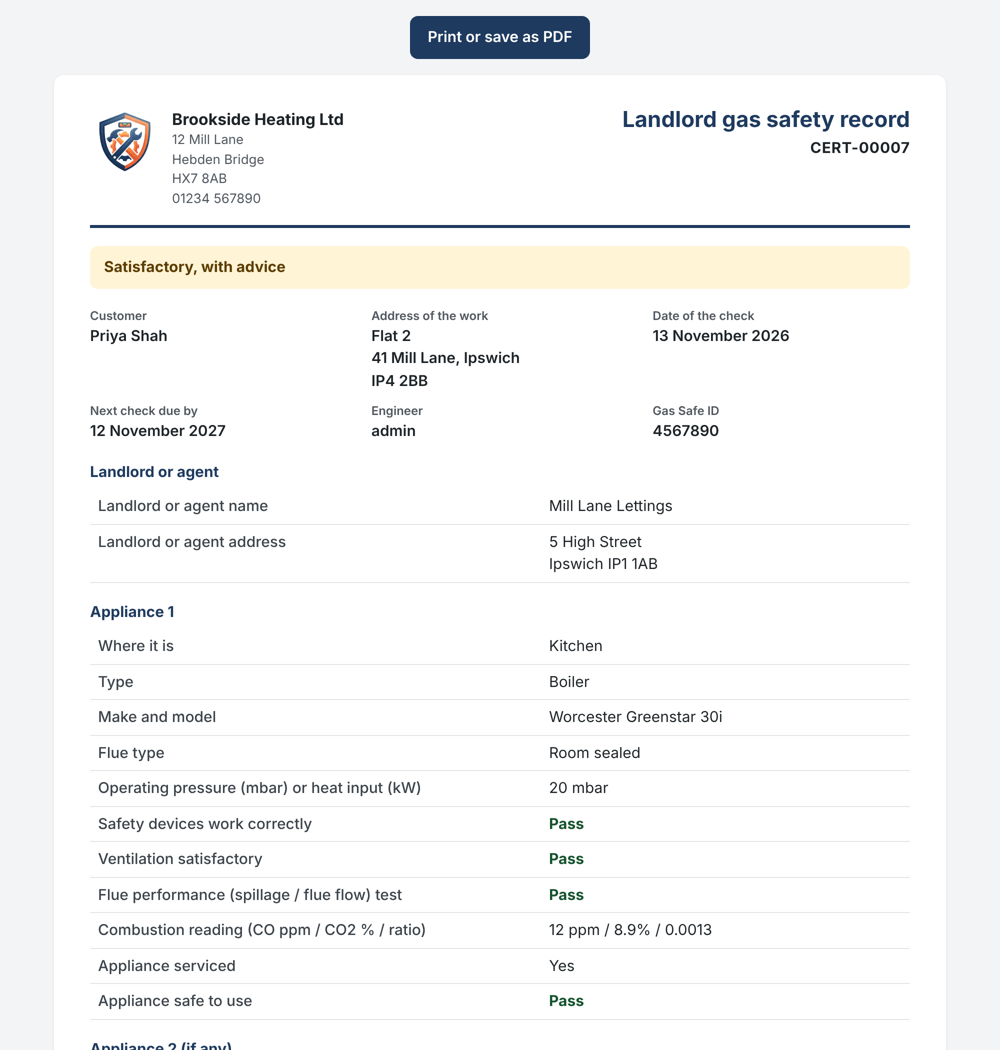
Un registro sulla sicurezza del gas per proprietari creato sul telefono 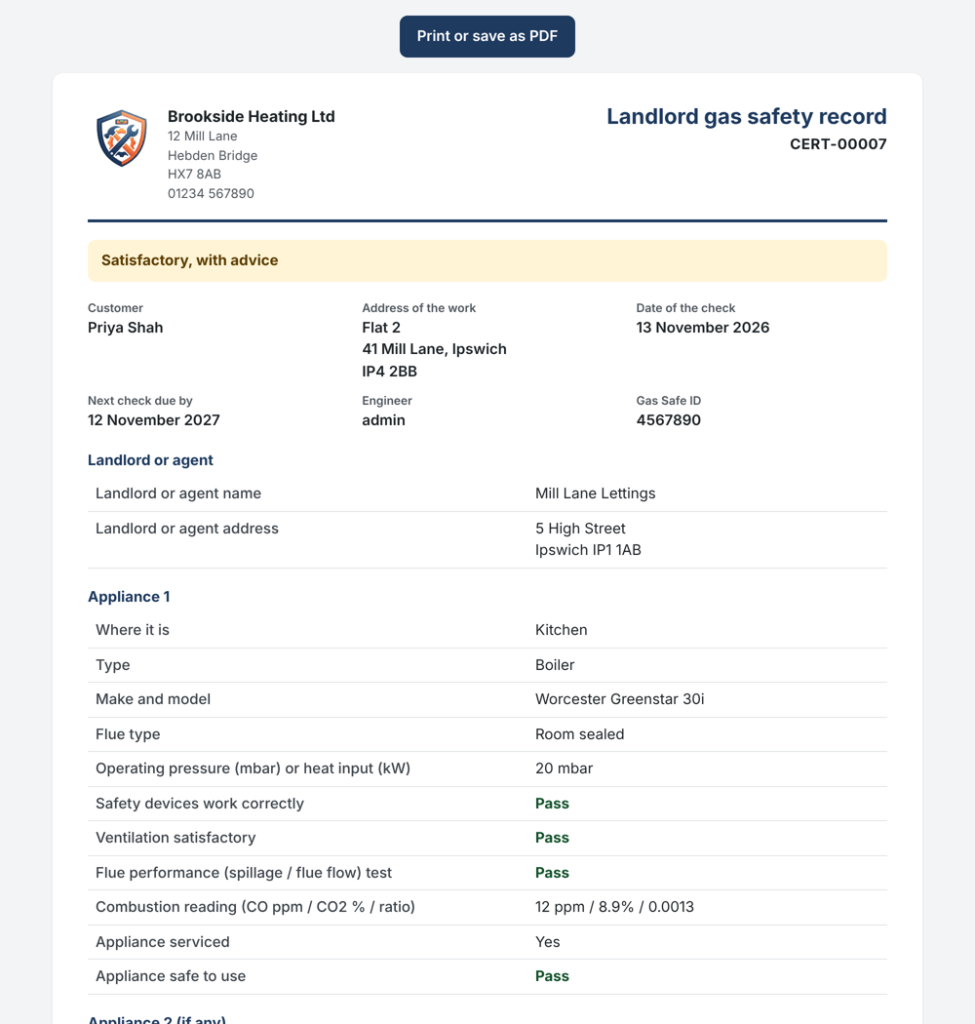
Conserva le tue tariffe di manodopera, i materiali e i kit in un listino prezzi e aggiungili a qualsiasi preventivo in un solo passaggio.
Dove: Denaro › Listino prezzi e kit (Standard)
Inserisci il costo di ogni singolo elemento e il tuo ricarico, e il prezzo di vendita si calcolerà da solo.
- Aggiungi le tue tariffe di manodopera, come l’ora e la giornata di un tecnico, quindi i materiali che acquisti più spesso.
- Nella scheda Kit, raggruppa i lavori che preventivi più di frequente, come la sostituzione di una caldaia con i suoi componenti e due giorni di manodopera.
- Su un preventivo o una fattura, seleziona il kit o l’articolo da "Aggiungi dal listino prezzi".
- Ciascun kit mostra il suo costo per te, quanto addebiti e il tuo margine.
- Quando un costo aumenta, i kit che lo utilizzano si aggiornano di conseguenza; i preventivi già inviati mantengono i loro prezzi.
- I kit possono includere anche articoli di magazzino.
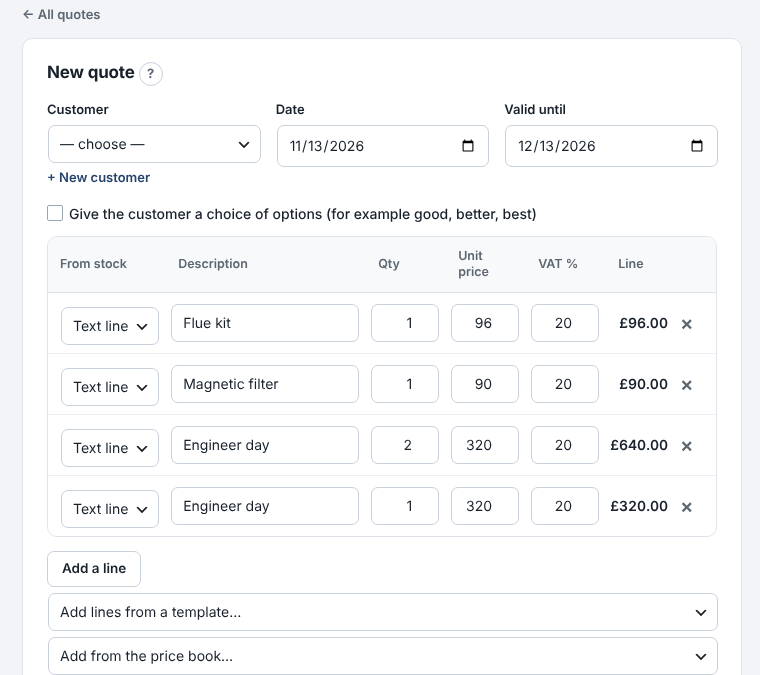
Aggiunta di un kit a un preventivo dal listino prezzi 
Visualizza ogni fattura fornitore da pagare, la sua scadenza e contrassegnala come pagata quando saldi il conto.
Dove: Money › Bills to pay (Premium)
Le fatture vengono registrate nelle spese con la loro data, in modo che IVA e profitti siano corretti anche prima del pagamento.
- Aggiungi una fattura: il fornitore, il numero di fattura, la data e il totale. La data di scadenza si compila in base ai termini di pagamento del fornitore.
- Controlla cosa è scaduto, cosa scade questa settimana e il totale dovuto.
- Quando paghi, premi Paid. Inserisci un importo inferiore se hai pagato solo in parte.
- Imposta termini di pagamento diversi per ciascun fornitore, ad esempio 60 giorni per il tuo fornitore principale.
- La ricezione di un ordine d’acquisto "a conto" aggiunge automaticamente la relativa fattura.
- La bacheca diventa rossa quando una fattura è scaduta.
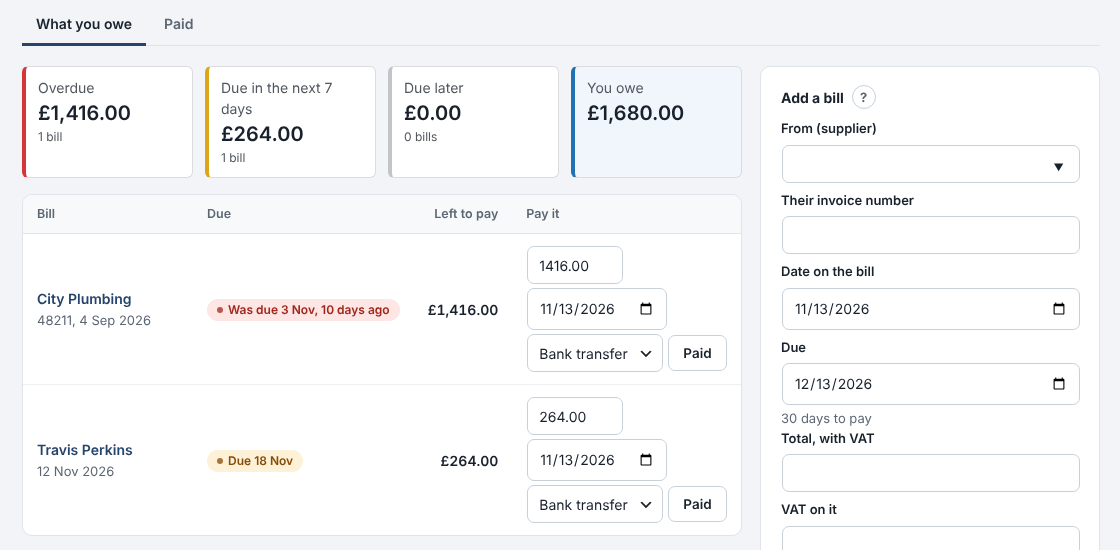
Cosa devi ai fornitori e quando 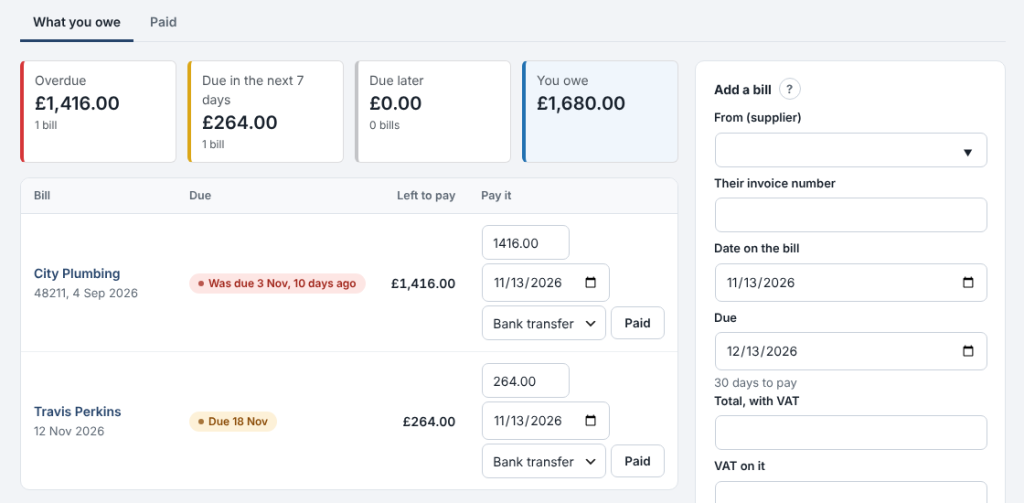
0.14.36November 13, 2026
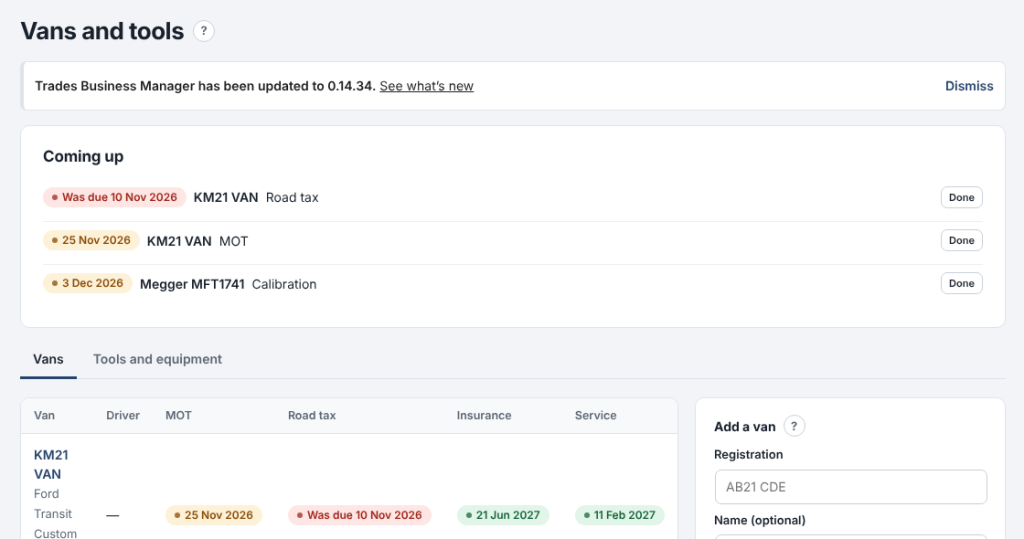
Keep every van's MOT, tax, insurance and service dates, and your tools' test dates, in one place.
Where: Team › Vans and tools (Standard)
Anything due in the next 30 days shows at the top and on the dashboard, and you get an email when it comes due.
- Add each van with its registration, driver and dates. Pick its stock to see the parts on board.
- On Tools and equipment, add anything that needs testing: PAT tests, meter calibration, ladder inspections.
- When something is done, press Done: the next date is set for you.
- Each date is emailed once, and again if it's missed.
- Overdue dates show in red.
- Sold vans and lost tools can be kept as no longer used.

0.14.35November 13, 2026
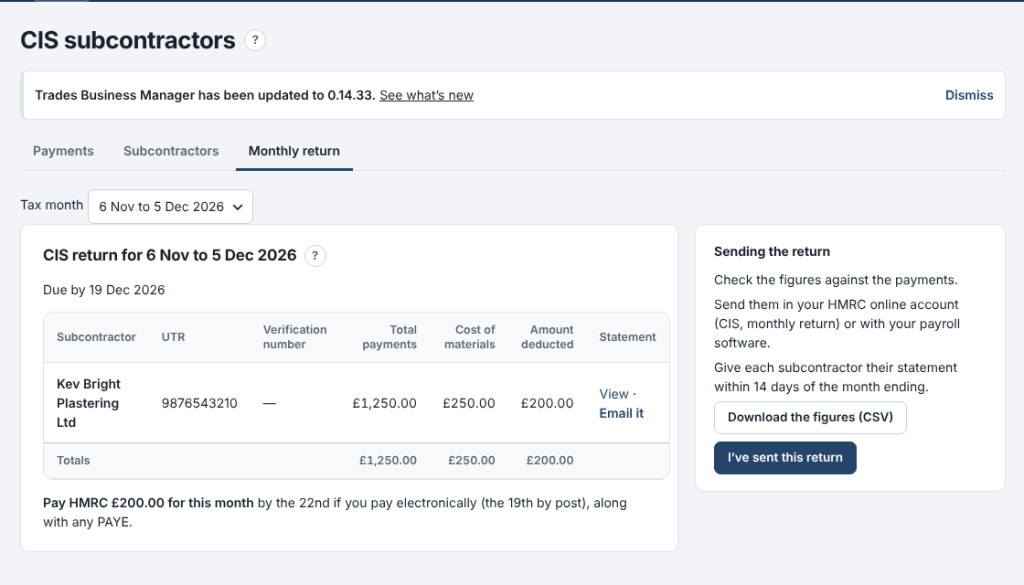
Pay subcontractors under CIS and get your monthly return figures without the sums.
Where: Money › CIS subcontractors (Premium)
Add each subcontractor with the status HMRC gave you, record what you pay them, and the deduction is worked out for you.
- On Subcontractors, add each one with their UTR and their status: gross, 20% or 30%.
- On Payments, record each payment: the amount for the work and the materials in it. The deduction and what you pay them show as you type.
- On Monthly return, copy the figures into your HMRC return by the 19th, and print or email each subcontractor's statement.
- The deduction comes off labour only, never materials or VAT.
- Payments go into Expenses under Subcontractors automatically.
- Nothing is sent to HMRC for you.

0.14.34November 13, 2026
The staff app now works with no signal.
Where: the staff app on the phone
Engineers can keep working in lofts, cellars and anywhere the signal drops.
- Open the app once a day with signal: today's and tomorrow's jobs are kept on the phone.
- With no signal, open a job and carry on: mark on site or done, add notes, photos, parts and the customer's signature.
- A yellow strip shows what is saved on the phone. When the signal comes back it all sends by itself.
- Nothing is sent twice, even if the signal drops mid-send.
- Messages to customers, such as On my way, still need signal.
- Signing out with changes not yet sent asks first.
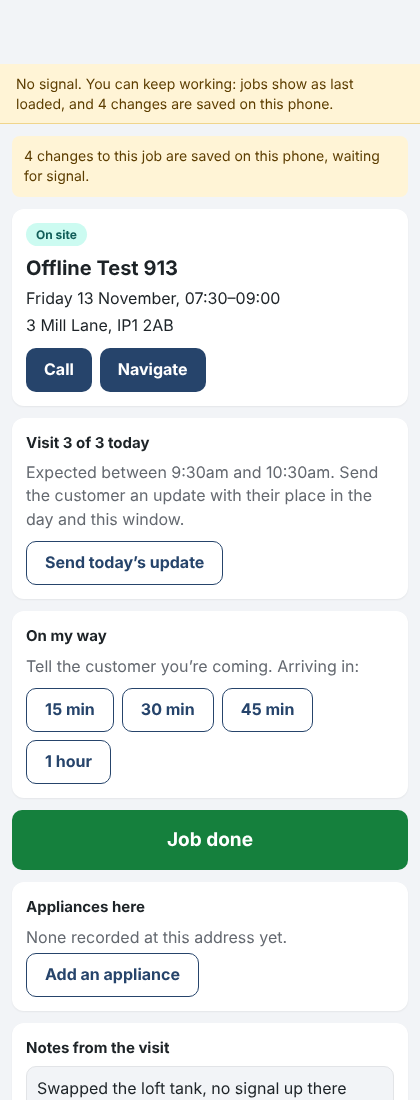
The staff app with no signal, changes saved on the phone 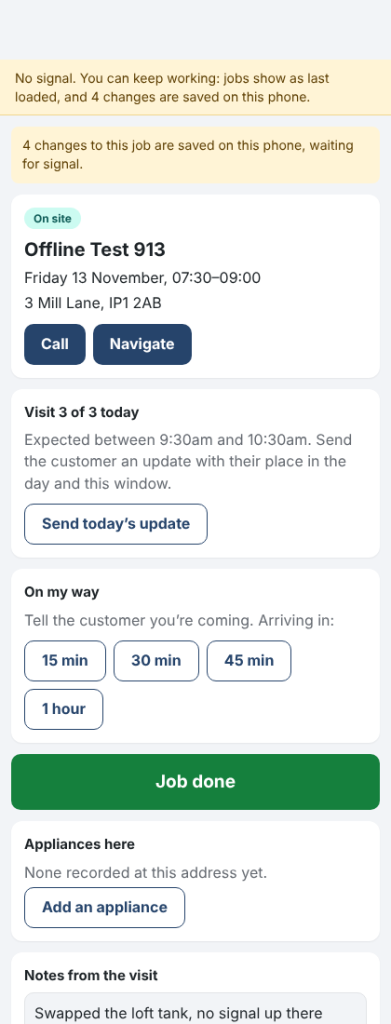
0.14.24November 10, 2026
Trades Business Manager now comes with a ready-made website for your business, with twelve designs to choose from.
Where: Settings › Website design
- Open Settings › Website design.
- Press Use this design on the one you like.
- Press View your website to see it.
- Your business name, phone, address and job types (with usual prices) come from Trades Business Manager.
- Every Get a quote button opens your enquiry form, so enquiries land in Trades Business Manager.
- Change design whenever you like. Once you've edited the home page, your words are kept.
- On sites ModuleFest hosts, the design picked at sign-up is already in place.
- Part of the Standard and Premium plans, ticked on the plan comparison. The free WordPress.org plugin doesn't include it.
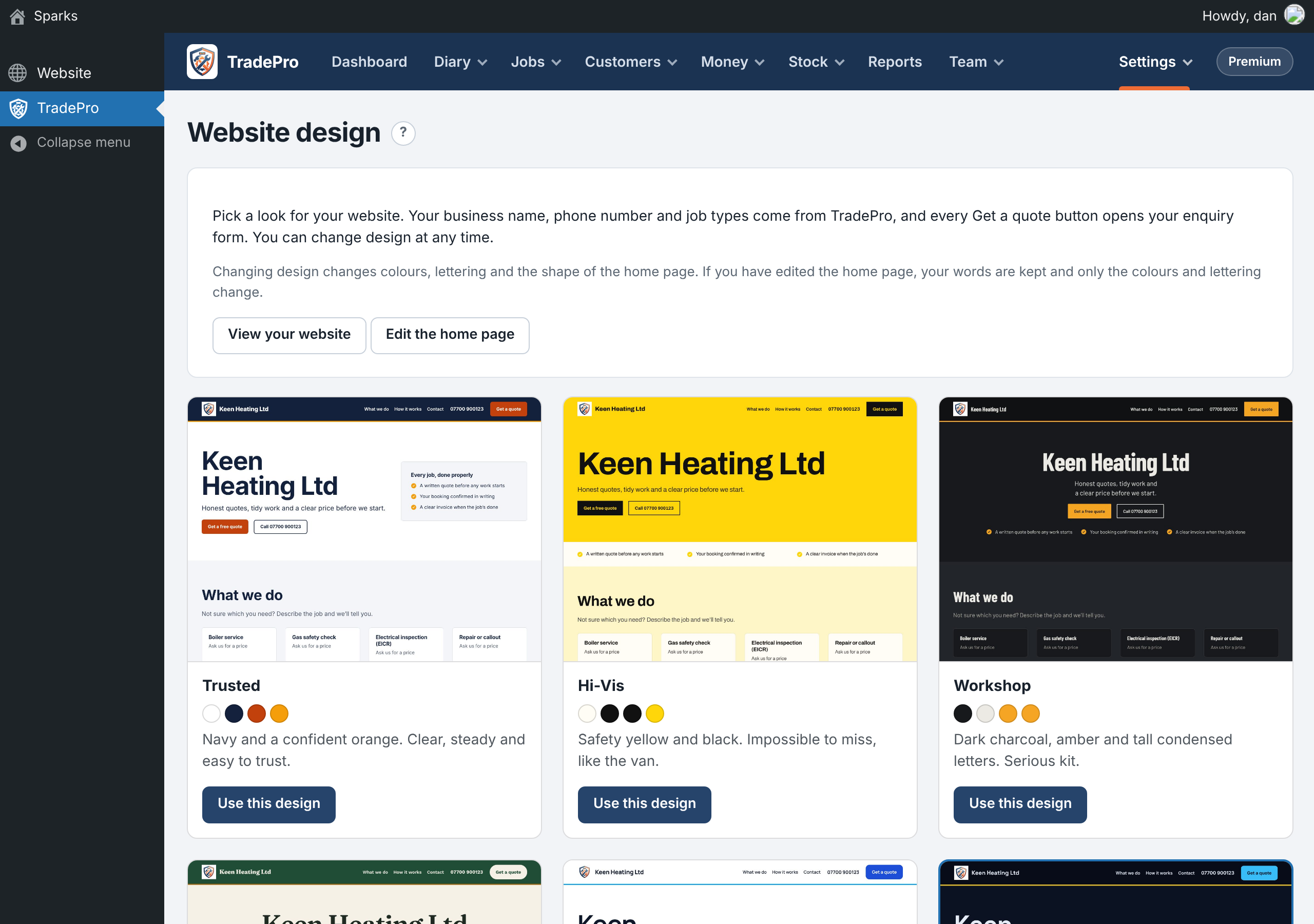
Choosing a website design
ModuleFest Trades Business Manager
Jobs, quotes, invoices and stock for trades
Altre notizie
 Nuova funzionePet Groomer 2.77: Account credit and monthly billingManage advance payments and bill chosen clients just once a month.Guarda le novità →
 Nuova versioneModuleFest Pet Walker 2.771.222I clienti possono ora pagare in anticipo e saldare le proprie fatture utilizzando il saldo. Anche in questa versione: pagamento mensile posticipato: una sola fattura a…Guarda le novità →
 Nuova versioneModuleFest Trades Business Manager 0.14.42Jobs, quotes, invoices and stock for tradesGuarda le novità →