A UK company Built and supported in the United Kingdom Help in UK hours Hosted sites kept in London

Available now Booking and business software

ModuleFest Pet Walker

The pet walking business manager: bookings, clients and invoicing

Full Premium access free for 14 days, no card needed. Then Premium, or Standard from £24.99 per month.

About the live demo

No login needed – give a name and email and you are in. A made-up dog walking business, shared with everyone else trying it, reset every three days.

Every feature, with screenshots →Compare the plans, feature by feature ↓

  • 14-day free Premium trial
  • Live demo to try
  • Updates and support included
  • A UK company, with support from the UK

Already a customer? Go to your account

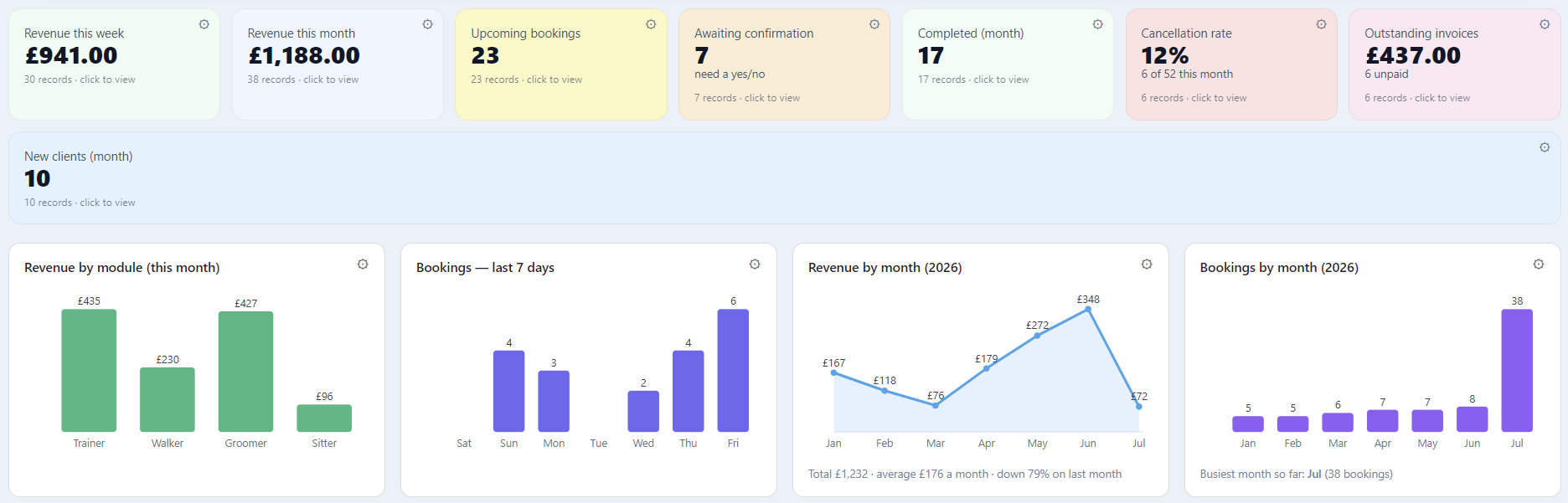
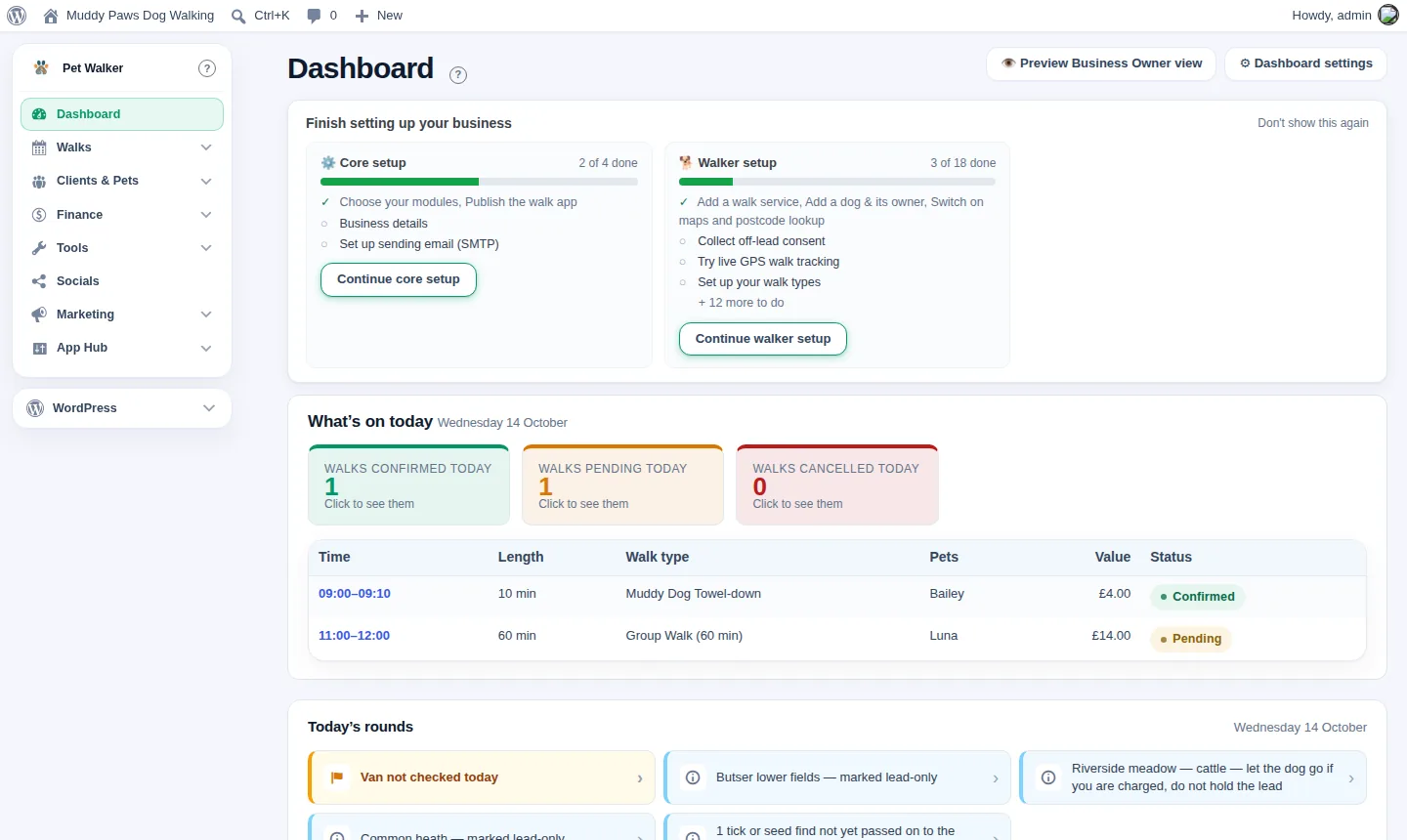
Pet Central dashboard: revenue, bookings, cancellations and outstanding invoices, with charts by service and month
Get ModuleFest Pet Walker newsTips, new features and update notes. Unsubscribe any time.

ModuleFest Pet Walker runs a dog walking business end to end, from the round to the invoice. It installs on your own WordPress site, so every client record, pet profile and booking stays in your database rather than on somebody else's platform.

There is a staff app for the people out doing the work, a customer portal so owners can book and reschedule themselves, and a demo mode for showing the thing off without touching real data.

It is one of four ModuleFest Pet Services plugins – Pet Groomer, Pet Walker, Pet Sitter and Pet Trainer – built on the same core, so a business that offers more than one service can add another later.
Just added

What's new

The latest additions, on the free plan unless it says otherwise.

No-show fees

Charge for late cancellations and no-shows, as a fixed fee or a share of the booking.

Multi-pet discount

Money off when a household books two or more pets together. Standard.

Price rises with notice

A new price from a date, with the customers affected told by email. Standard.

Account credit

Give a client credit, and it comes off their next invoices.

Customer flags

VIP, Pays late or Handle with care, wherever a customer appears.

Your website on one screen

Every page in one place, with locked sections, a colour preview, team photos, a map and reviews. Standard.

One tidy platform

From first enquiry to paid invoice

Everything you were doing across spreadsheets, diaries and half-a-dozen apps – brought together.

Smart booking calendar

Mobile-first scheduling with durations, deposits and website booking requests.

Client & pet profiles

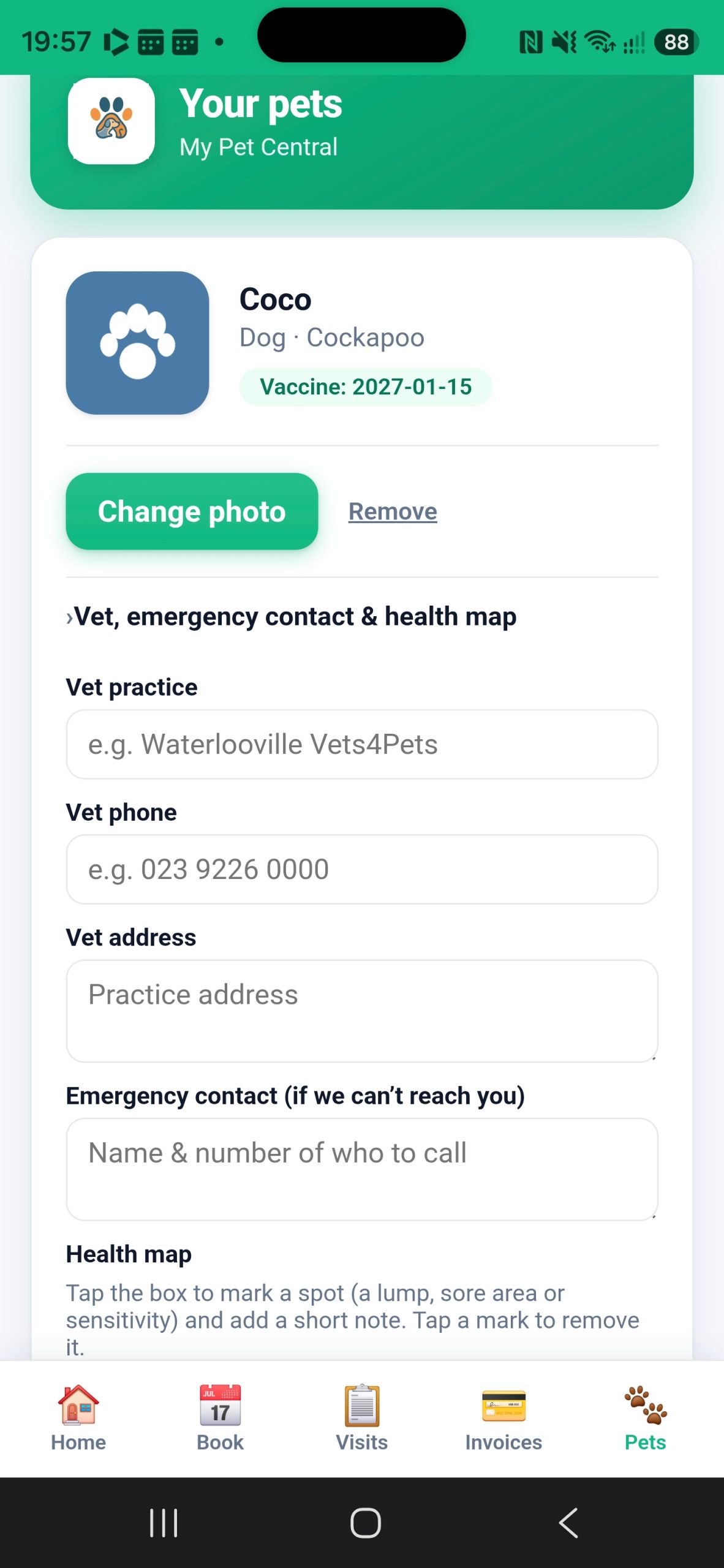
Temperament flags, vaccine expiry, coat and feeding notes, photos and full history.

Invoicing & payments

Branded invoices, deposits, automatic overdue chasing and clear finance reports.

Automations

Simple "when this, then that" rules for reminders, thank-yous and compliance flags.

Client portal

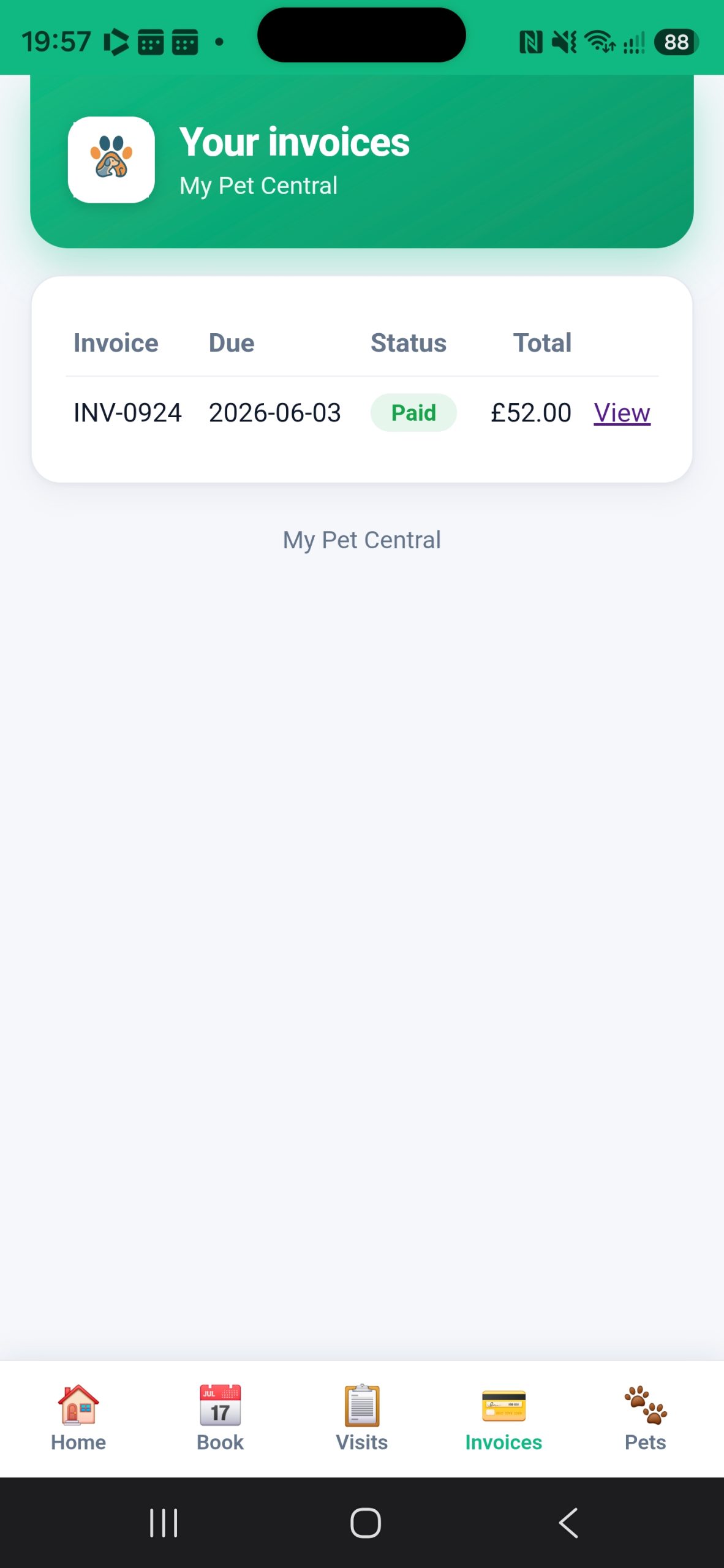
A portal where clients view bookings, pay invoices and update their pet.

Works offline

Install it as an app and keep working with no signal – it syncs when you're back.

Walker tools

Made for dog walkers

Walk types

Dog limits and breed rules for every kind of walk, so a round never goes out over capacity.

Pack builder

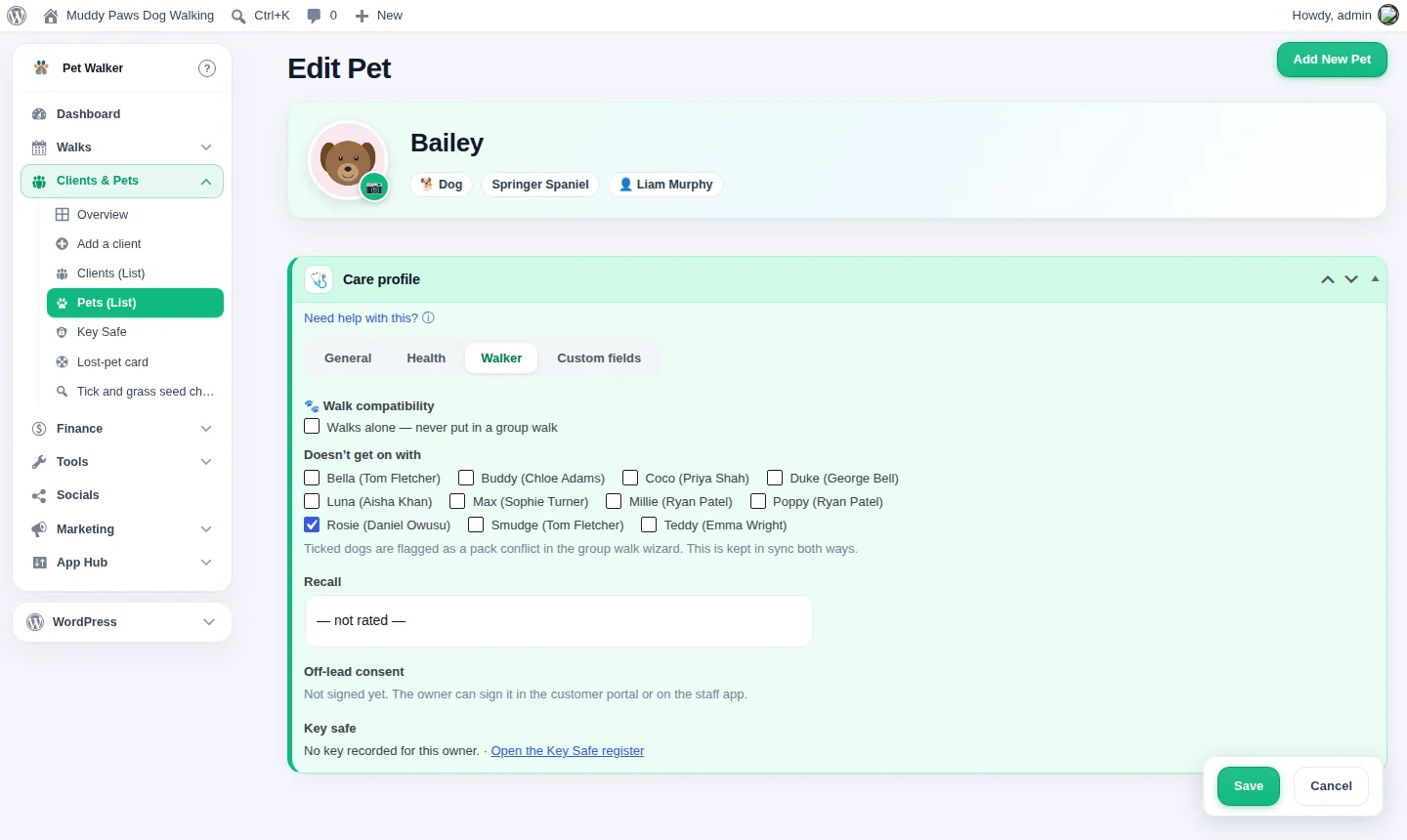
Group-walk capacity and chemistry, with a suggested pickup order.

Live GPS

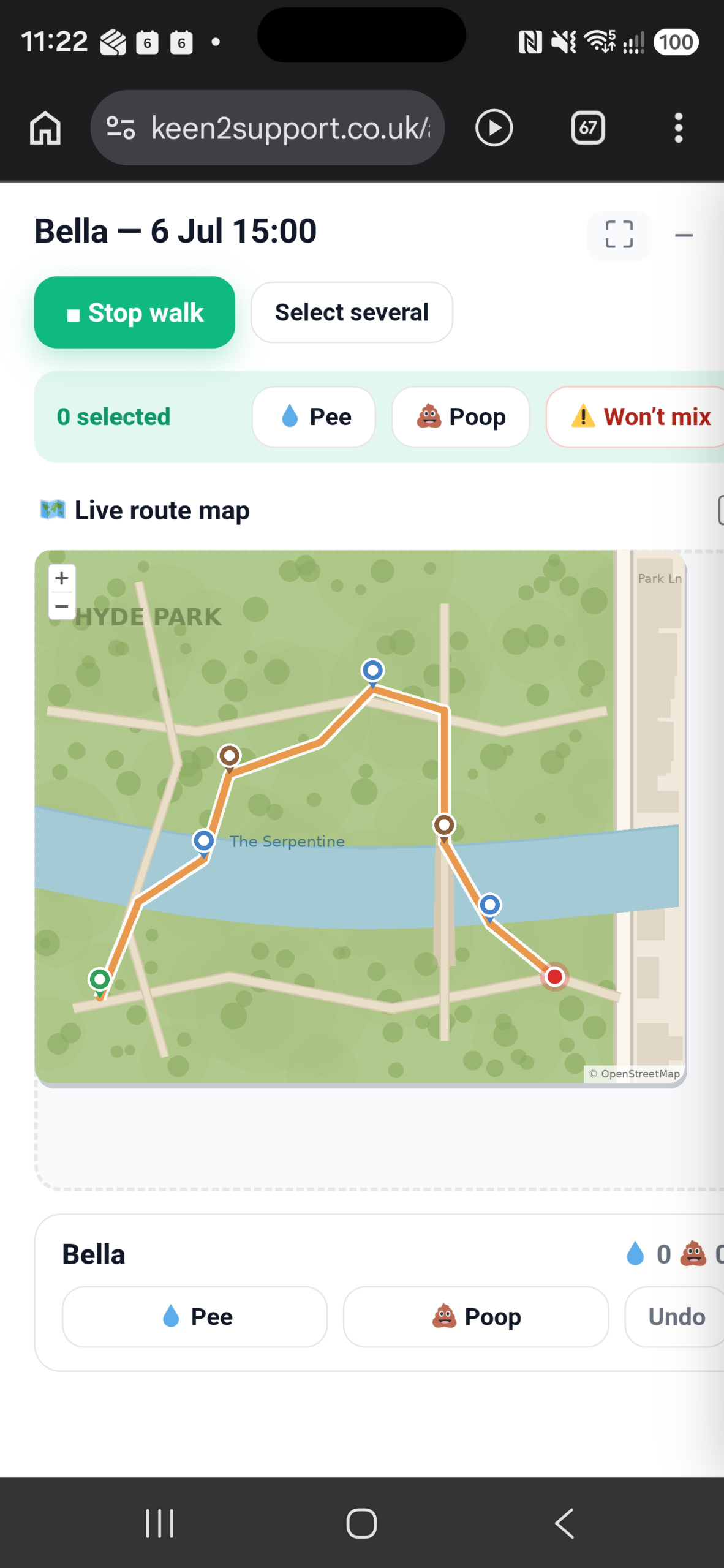
Walk tracking with route maps and pee and poop pins that owners can follow.

Off-lead consent

A consent vault so you always know which dogs may go off lead.

Round briefing

A van roll-call, and water, tick, livestock, vehicle and heat safety checks.

Keys and lost dogs

A secure key log, and a lost-dog card ready to share if the worst happens.

Client portal

A polished experience your clients will remember

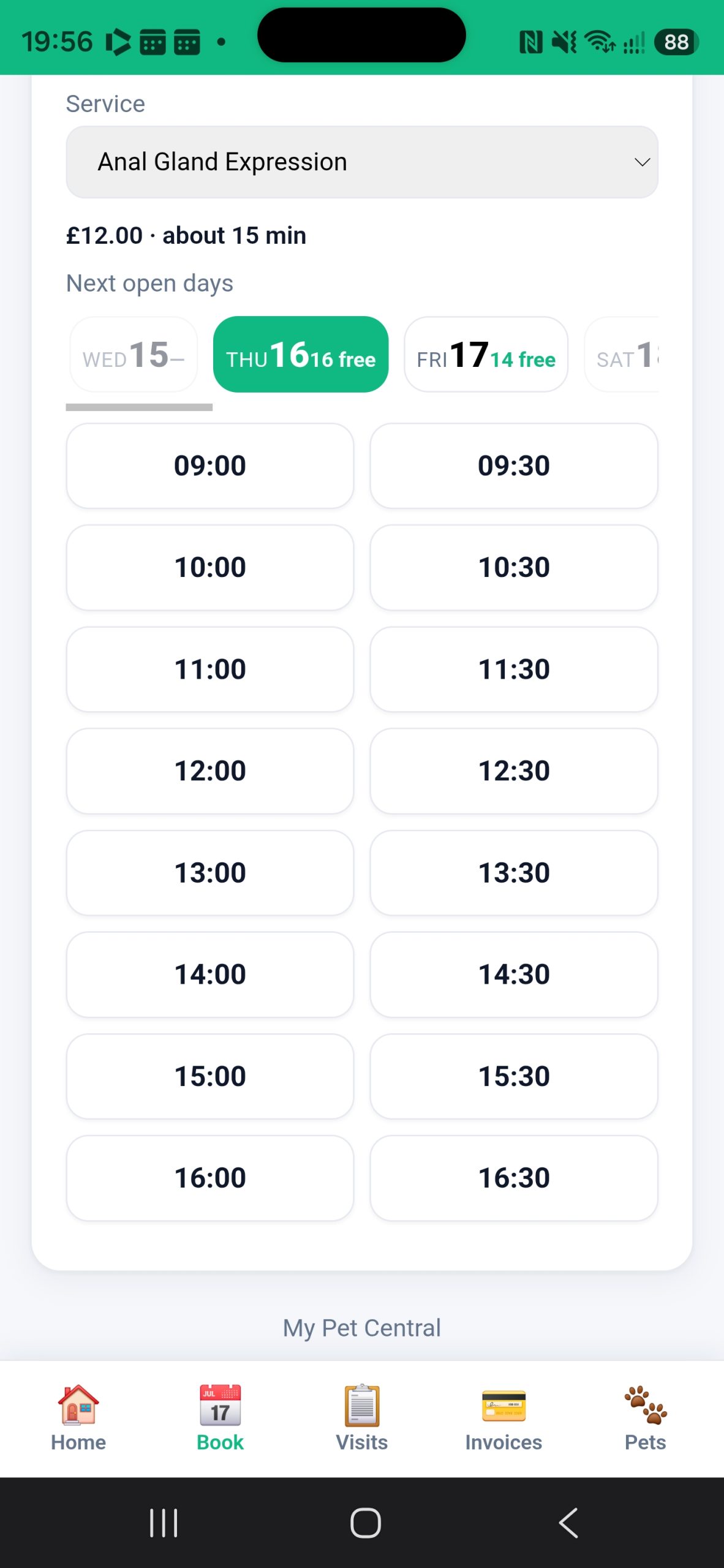
  • Check live availability and book online
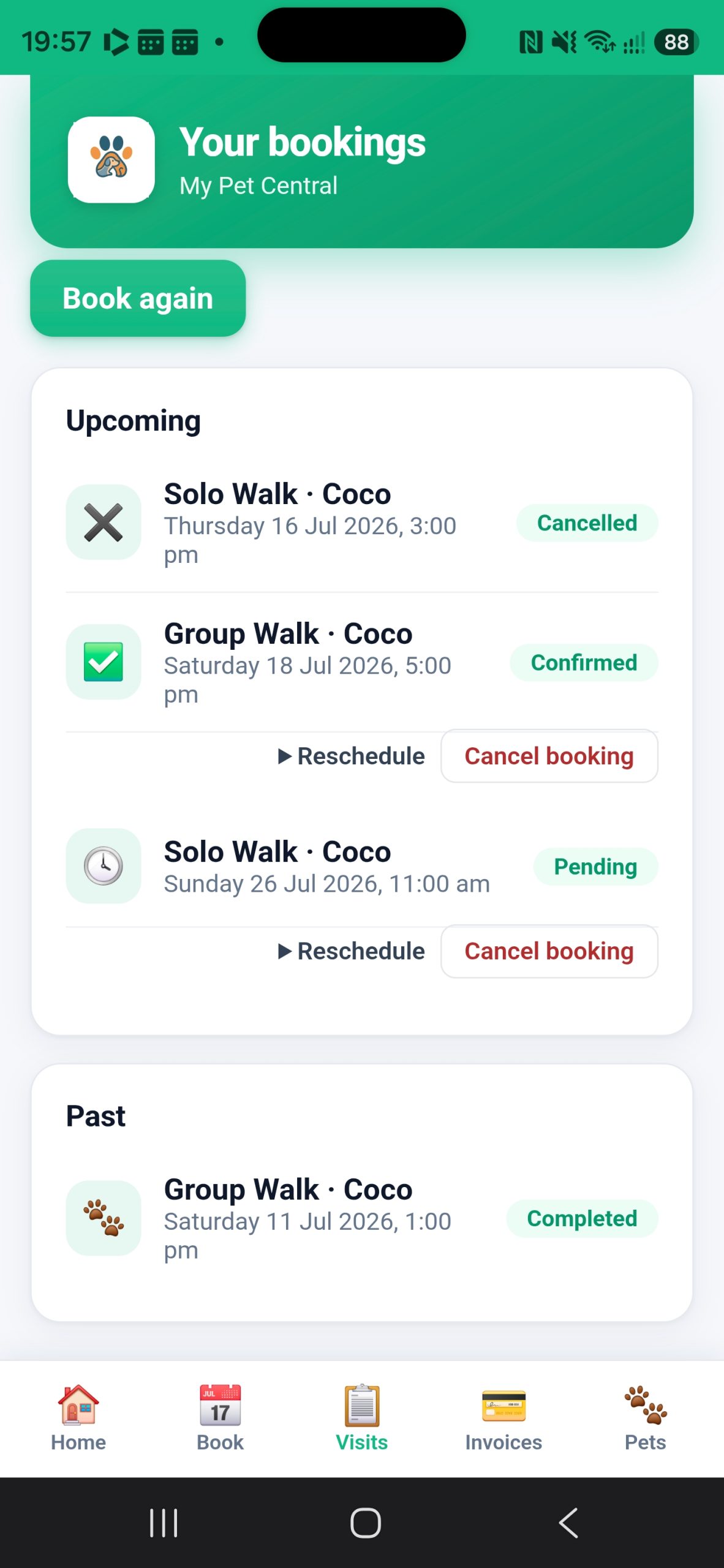
  • View upcoming and past bookings
  • Pay invoices and see balances
  • Install it as an app – no password to forget
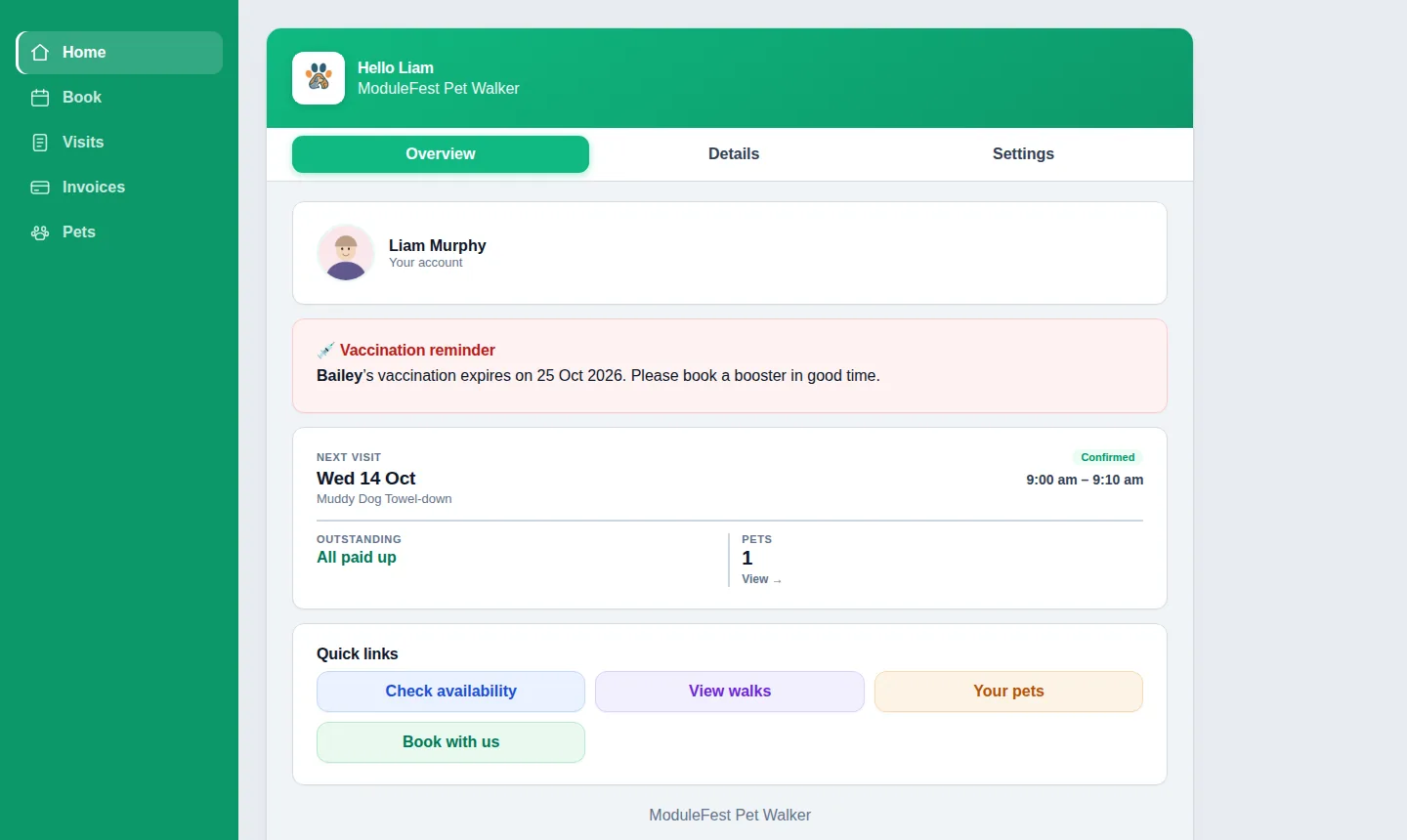
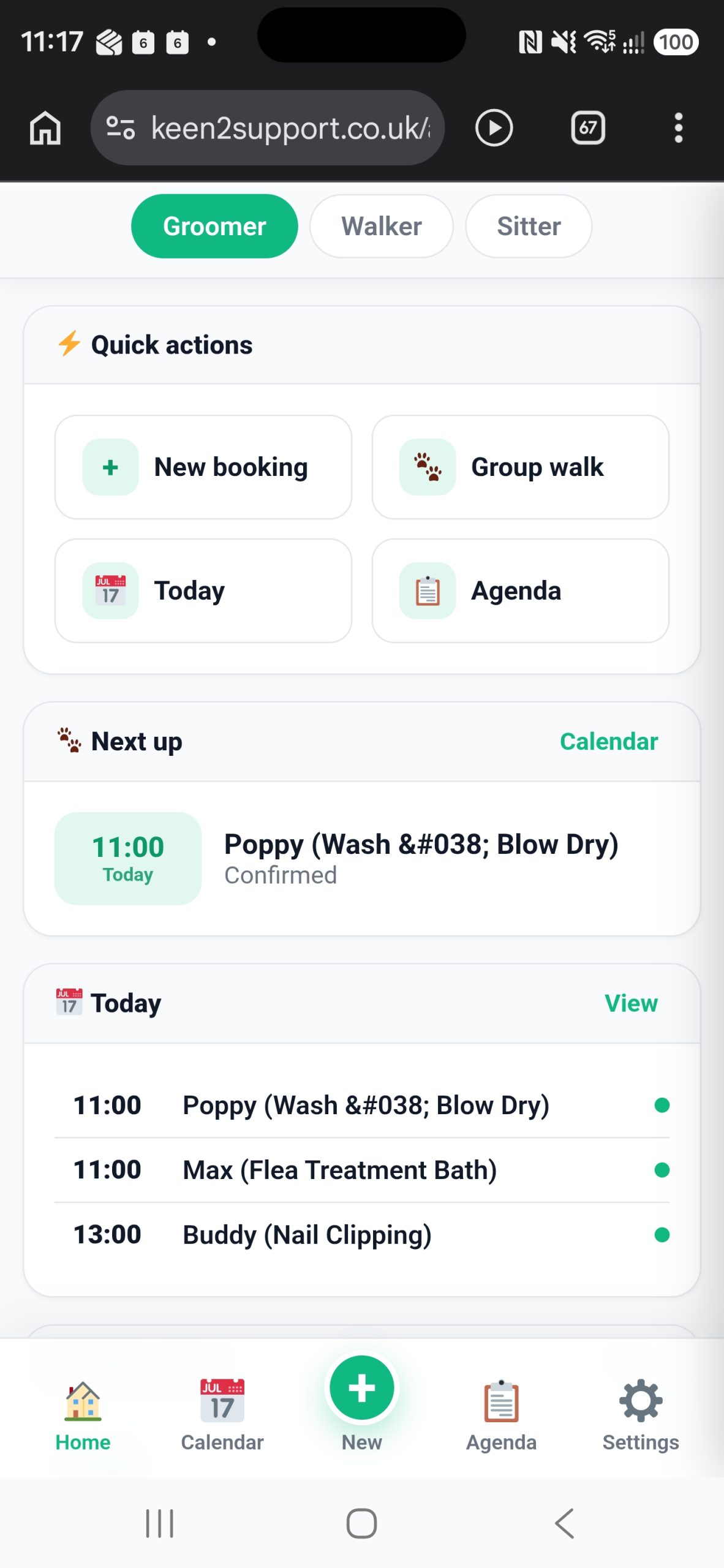
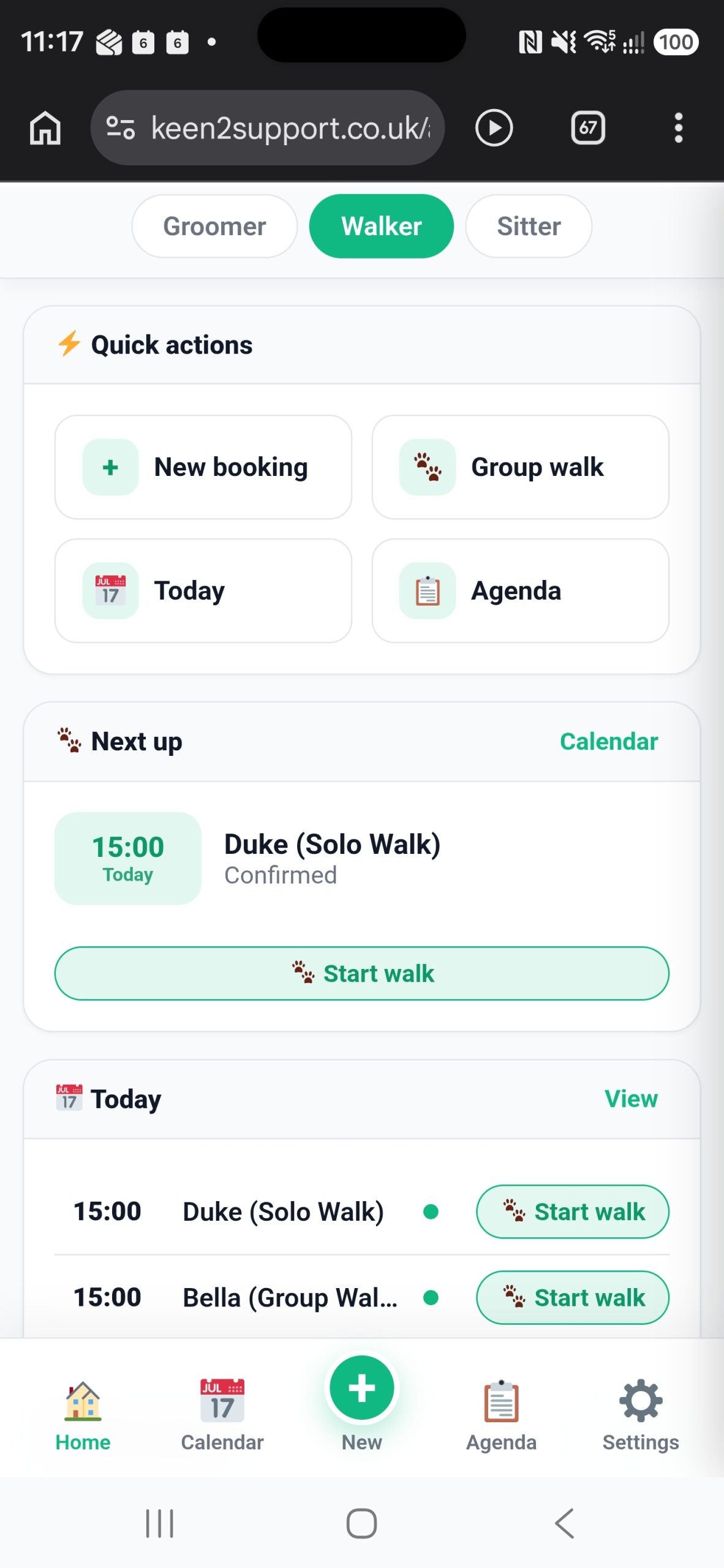
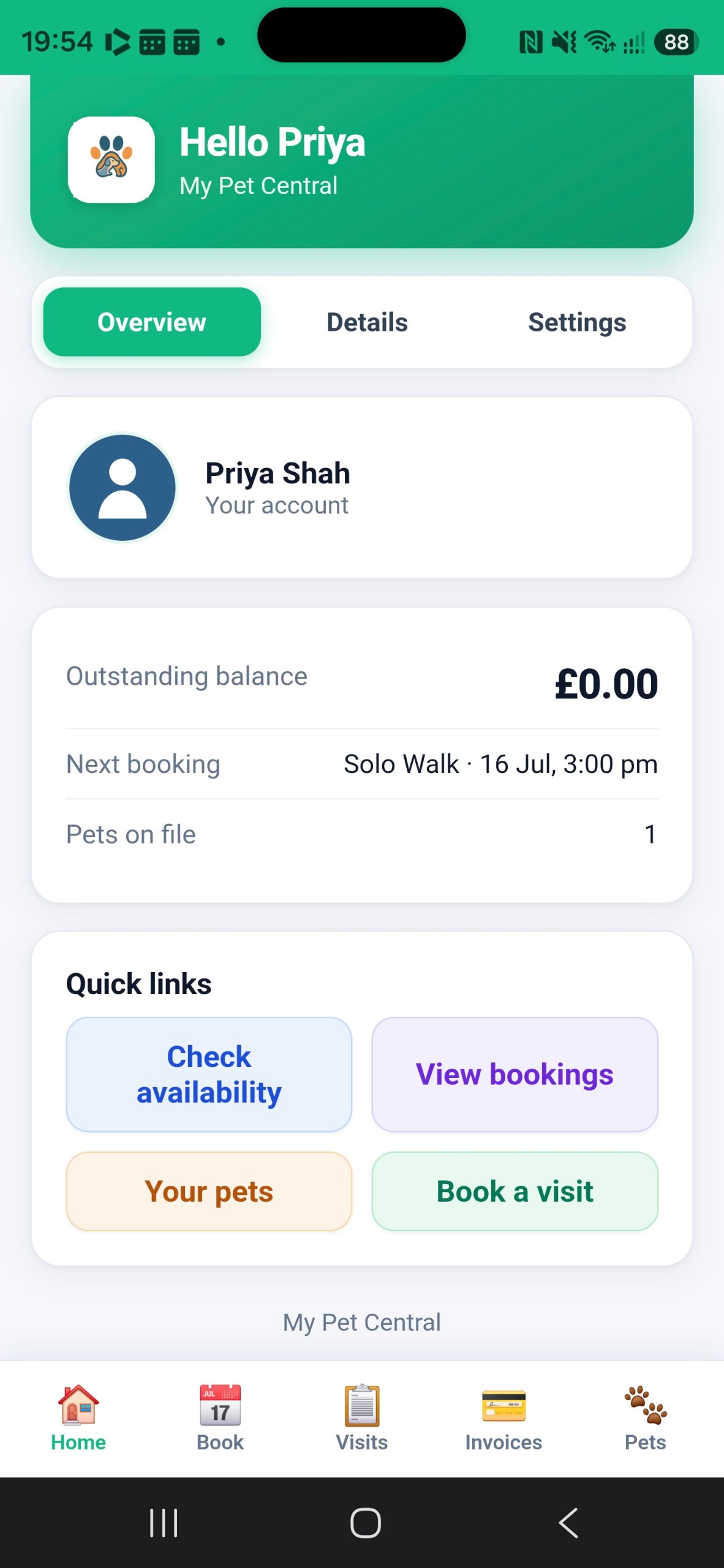
The customer app's home screen
The customer app – everything a client needs, on their own phone.

A closer look

See it in action

For the walkers out on the job

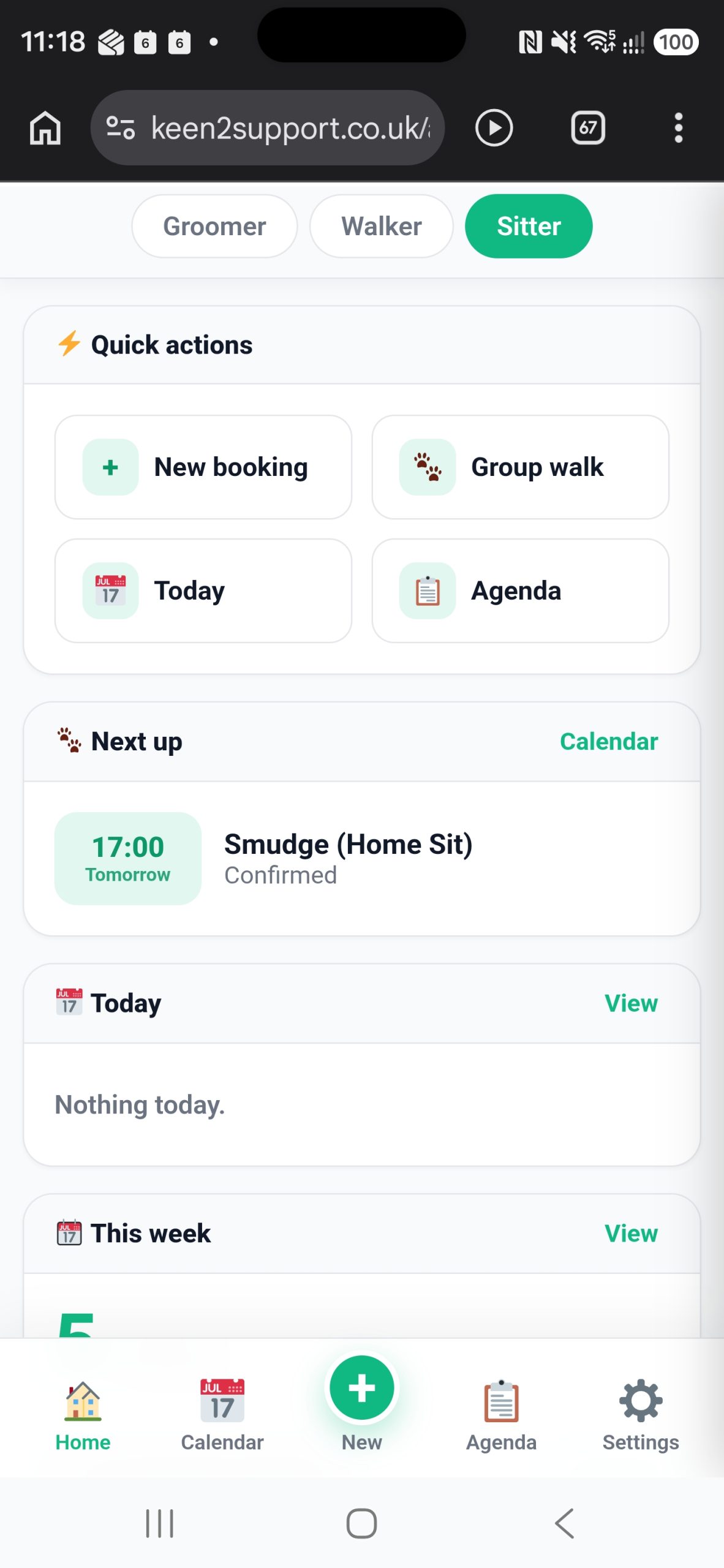
The staff app

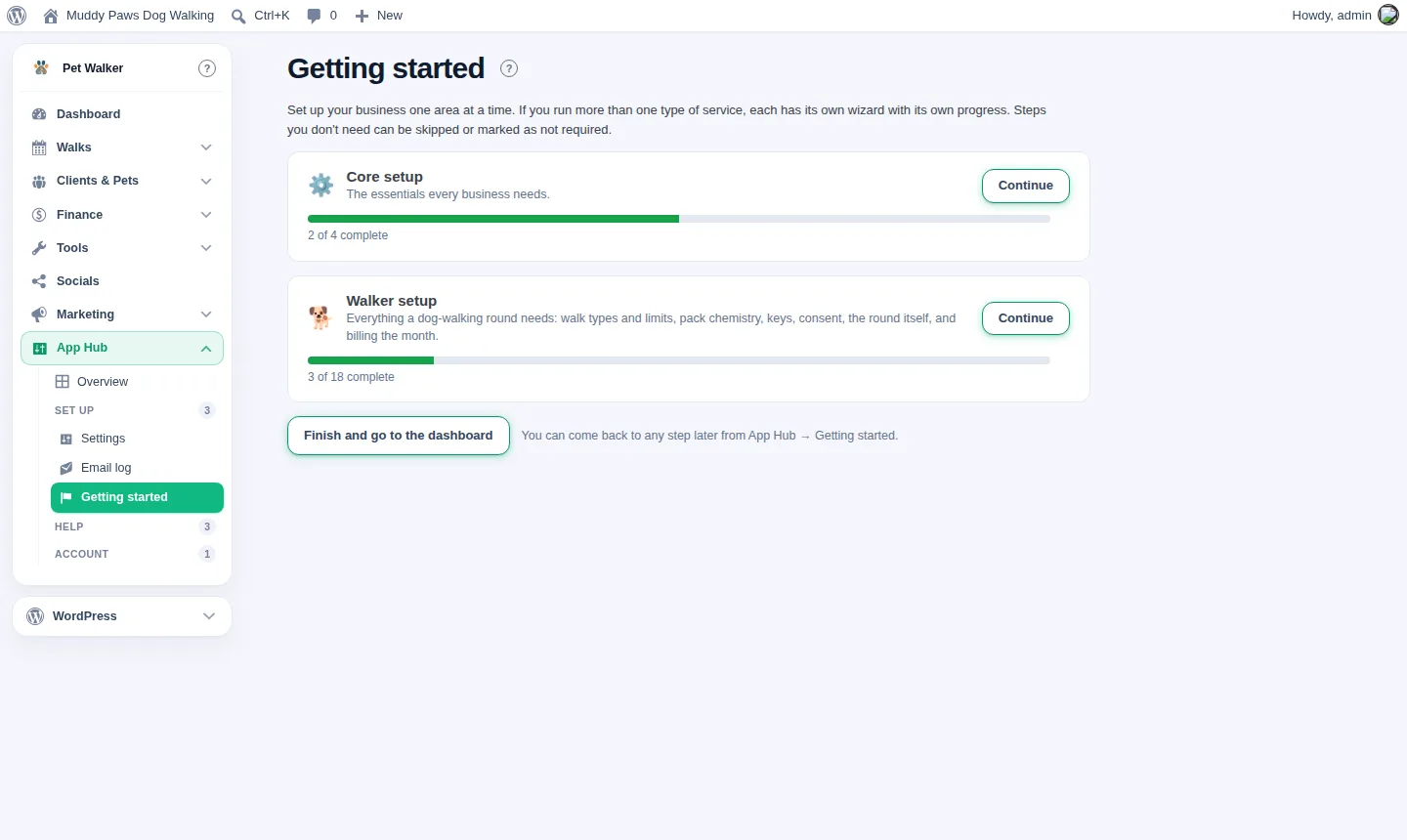
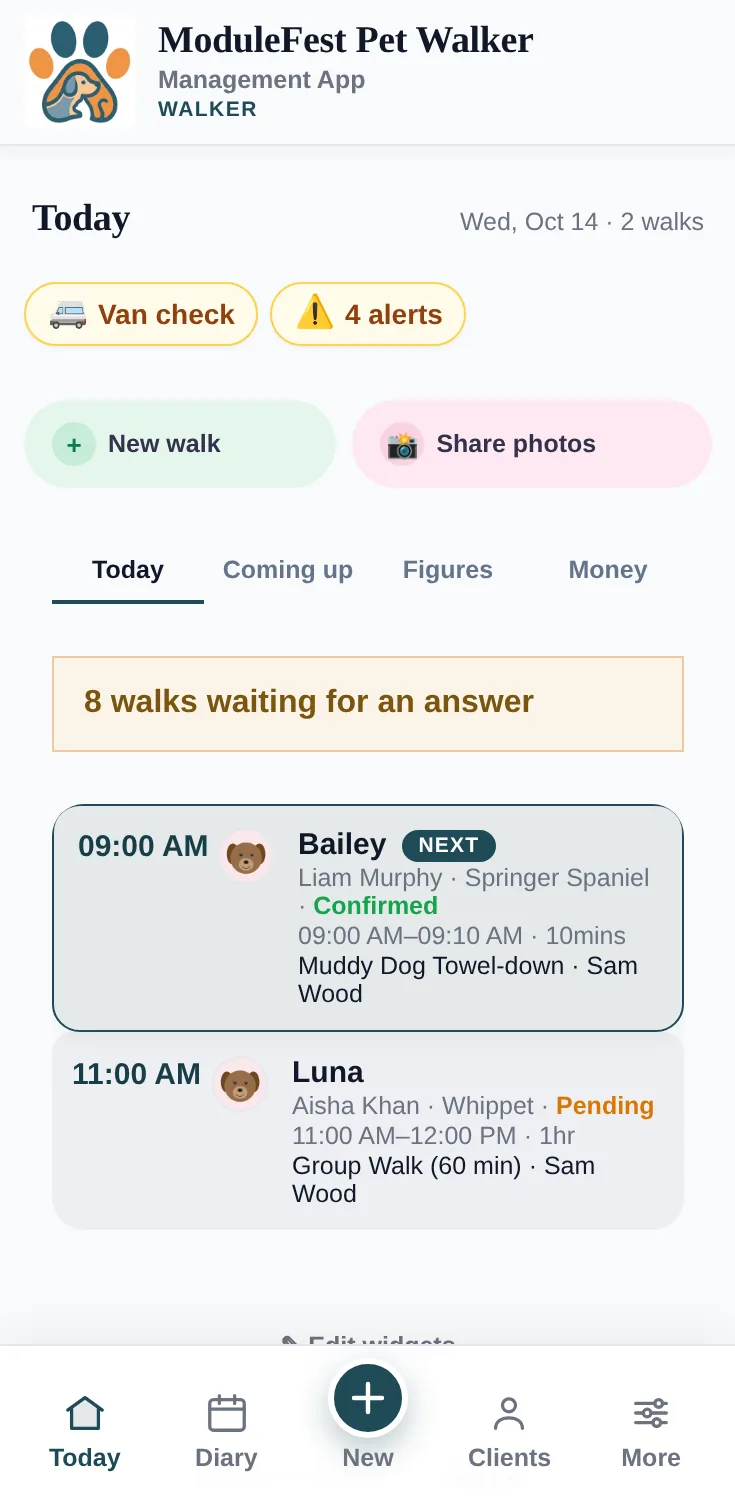
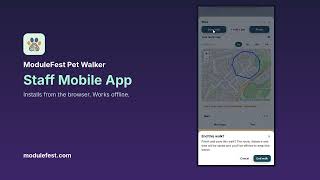
An installable app for the walking round: today's walks, live GPS tracking with route maps, and report cards written as it happens rather than at the kitchen table.

For your clients

The customer app

Your clients sign up, book, cancel and reschedule themselves, see their invoices, and keep their pet's profile up to date – without phoning you.

Features

Everything it does

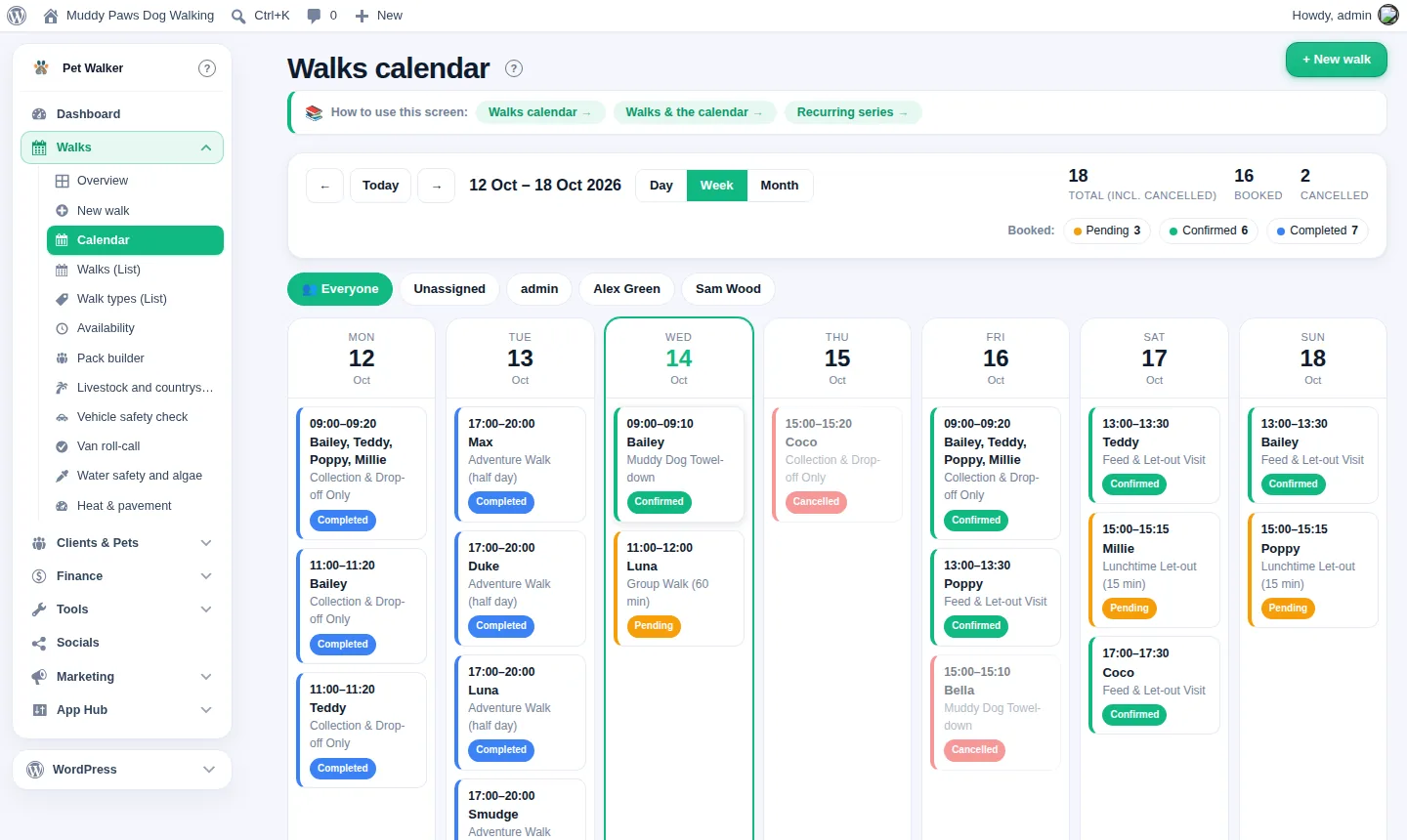
  • Booking and calendar Day and week views, edit straight from the grid
  • Clients and pets Full client records with a profile and body map for every pet
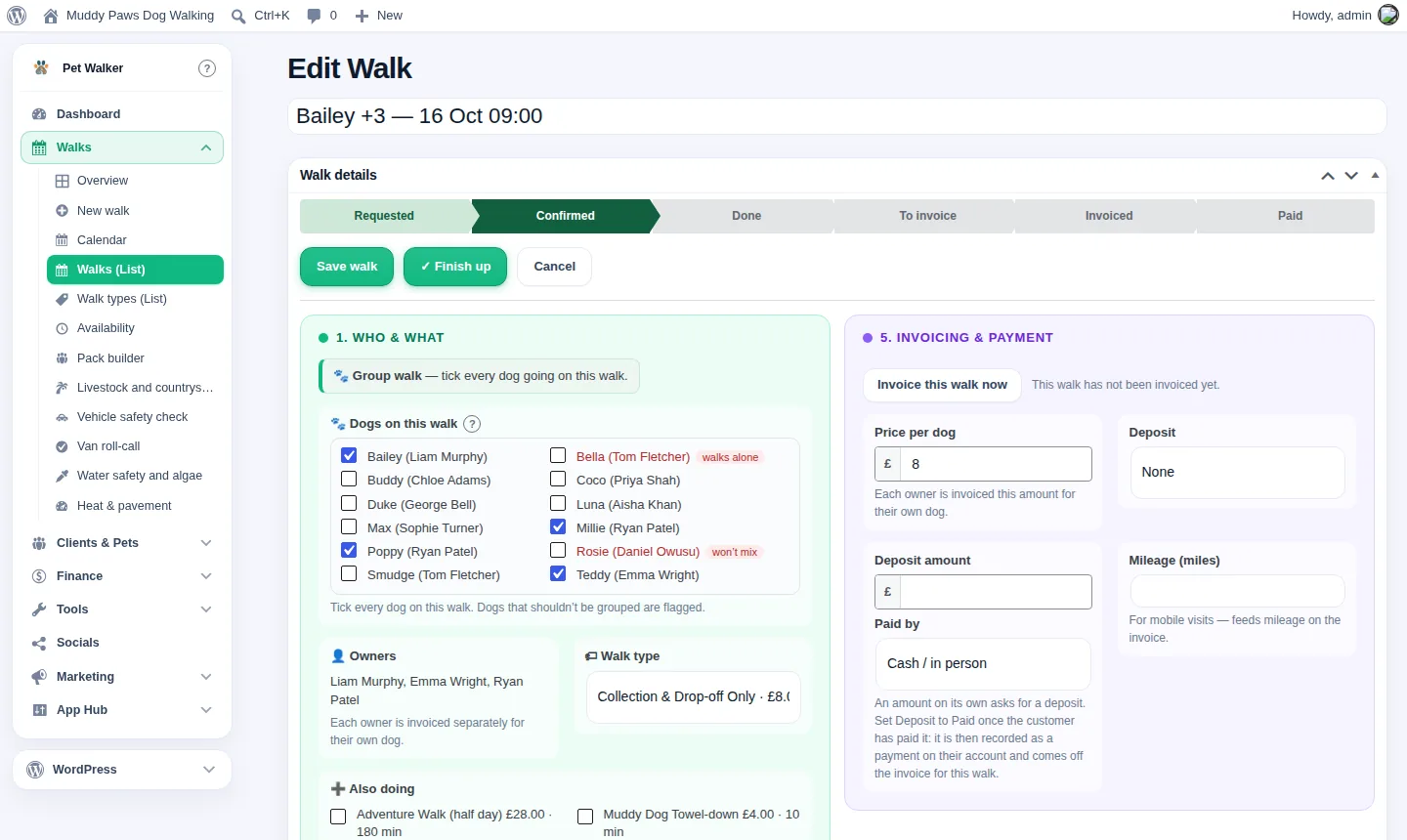
  • Invoicing and finance Deposits, mileage, automatic invoicing and output options
  • 22 countries Currency, tax and phone codes set up for where you work
  • Other languages besides English on the Standard plan and above
  • Customer portal Owners sign up, cancel and reschedule without phoning you
  • Staff app An installable app that works offline, for the walkers out on the job
  • Walker tools Live GPS walk tracking, a pack builder for group walks, off-lead consent and a lost-dog card
  • Team management Role-based access for every walker on your team
  • Automations Rules and validation that stop the diary going wrong
  • Branding Your own login page and QR codes that open the booking form
  • Demo mode A safe sandbox for demonstrations and training
  • Pricing tools Late-cancellation and no-show fees, multi-pet discounts, price rises with notice to the customers affected, and account credit.
  • Customer flags Short coloured warnings, such as VIP or Pays late, wherever a customer appears.
  • Your website on one screen Every page in one place, with locked sections that cannot break, a colour and font preview, team photos, a map and reviews.

Countries

Works in 22 countries

Choose your country and ModuleFest Pet Walker sets your currency, how prices are written, your tax name, whether your prices include tax, your phone code and your tax year. You can change any of them.

  • United Kingdom£1,234.50 · VAT included · +44
  • Ireland€1,234.50 · VAT included · +353
  • United States$1,234.50 · Sales tax added · +1
  • CanadaC$1,234.50 · GST/HST added · +1
  • AustraliaA$1,234.50 · GST included · +61
  • New ZealandNZ$1,234.50 · GST included · +64
  • South Africa1 234,50 R · VAT included · +27
  • France1 234,50 € · TVA included · +33
  • Germany1.234,50 € · MwSt included · +49
  • Austria1.234,50 € · USt included · +43
  • Netherlands1.234,50 € · BTW included · +31
  • Belgium1.234,50 € · BTW/TVA included · +32
  • Spain1.234,50 € · IVA included · +34
  • Portugal1 234,50 € · IVA included · +351
  • Italy1.234,50 € · IVA included · +39
  • Denmark1.234,50 kr · Moms included · +45
  • Sweden1 234,50 kr · Moms included · +46
  • Norway1 234,50 kr · MVA included · +47
  • SwitzerlandCHF 1,234.50 · MWST included · +41
  • SingaporeS$1,234.50 · GST included · +65
  • United Arab EmiratesAED 1,234.50 · VAT included · +971
  • India₹1,234.50 · GST included · +91

Support is provided from the UK, in English only.

  • The free Basic plan is in English only, because WordPress.org’s rules for free plugins don’t allow it; every other language needs the Standard plan or above.
  • The tax rate isn't set by the country. You type your own, because it depends on what you sell and whether you're registered.
  • One tax rate per business: there is no per-state US sales tax, no per-province Canadian rate and no mix of rates per product.
  • Somewhere else? Choose the nearest country and adjust the settings. It will work, but it hasn't been set up or tested for your country.

Video guides

See how it works, a minute or two at a time

Short, narrated walk-throughs of each part, recorded on the live demo.

All our videos on YouTube →

Plans & pricing

Simple plans that grow with you

Start free and move up when you need to. Every plan keeps your data and settings exactly where they are.

Premium

£49.98 per month

Includes 3 staff logins. Add as many as you need at £6 a month each.

  • Everything in Standard, plus
  • Waiting lists that refill cancellations
  • Automatic rebooking prompts
  • Round planner
  • Customer segmentation and automations
  • Team management, rotas and permissions
  • Priority support
Start free trialor buy now

For teams

Several walkers, vans or a salon team? Premium has rotas, permissions, the round planner and cover briefings. It includes 3 staff logins, and each extra person is £6 a month. Add or remove staff whenever you like from your account.

Staff are the people who sign in to the dashboard or the staff app. Your customers are never counted.

BusinessStaffPlanA month
Sole trader groomer 1 Standard £24.99
Groomer and an assistant 2 Standard + 1 extra £30.99
Walking company, 3 walkers and a van 3 Premium £49.98
Walking company, 6 walkers and 2 vans 6 Premium + 3 extra £67.98
Salon group, 12 staff 12 Premium + 9 extra £103.98

Vans, rounds and locations are not charged for: the price follows people only. Standard goes up to 3 staff; a team of 4 or more needs Premium's team features.

Moving from another system? Bring your clients, pets, staff and bookings across yourself with the import tools. The help guides show you how, step by step.

Now and later

Your 14-day trial
Full access to Premium, our top plan, with every feature switched on. No card needed. When it ends you decide: keep Premium, or move down to Standard if you do not need the extras. You can change between them later too. If you do not choose a plan by the end of the trial: your trial site becomes read-only for 7 days, then it is taken offline, and 30 days after that it is deleted from our servers automatically, with all its data (37 days after your trial ends). Choose a plan at any time before then and everything comes back exactly as it was.
What you get
Your own booking page at yourbusiness.modulefest.uk with your name and logo. Customers book, pay deposits and sign in to see their appointments. You and your staff use the app on your phones, even with no signal. We keep it all running, backed up and up to date.
Already have a website?
Keep it. Add a "Book now" button that links to your booking page. That works with any website: Wix, Squarespace, GoDaddy or anything else.
Want a full website later?
Add one at any time from your account. Your booking page becomes a full website with a ready-made design for your trade, and you add your own pages, words and photos. Your bookings and clients stay exactly where they are.
Your own web address
Want happypaws.co.uk rather than our address? That comes with the full website: we point your own domain at it.
Never locked in
Export everything in one download whenever you like. If you ever move to a website of your own, the same software runs there and imports it all.

Already run your own WordPress website? Use the free plugin on it instead.

Compare the plans, feature by feature

Everything in Basic, plus more in Standard, plus more again in Premium.

Feature Basic Free forever Standard Licence £24.99 per month Premium Licence £49.98 per month
Day to day
Dashboard & KPIs Included Included
Services Included Included
Bookings & calendar Included Included
Installable booking app Included Included
Round planner (route optimisation) Not included Included
Waiting list & cancellation fill Not included Included
Languages other than English Not included Included
Clients & pets
Client records Included Included
Pet profiles Included Included
Self-service client portal Included Included
Online booking requests Included Included
Vaccination compliance Included Included
New Customer flags: short coloured warnings such as VIP or Pays late, wherever a customer appears Included Included
Money
Invoicing, deposits & Stripe payments Included Included
New Late-cancellation and no-show fees Included Included
New Special prices for a customer Included Included
New Account credit for a client, taken off their next invoices Included Included
Automatic statements Not included Included
Finance reports Not included Included
Mileage tracking Not included Included
Bank reconciliation (several accounts) Not included Included
Accounting integrations – Xero, QuickBooks, Sage and more Not included Included
Packages & passes Not included Included
Sale prices Not included Included
New Multi-pet discount when a household books two or more pets together Not included Included
New Price rise with notice: a new price from a date, and the customers affected told Not included Included
Shop, till & stock Not included Included
Marketing & keeping customers
Post-booking satisfaction surveys Included Included
WhatsApp messaging Included Included
Email reminders & vaccination digest Not included Included
Newsletter builder & customer emails Not included Included
Loyalty card Not included Included
Automatic rebooking prompts Not included Included
Customer segments Not included Included
Team & control
Approvals Not included Included
Automations & flows Not included Included
Team: rotas, commission & tips Not included Included
Roles & permissions Not included Included
Insight
Report builder & exports Not included Included
Google Analytics & dashboard Not included Included
Setup & support
Import / export & import wizard Included Included
Demo data Included Included
Setup wizards Included Included
Support desk & automatic updates Included Included
Website designs Not included Included
New Your website on one plain screen: locked sections that cannot break, a colour and font preview, team photos, a map, reviews you add and photos from the staff app Not included Included
Validation rules Not included Included
White label – your own web address on everything a customer opens Not included Included
Walker tools
Round briefing & van roll-call Included Included
Water, tick, livestock, vehicle and heat safety checks Included Included
Lost-dog card Included Included
Live GPS walk tracking with pee and poop pins Included Included
Off-lead consent vault Included Included
Pack builder: group-walk capacity & chemistry Included Included

Walker tools come with ModuleFest Pet Walker on every plan – including free.

What's new

Release history

Everything added and fixed, release by release. Your site offers each update in Plugins › Updates.

2.771.222November 13, 20262 changes
  • Customers can now pay in advance and have their invoices paid from the balance.

    Find it on the customer: Clients › open a customer › Account credit, and in Settings › Invoicing › Account credit.

    1. To record money paid in advance, choose Money received and how it was paid, enter the amount and press Add credit.
    2. New invoices are paid from the credit automatically, or offered on the invoice if you prefer. When the credit is short it pays part.
    3. To give money back or correct a mistake, open Take credit off.
    • Customers see their balance in their account, and can top up by card when card payments are set up.
    • Staff see the balance in the staff app.
    • Every movement is on the customer's statement, and a top-up is counted once in your takings.
    Account credit on the customer record
    Account credit on the customer record
    Account credit in the customer account
    Account credit in the customer account
  • You can now bill chosen customers once a month instead of after every visit.

    Find it on the customer: Clients › open a customer › Billing.

    1. Tick Bill monthly and set the payment terms, for example 14 days.
    2. Their finished visits wait under To be billed, on their record and in their account.
    3. On the billing day one invoice lists every visit and is emailed to them. Press Send this invoice now to do it early.
    • Choose the billing day in Settings › Invoicing › Monthly billing: the last day of the month, or a day from 1 to 28.
    • A cancelled visit drops off, and a visit next month goes on next month's invoice.
    • Deposits and account credit are put towards the invoice.
    • Everyone else is billed as before.
    Bill monthly on the customer record
    Bill monthly on the customer record
    To be billed in the customer account
    To be billed in the customer account
2.771.221November 13, 20263 changes
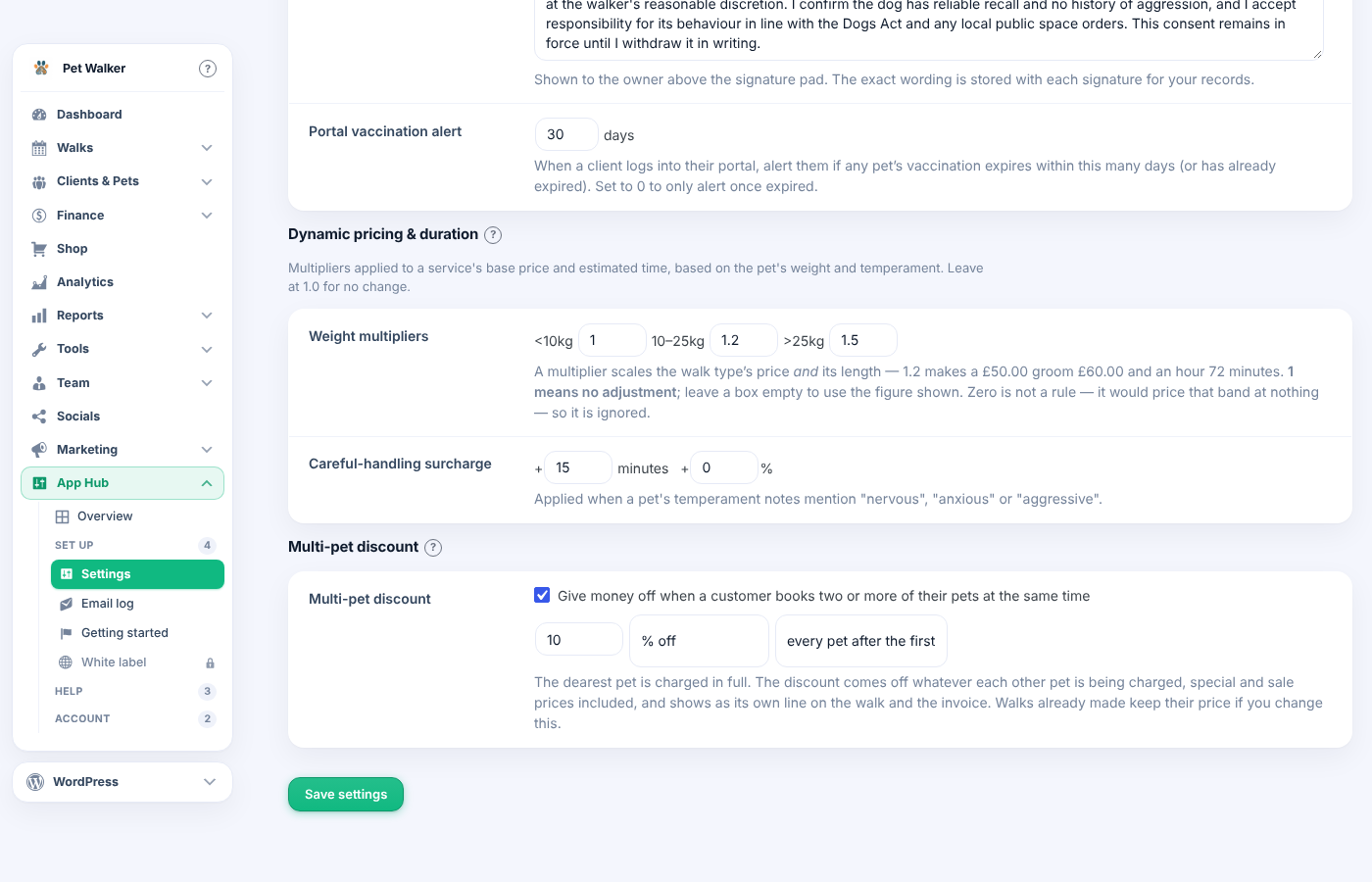
  • You can now give money off when a customer books two or more of their pets at the same time.

    Find it in Settings › Pricing › Multi-pet discount.

    1. Tick the box and enter the amount, as a percentage or a fixed amount.
    2. Choose every pet after the first, or the second pet only.
    3. Book the pets at the same time for the same customer, or on one group booking. The discount is added for you.
    • The dearest pet is charged in full; the discount never takes a price below nothing.
    • It comes off whatever each pet is being charged, special and sale prices included.
    • It shows as its own line on the booking, the invoice and the staff app.
    • Bookings already made keep their price if you change the setting.
    Multi-pet discount in Settings, Pricing
    Multi-pet discount in Settings, Pricing
    The discount on a booking
    The discount on a booking
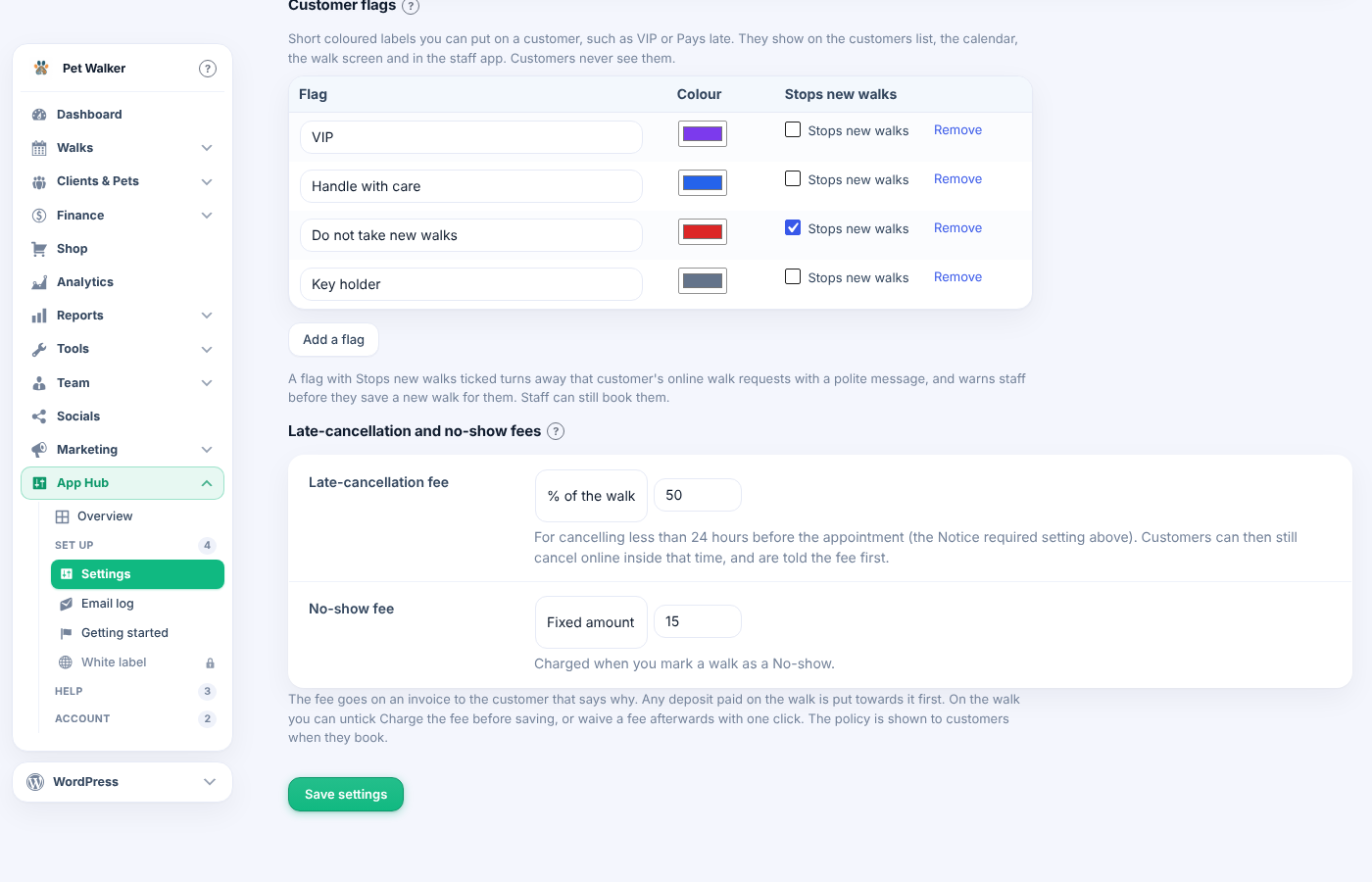
  • You can now charge a fee for late cancellations and no-shows.

    Find it in Settings › Bookings › Late-cancellation and no-show fees.

    1. Set Notice required, for example 24 hours.
    2. Choose a fixed amount or a percentage of the booking for each fee.
    3. Mark a missed booking as No-show. A confirmed booking cancelled inside the notice period is charged the late fee.
    • The fee goes on an invoice that says why, and any deposit paid is put towards it first.
    • Untick Charge the fee on the booking before saving, or press Waive this fee afterwards.
    • Customers see the policy when they book, and can still cancel online at the last minute, being told the fee first.
    • Fees have their own line in the finance reports.
    Fees in Settings, Bookings
    Fees in Settings, Bookings
    A late-cancellation fee on a booking
    A late-cancellation fee on a booking
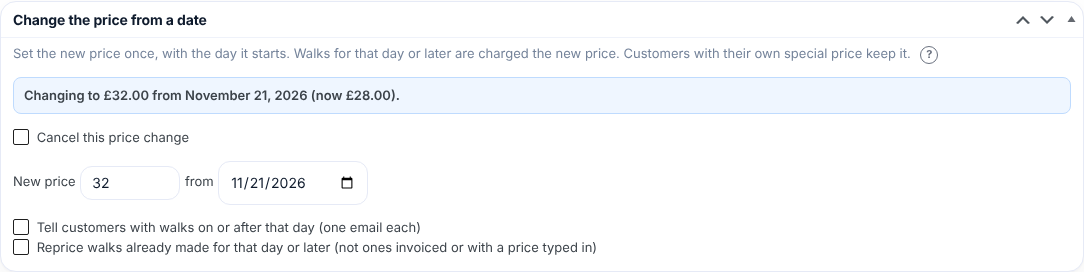
  • You can now raise a price from a set date and tell the customers affected.

    Find it on the service: Services › open a service › Change the price from a date.

    1. Enter the new price and the day it starts, then update the service.
    2. Leave Tell customers ticked to email everyone with a booking on or after that day, once each.
    3. Tick Reprice bookings already made only if those bookings should pay the new price too.
    • Bookings for that day or later use the new price; earlier ones keep the old one.
    • Customers with their own special price keep it and are not emailed.
    • The change shows on the services list and under the price list on your website until it starts.
    • Changed your mind? Tick Cancel this price change before the day.
    Change the price from a date, on a service
    Change the price from a date, on a service
2.771.220November 13, 20262 changes
  • You can now give money off when a customer books two or more of their pets at the same time.

    Find it in Settings › Pricing › Multi-pet discount.

    1. Tick the box and enter the amount, as a percentage or a fixed amount.
    2. Choose every pet after the first, or the second pet only.
    3. Book the pets at the same time for the same customer, or on one group booking. The discount is added for you.
    • The dearest pet is charged in full; the discount never takes a price below nothing.
    • It comes off whatever each pet is being charged, special and sale prices included.
    • It shows as its own line on the booking, the invoice and the staff app.
    • Bookings already made keep their price if you change the setting.
    Multi-pet discount in Settings, Pricing
    Multi-pet discount in Settings, Pricing
    The discount on a booking
    The discount on a booking
  • You can now charge a fee for late cancellations and no-shows.

    Find it in Settings › Bookings › Late-cancellation and no-show fees.

    1. Set Notice required, for example 24 hours.
    2. Choose a fixed amount or a percentage of the booking for each fee.
    3. Mark a missed booking as No-show. A confirmed booking cancelled inside the notice period is charged the late fee.
    • The fee goes on an invoice that says why, and any deposit paid is put towards it first.
    • Untick Charge the fee on the booking before saving, or press Waive this fee afterwards.
    • Customers see the policy when they book, and can still cancel online at the last minute, being told the fee first.
    • Fees have their own line in the finance reports.
    Fees in Settings, Bookings
    Fees in Settings, Bookings
    A late-cancellation fee on a booking
    A late-cancellation fee on a booking
2.771.218November 12, 20261 change
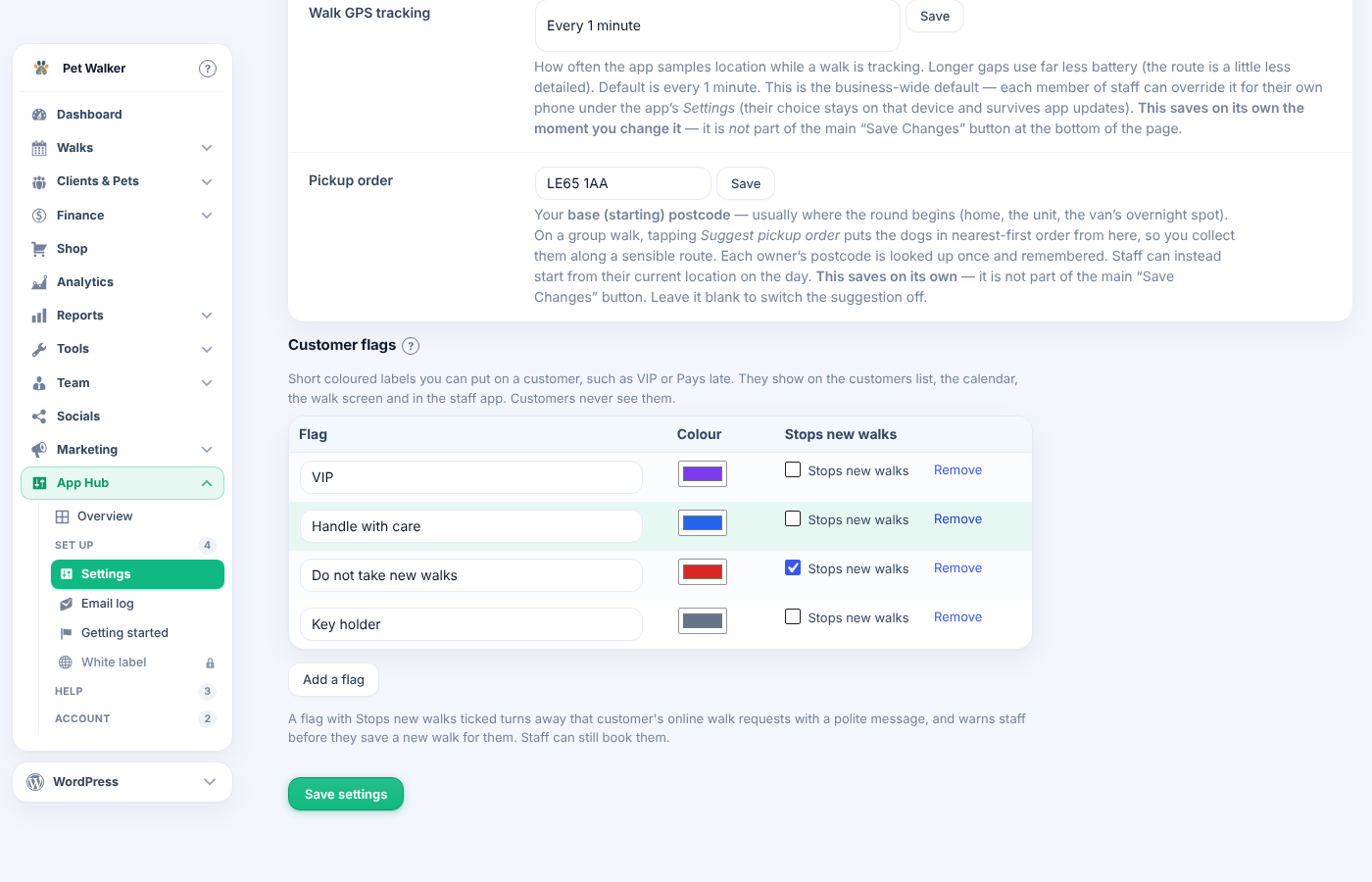
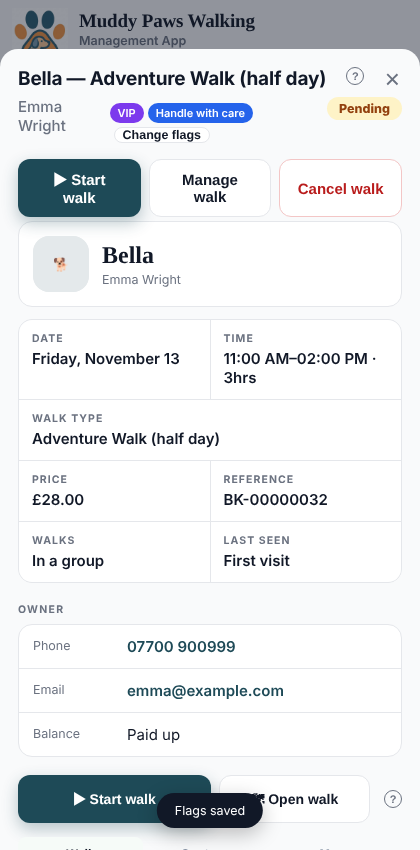
  • You can now put coloured flags on a customer, such as VIP, Pays late or Handle with care, so the whole team sees them at a glance.

    Set up the list in Settings › Bookings › Customer flags.

    1. Rename, recolour or remove the flags you start with, or press Add a flag.
    2. Open a customer and tick their flags in the Customer flags box. In the staff app, open one of their bookings and press Add a flag.
    • Flags show on the customers list, the calendar, the booking screen and the staff app.
    • A flag with Stops new bookings ticked turns away that customer's online requests with a polite message, and warns staff before saving a new booking. Tick Book them anyway to go ahead.
    • Customers never see their flags.
    Customer flags in Settings, Bookings
    Customer flags in Settings, Bookings
    The warning on a new booking
    The warning on a new booking
    Flags in the staff app
    Flags in the staff app
2.771.217November 11, 20261 change
  • Fixed a Plugin Check warning in the free WordPress.org copy.

    • 2.771.216 used a shared hook name so that two pet plugins on one site add the search and sharing tags only once. Plugin Check asks that every hook name starts with the plugin's own prefix.
    • The plugins now agree which one adds the tags without any shared name. Nothing changes on your website: the tags are still added once.
2.771.216November 10, 20261 change
  • Fixed: with two ModuleFest pet plugins on one site, the search and sharing tags were added by each plugin.

    They're now added once, whichever plugins you have.

2.771.214November 10, 20261 change
  • Fixed: the Website screen said the prices come from "the walk system".

    It now says your services, prices and opening hours come straight from this plugin, on every edition.

2.771.213November 8, 20261 change
  • The free copy from the WordPress plugin directory no longer contains any code that contacts ModuleFest for website wording.

    • In 2.771.212 the Your wording box carried the request for a written draft inside the free copy too. It never ran there, but the WordPress.org rules don't allow the code at all.
    • That request now lives in its own part of the plugin, which is only in copies linked to ModuleFest. The free copy's Your wording box works entirely on your own site.
    • Nothing changes in how the Website screen looks or works.
2.771.211November 8, 20261 change
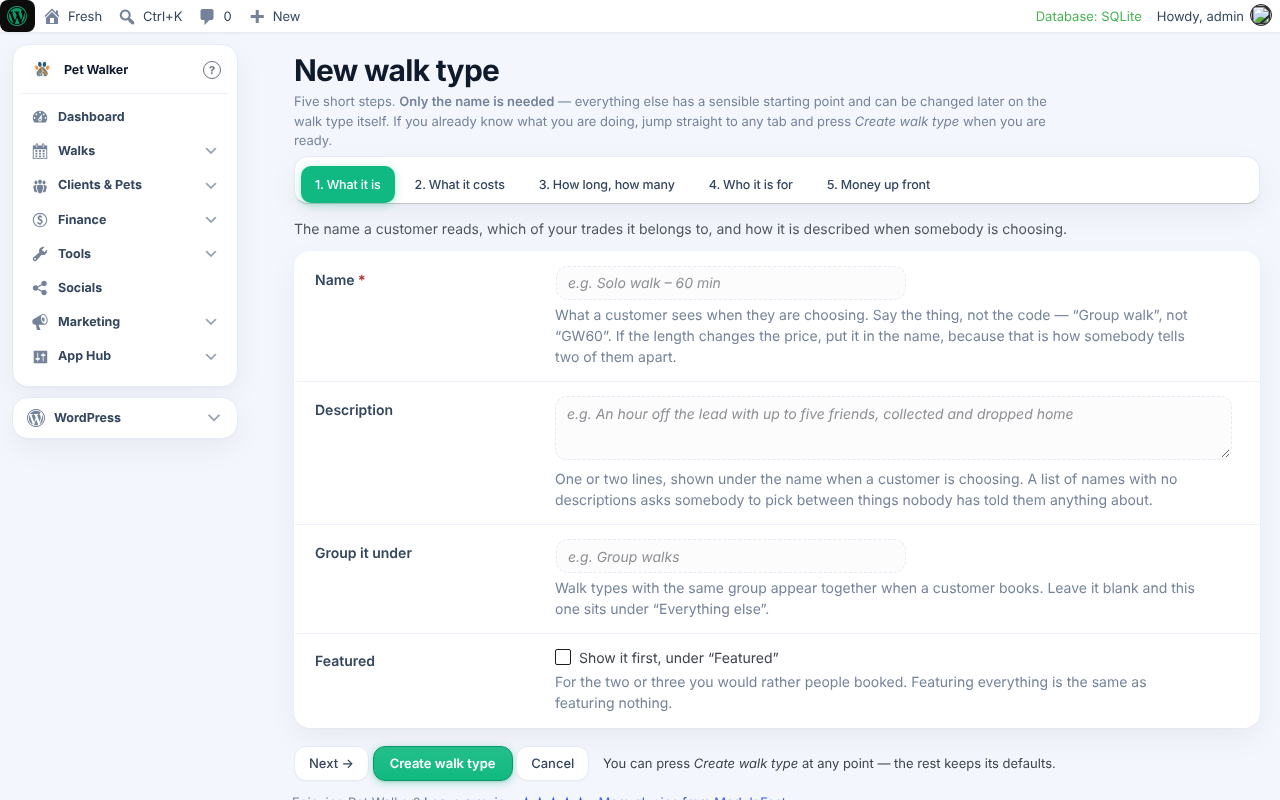
  • Setting up a walk type now speaks your language, and Getting started no longer sends you to a page you can't open.

    • Pet Walker › Walk types › Set one up step by step is now called "New walk type", with examples from your kind of work instead of grooming ones. It no longer asks which trade the walk type is for when your site only runs one. On Pet Services it only offers the trades you run.
    • Getting started leaves out a step whose screen isn't part of your copy. Before, the round planner step opened WordPress's "You don't have access" page.
    • The Add a walk type button in Getting started uses your own word.
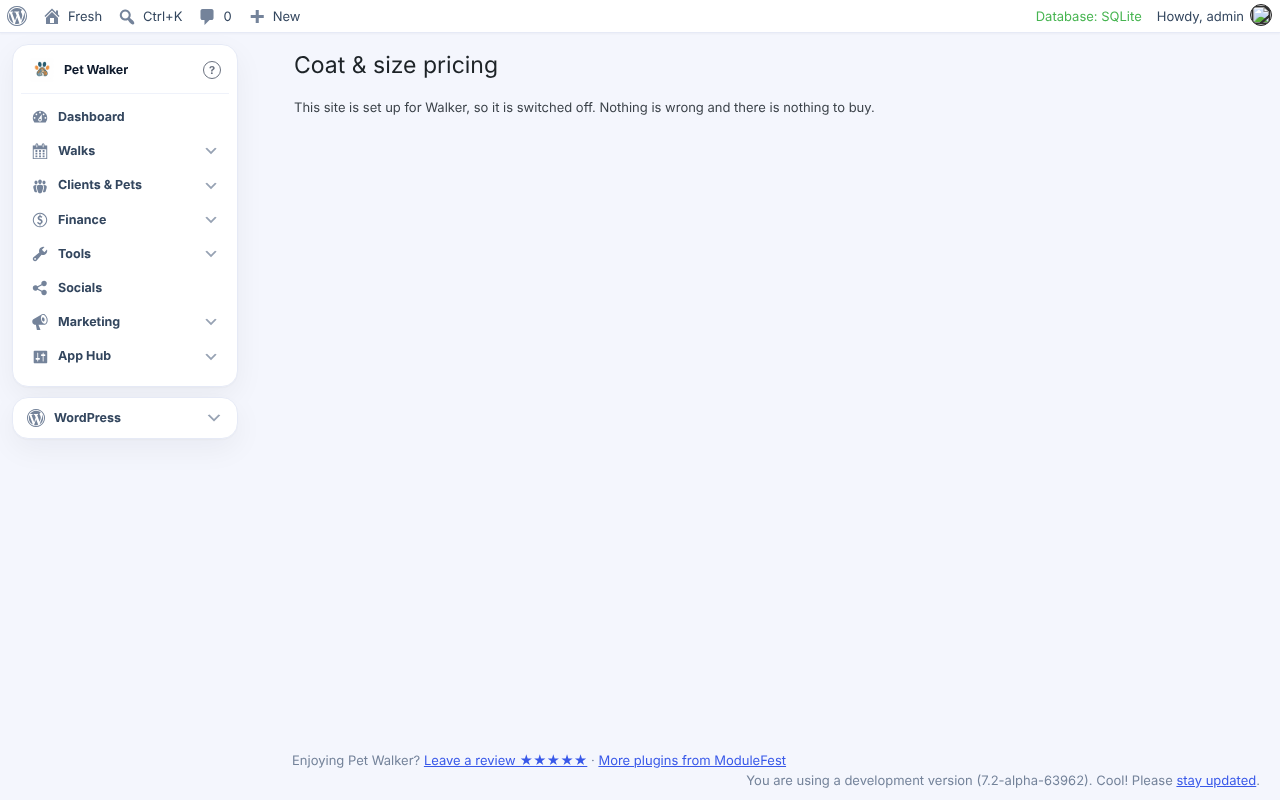
    • Coat & size pricing is a grooming screen, so on sites that don't groom it now says it's switched off.
    • In Help, outside services such as postcode lookup are no longer called walk types.
    New walk type wizard
    New walk type wizard
    Coat & size pricing switched off
    Coat & size pricing switched off
2.771.209November 8, 20261 change
  • You can now give a client credit on their account, and use it on their invoices.

    Find this on the client's record in Pet Walker › Clients, at the top of the Account box.

    1. Enter the amount and a reason, for example "Goodwill for the missed visit".
    2. Press Add credit.
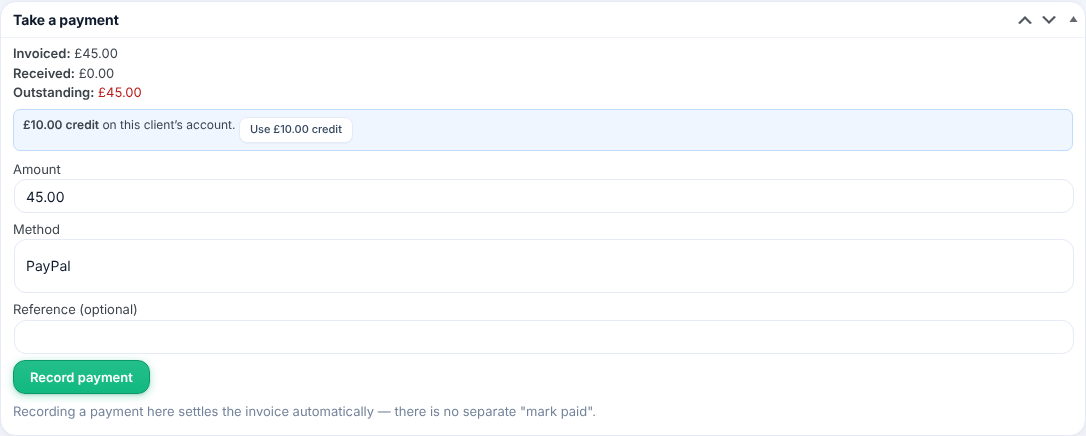
    3. On any unpaid invoice for that client, press Use credit in the Take a payment box. It takes up to what the invoice still owes; the rest stays on the account.
    • Only the business owner can add a credit.
    • A credit is not money received, so it stays out of your takings.
    • It shows on the client's statement with your reason.
    Account credit on the client record
    Account credit on the client record
    Use credit on an invoice
    Use credit on an invoice
2.771.208November 7, 20262 changes
  • Fixed: on the demo sites, the demo menu button no longer covers the tabs at the bottom of the staff app.

    It now sits at the top right of the app, on a phone and on a computer, and its menu opens downwards from it. A long business name stops short of it.

  • Fixed: the staff logins warning now says which plugin it is from.

    With more than one ModuleFest pet plugin on a site, the WordPress Dashboard shows one warning for each, starting with its name, for example “ModuleFest Pet Groomer – Staff logins”. Each plugin's own screens show only its own warning.

2.771.207November 6, 20263 changes
  • Fixed: invoices made from your bookings now include your tax, like the ones you write by hand.

    Set your rate in Pet Walker › Settings › Invoicing › Default tax rate (%).

    • Invoices raised when a booking is finished, from a billing run or automatically now use that rate.
    • With prices excluding tax, a £14.00 booking at 20% shows £2.80 tax and £16.80 to pay.
    • With no tax rate set, nothing changes.
    • Invoices already raised are not changed; edit one under Finance › Invoices if it needs the tax adding.
  • Fixed: a water spot you mark unsafe now shows in Today on your dashboard.

    Find it in Pet Walker › Walks › Water safety.

    1. Mark a pond, river or lake as Reported unsafe or Looked off.
    2. Save.
    3. Open the Dashboard: the spot and the reason are listed under Today's rounds, with a link back to Water safety.
  • Fixed: the group booking warning now reads properly for one pet, and the help pages only talk about your own kind of business.

    • Booking too many pets on a one-at-a-time service now says, for example, “takes up to 1 pet”.
    • Help topics such as Pet and client and the holiday cover tips no longer mention other trades.
2.771.200November 4, 20261 change
  • You can now easily manage your team size with accurate staff login counts and clear licence limits.

    Find this in Pet Walker > Staff.

    1. View your current usage at the top of the screen to see how many active staff logins you are using out of your total limit.
    2. Archive staff members who no longer work with you to free up space while keeping their complete history.
    3. If you reach your limit, existing staff can still sign in, and you will see a notice with a quick link to upgrade your account whenever you are ready to add more team members.
2.771.192October 31, 20261 change
  • Directory build 2.771.192: the 22 "must fix" findings are fixed (customer links read through prefixed WordPress query variables; nonce checked first in every form; WordPress hook and option names no longer fired or written). Links already sent from hub copies keep working.

2.771.189October 24, 20261 change
  • This update makes the wording in the WordPress.org (directory) copy of the plugin plainer. Nothing works differently and no settings change.

    What changed:

    • The add-on page is called "ModuleFest add-on" in the menu, on its page and in the readme.
    • The readme no longer talks about trials, licence keys or subscriptions.
    • The staff PIN screen and a few notes say "open" instead of "unlock".

    How to use it: there is nothing to do. Update as normal and carry on.

2.771.188October 24, 20261 change
  • This update makes the readme say exactly where each outside service is called. Under "External services" it now gives the address used for card payments (Stripe), text messages (Twilio) and WhatsApp messages. Nothing looks different on screen and no settings change.

    What changed:

    • The readme's External services section names the address of each service the plugin can call, next to what is sent and when.

    How to use it: there is nothing to do. Update as normal and carry on.

2.771.187October 24, 20261 change
  • This update moves the list of outside services in the readme into its own "External services" section, as the WordPress.org directory asks. Nothing looks different on screen and no settings change.

    What changed:

    • The readme lists the outside services the plugin can use in its own section, with what is sent and when.

    How to use it: there is nothing to do. Update as normal and carry on.

2.771.185October 20, 20261 change
  • New: A sturdier start-up and safer page scripts. You can now who: everyone using ModuleFest Pet Walker, and the WordPress.org plugin review team.

    Edit this text so it says where to find it and the steps to use it.

Try ModuleFest Pet Walker free for 14 days

Set up your own copy and run your business on it, or have a look round the live demo first.

About the live demo

No login needed – give a name and email and you are in. A made-up dog walking business, shared with everyone else trying it, reset every three days.

More from ModuleFest

The rest of the catalogue

ModuleFest Pet Sitter

Booking and business software

The pet sitting business manager: bookings, clients and invoicing

In development From £24.99 per month

Already have WordPress hosting? A free plugin is available, with upgrades whenever you need them.

ModuleFest Pet Trainer

Booking and business software

The pet training business manager: bookings, clients and invoicing

In development From £24.99 per month

Already have WordPress hosting? A free plugin is available, with upgrades whenever you need them.

ModuleFest Pavilion

WordPress plugin

Complete bowls club management, under one roof

In development From £24.99 per month

Already have WordPress hosting? A free plugin is available, with upgrades whenever you need them.

Take a look v10.101.3

ModuleFest Lantern

WordPress plugin

Attendance, parent comms and safeguarding for special needs schools

In development From £24.99 per month

Already have WordPress hosting? A free plugin is available, with upgrades whenever you need them.

Take a look v0.99.21

ModuleFest HallPro

WordPress plugin

Run your village or community hall from one place.

In development From £24.99 per month

Already have WordPress hosting? A free plugin is available, with upgrades whenever you need them.

Take a look v0.113.40

Jobs, quotes, invoices and stock for trades

Awaiting WordPress.org approval From £24.99 per month

Already have WordPress hosting? A free plugin is available, with upgrades whenever you need them.

Take a look v0.14.42