A UK company Built and supported in the United Kingdom Help in UK hours Hosted sites kept in London

In development WordPress plugin

ModuleFest Cron Monitor

The control tower for your site's scheduled tasks.

Free.

Every feature, with screenshots →See everything it does ↓

  • v1.9.0
  • WordPress 6.2+, PHP 7.2+
  • Updates and support included
  • A UK company, with support from the UK

Already a customer? Go to your account

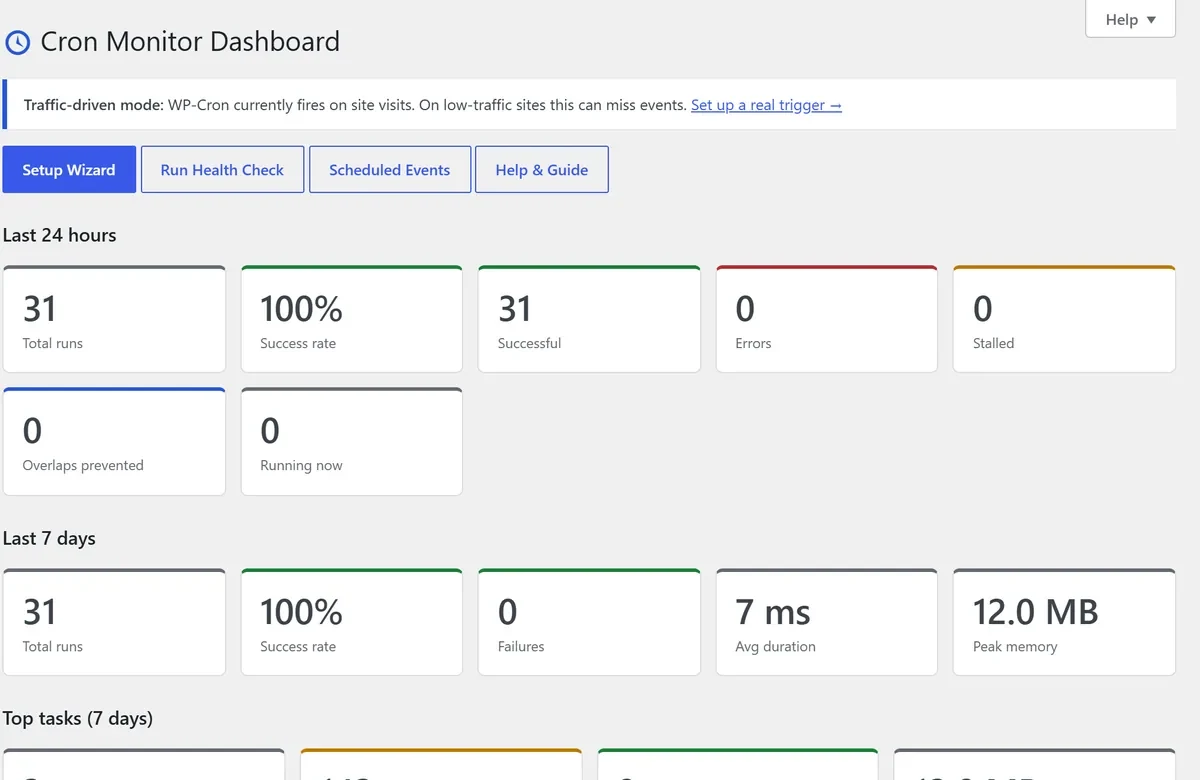
The ModuleFest Cron Monitor dashboard: runs, success rate, failures and the slowest and hungriest tasks over 24 hours and 7 days
Get ModuleFest Cron Monitor newsTips, new features and update notes. Unsubscribe any time.

WordPress runs its background jobs (emails, backups, order syncs, cleanups) through WP-Cron, which only fires when someone visits. Quiet sites run tasks late or not at all; busy sites run them on top of each other. Cron Monitor shows you every task, how long it takes and when it fails, and lets a real scheduler take over.

Free on WordPress.org. No account, no licence key, no locked features, and nothing sent anywhere unless you set up alerts yourself.

Formerly Cron-Sentry: already using Cron-Sentry? Install Cron Monitor and your settings and history come across automatically.


Features

Everything it does

  • Bottleneck profiler Every cron task timed and ranked by duration, memory and failure rate. It only measures during cron runs, so page loads stay fast. See it in action →
  • Overlap protection Mark heavy tasks as guarded and only one copy runs at a time. See it in action →
  • Stall recovery and alerts Stuck or crashed tasks are closed and rescheduled, with email and Slack, Discord or Teams alerts. See it in action →
  • Real cron trigger A secret URL for a server crontab or uptime monitor, with a Setup Wizard that gives you the exact line. See it in action →
  • KPI dashboard Success rate, errors, stalls, overlaps prevented, average duration and peak memory at a glance. See it in action →
  • Per-run drill-down Arguments, callbacks, the plugin or theme behind each task, memory and query counts. See it in action →
  • Event editor Run now, pause, resume, reschedule, add and remove events; custom schedules. See it in action →
  • Action Scheduler view See the WooCommerce / Action Scheduler queue next to WP-Cron. See it in action →
  • Health Check Pass, warn and fail checks with a fix link for each. See it in action →
  • WP-CLI Wp cronmonitor for agencies running many sites. See it in action →

Have a question about ModuleFest Cron Monitor?

Tell us what you need and we will answer your questions – no obligation.

More from ModuleFest

The rest of the catalogue